1
Printer Operations
Large-Format Printers
Basic Guide
1
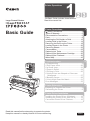
This Basic Guide includes three booklets.
Read this manual first.
Printer Operations
1
Safety Precautions ........................................2
Types of Manuals .............................................5
Documentation Conventions ............................6
Parts .................................................................8
Attaching the Roll Holder to Rolls ...................12
Loading Rolls in the Printer ............................14
Removing the Roll from the Printer ................18
Loading Sheets in the Printer .........................20
Removing Sheets ...........................................22
Consumables..................................................23
Replacing Ink Tanks .......................................24
Replacing the Maintenance Cartridge ............30
Replacing the Printhead .................................36
Menu Map.......................................................42
Troubleshooting
2
Troubleshooting ................................................2
If Roll Paper Jams ..........................................20
If a Sheet Jams...............................................22
If Paper is Soiled ............................................24
If Printing is Faint ............................................26
If Vertical Lines are Warped or Colors are
Misaligned ..................................................27
If Banding Occurs ...........................................29
If Line Length Does Not Match .......................31
Error Messages ..............................................33
Printer Relocation
3
Preparing to Transfer the Printer ......................2
Reinstalling the Printer .....................................8
Printer Driver Installation
Installing the Printer Driver (Windows) ...........12
Installing the Printer Driver (Mac OS X) .........14
Convenient Printer Driver Features ................16
Read this manual before attempting to operate the printer.
Keep this manual in a handy location for future referencing.
ENG
Safety Precautions
Follow the warnings and precautions below to use the printer safely. Do not perform any operations or procedures
other than as described in this manual. Doing so may result in unexpected accidents and can cause a fire or
electrical shocks.
Warning
█ Printer Location
• Do not set up the printer in any location exposed to alcohol, thinner, or other volatile liquids. If these
substances come into contact with electrical components inside the printer, there is a risk of fire or
electrical shock.
█ Power Supply
• Never handle the power cable with wet hands. Doing so may cause electrical shock.
• Insert the power cable securely and completely into the power source. If the power cable is not
inserted completely, this could cause a fire or electrical shock.
• Do not use any power cable other than the one provided. This could cause a fire or electrical shock.
Never use the power cable with any other electrical device.
• Never cut the power cable or attempt to modify it, and never stretch it or bend it forcefully. Never place
a heavy object on the power cable. Damaged sections of the power cable could cause a short circuit
and may cause a fire or electrical shock.
• Never connect the power cable to a power strip or any power source shared by other electrical
devices. This could cause a fire or electrical shock.
• Never knot the power cable or wrap it around itself. This could cause a fire or electrical shock.
• Periodically disconnect the power cable and use a dry cloth to wipe away dust that has collected on
the plug and the area around the power outlet. Leaving the power cable plugged in and not cleaned
for a long period, especially in an area subject to dust, oil, and humidity, could cause the insulation
material to deteriorate and lead to a fire.
█ In an Emergency
• If the printer emits smoke or strange odors, continuing to use the printer may cause a fire or electrical
shock. Switch the printer off immediately and remove the power plug from the power outlet. Contact
the nearest service center.
█ Cleaning the Printer
• For cleaning, use a cloth dampened in water. Never use flammable solvents such as alcohol,
benzene, or thinner. If these substances come into contact with electrical components inside the
printer, there is a risk of fire or electrical shock.
█ Pacemakers
• This printer generates a low-level magnetic field. Anyone wearing a pacemaker who experiences
discomfort while working around the printer should leave the area. Consult a physician before
continuing to work around the printer.
2
Safety Precautions
Caution
█ Printer Location
• Never install the printer on an unstable or vibrating surface. If it falls over, this could cause personal
injury.
• Never set up the printer in a location that is exposed to high humidity or large amounts of dust, or
exposed to direct sunlight, high temperature, or open flame. This could cause a fire or electrical shock.
Use the printer location in an environment where temperature and humidity are within the ranges of
15°C to 30°C (59°F to 86°F) and 10 to 80% RH (with no condensation).
• Never place the printer on a heavy wool or shag carpet. The fibers may enter the printer and cause a
fire.
• Keep the area around the power outlet clear of items so that you can disconnect the power cable
immediately if the printer starts operating abnormally. In the event of a printer malfunction, remove the
power cable from the outlet as soon as possible to prevent fire and electrical shocks.
• Do not install the printer near sources of strong electromagnetic fields, whether equipment that
generates such fields or places where such fields occur. This could damage the printer or cause
malfunction.
█ Moving the Printer
• The weights of main printer units are as follows:
iPF8300: Approx. 111 kg (244.7 lb)
• Moving the printer requires at least six people, holding it on both sides. Be careful to avoid back strain
and other injuries.
• When moving the printer, firmly grasp the Carrying Handles under each side. The printer may be
unsteady if you hold it at other positions, which poses a risk of injury from dropping the printer.
█ Power Supply
• Always grip the plug to remove the power cable from the power outlet. Pulling on the power cable
could damage the cable and lead to a fire or electrical shock.
• Never use an extension cord. This could cause a fire or electrical shock.
• Never use any power source other than 100–120 / 220–240 V AC. This could cause a fire or electrical
shock. The printer operating conditions are described below. Use the printer under the following
conditions.
Power supply voltage: 100–120 / 220–240 V AC
Power supply frequency: 50 / 60 Hz
█ Cleaning the Printer
• Always disconnect the power cable from the outlet before cleaning the printer. If the printer is switched
on accidentally, moving parts inside the printer may cause personal injuries.
█ Printhead, Ink Tanks, and Maintenance Cartridge
• Always store consumables in a safe location out of the reach of small children. If a child licks or
ingests ink accidentally, seek medical assistance immediately.
• If ink accidentally gets in your eyes, immediately rinse with water.
If ink gets on your skin, immediately clean it off with soap and water.
If irritation persists in your eyes or on your skin, contact a physician immediately.
• Avoid dropping or shaking printheads, ink tanks, and maintenance cartridges. Spilled ink can stain
clothing and the work area.
• Never touch the electrical contacts of the Printhead after printing. The contacts become extremely hot
and can cause minor burns.
3
Safety Precautions
█ Other
• Never disassemble the printer or attempt repairs. There are high voltage parts inside the printer that
can cause a fire or electrical shock.
• Never use flammable sprays around the printer. The gas of flammable sprays can cause a fire or
electrical shock, if it contacts high voltage points inside the printer.
• Never insert your hand into the printer while it is printing. Moving parts inside the printer can cause
injuries.
• Never place anything on the printer such as small metal objects (paper clips, staples), liquids, any
type of liquid container that contains flammable liquids (alcohol, benzene, etc.). If such objects fall into
the printer, this could cause a fire or electrical shock.
• After removing the Cutter Unit, never touch the cutting edge (a). This could cause personal injury.
a
• To prevent a fire hazard or dangerous electric shock, if a foreign object falls into or a liquid spills into
the printer, press the Power button immediately to switch the printer off, unplug the printer power cable
from the outlet, and then call for service. If you continue to use the printer, this could cause a fire or
electrical shock.
• Connect the interface cable correctly. To avoid damage, before connection make sure that the shape
of the cable connector matches the connection point on the printer.
• During printing, turn on the ventilation system in the room.
• We recommend ensuring ample space for installation.
Trademarks
Canon, the Canon logo, and imagePROGRAF are trademarks or registered trademarks of CANON INC.
Microsoft and Windows are trademarks of Microsoft Corporation, registered in the U.S. and other countries.
Macintosh is trademark of Apple Inc., registered in the U.S. and other countries.
Other company and product names in this guide are trademarks or registered trademarks of their respective
owners.
Legal Notice
It is illegal to reproduce currency, bills, negotiable securities and other documents prohibited by law. Reproduction
of such items may be subject to criminal prosecution.
It is illegal to reproduce legal certificates, licenses, travel tickets, and certain public and private documents
prohibited from reproduction by law. Reproduction of such items may be subject to criminal prosecution. Please
note that intellectual property protected by copyright may not be reproduced without the express permission of the
copyright holder except for personal or household use under limited circumstances.
4
Types of Manuals
Types of manuals
Title
Details
Setup Guide
Instructions for unpacking and setting up the printer, and
for installing the printer driver
Basic Guide 1 (this manual)
Descriptions of basic printer operations
Printer Operations
Basic Guide 2
Troubleshooting tips
Troubleshooting
Basic Guide 3
Instructions for preparing to relocate the printer and for
Printer Relocation / Printer Driver Installation software installation
User Manual
Detailed instructions for using the printer
(electronic manual)
Paper Reference Guide
Information on paper you can use with the printer
(electronic manual)
Accessing the electronic manuals
The electronic manuals are accessible from imagePROGRAF Support Information.
Besides the electronic manuals, you can also access the imagePROGRAF website from imagePROGRAF
Support Information.
• User Manual
The User Manual gives detailed operating
instructions for the printer, as well as
troubleshooting tips in case of printing issues.
• Paper Reference Guide
The Paper Reference Guide identifies the types
of paper you can use with the printer and gives
specifications.
• Stay Informed
Provides access to the imagePROGRAF website,
where you can find news on a variety of printing
topics and tips on getting the most from your
printer.
Access imagePROGRAF Support Information as follows.
Windows
Double-click the iPFxxxx Support desktop icon. (xxxx indicates the printer
model.)
Mac OS X
Click the iPF Support icon in the Dock.
5
Documentation Conventions
Symbols
The following symbols are used in this document to indicate safety information and explanations of
restrictions or precautions in use.
Caution
Indicates caution items for which operating error poses a risk of injury or damage
to equipment or property. To ensure safe use, always follow these precautions.
Important
Indicates important information that must be followed when using the printer. Be
sure to read this information to prevent printer damage or operating errors.
MEMO
Indicates helpful reference information and supplemental information on particular
topics.
Cross-reference
Additional sources of information are identified as follows in the documentation.
In the Basic Guides:
(→
, Section title), (→
, Section title), (→
, Section title)
(Guide number and section title)
In the User Manual:
(→"Section title," User Manual)
Text conventions and illustrations
Button names and user interface elements
Key and button names on the control panel and user interface elements in software (such as menus and
buttons) are indicated as follows in this document.
Control panel buttons
Example: Press the OK button.
Control panel messages
Example: Head Cleaning is displayed.
Software interface items
(menus and buttons)
Example: Click OK.
Keyboard keys
Example: Press the Tab key.
Part names
Names of printer parts are indicated as follows in this document.
Printer part names
Example: Open the Top Cover.
Figures and software screens
• Screens depicted in this document for the printer driver or other software may look different from the
actual screens because of subsequent updates.
• Windows XP screens are used in explanations of Windows operations.
6
FCC Regulations (U.S.A)
Canon Large Format Printer
iPF8300
This device complies with Part 15 of the FCC Rules. Operation is subject to the following two conditions: (1)
This device may not cause harmful interference, and (2) this device must accept any interference received,
including interference that may cause undesired operation.
Note: This equipment has been tested and found to comply with the limits for class B digital device, pursuant
to Part 15 of the FCC Rules. These limits are designed to provide reasonable protection against harmful
interference in a residential installation.
This equipment generates, uses and can radiate radio frequency energy and, if not installed and used in
accordance with the instructions, may cause harmful interference to radio communications.
However, there is no guarantee that interference will not occur in a particular installation. If this equipment
does cause harmful interference to radio or television reception, which can be determined by turning the
equipment off and on, the user is encouraged to try to correct the interference by one or more of the following
measures:
• Reorient or relocate the receiving antenna.
• Increase the separation between the equipment and receiver.
• Connect the equipment into an outlet on a circuit different from that to which the receiver is connected.
• Consult the dealer or an experienced radio/TV technician for help.
Use of shielded cable is required to comply with Class B limits in Subpart B of Part 15 of FCC Rules.
Do not make any changes or modifications to the equipment unless otherwise specified in the manual.
If such changes or modifications should be made, you could be required to stop operation of the equipment.
Canon U.S.A. Inc.
One Canon Plaza, Lake Success, NY 11042, U.S.A.
Tel No. 516-328-5600
For CA, USA Only
Included battery contains Perchlorate Material - special handling may apply.
See http://www.dtsc.ca.gov/hazardouswaste/perchlorate/ for detail.
7
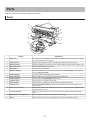
Parts
Names and functions of printer parts are as follows.
Front
j
b
a
c
k
m
n
g
d
i
n
o
f
p
l
h
e
Name
Operation
a
Top Cover
Open this cover to install the Printhead, load paper, and remove any jammed paper
from inside the printer as needed.
b
Cutter Groove
Paper is cut (using the cutter or manually with scissors) over this groove.
c
Ejection Guide
Guides printed documents as they are ejected. Raise the guide when loading a roll.
d
Roll Holder Slot
Slide the Roll Holder into this slot.
e
Roll Holder
Load the roll on this holder.
f
Ejection Support
Prevents printed documents from winding around the Roll Holder or being drawn
into the Paper Feed Slot.
g
Output Stacker
A cloth tray that catches ejected documents.
h
Paper Feed Slot
When loading a roll, insert the edge of the roll paper here.
i
Holder Stopper
Secure rolls on the Roll Holder with this part.
j
Ink Tank Cover
Open this cover to replace an Ink Tank.
k
Control Panel
Use this panel to operate the printer and check the printer status.
l
Release Lever
Releases the Paper Retainer. Lift this lever toward the front of the printer when
loading paper.
m
Maintenance Cartridge
Absorbs ink used for maintenance purposes such as head cleaning. (Replace the
cartridge when it is full.)
n
Carrying Handles
When carrying the printer, have four people hold it by these handles under both
sides.
o
Maintenance Cartridge Cover
Open this cover to replace the Maintenance Cartridge.
p
Stand
A stand that holds the printer. Equipped with casters to facilitate moving it.
8
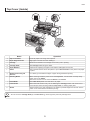
Parts
Top Cover (Inside)
h
a
c
j
d
e
f
g
b
i
k
Name
Operation
a
Top Cover Roller
Prevents paper from rising when ejected.
b
Paper Alignment Line
Align paper with this line when loading it.
c
Carriage
Moves the Printhead. The carriage serves a key role in printing.
d
Carriage Shaft
The Carriage slides along this shaft.
e
Paper Retainer
Important in supplying the paper. This retainer holds paper as it is fed.
f
Platen
The Printhead moves across the platen to print. Vacuum holes on the platen hold paper
in place.
g
Borderless Printing Ink
Grooves
For catching ink outside the edges of paper during borderless printing.
h
Cleaning Brush
When cleaning inside the printer under the Top Cover, use this brush to sweep away
paper dust on the Platen.
Also use the brush to move the blue Switch on the Platen.
i
Fixed Blade
The Cutter Unit passes over this rail to cut paper.
j
Linear Scale
The linear scale serves a key role in detecting the Carriage position. Be careful not to
touch this part when cleaning inside the Top Cover or clearing paper jams.
k
Switch
Set the switch to the side opposite ● if the edges of printed images are blurred. Set the
switch to the ● side before borderless printing.
• Do not touch the Carriage Shaft (d) or Linear Scale (j). Touching these parts may damage them.
9
Parts
Control Panel
a
b
c
d
e
f
r
q
p
o
n
m l k j
Name
i h
g
Operation
a
Display Screen
Shows the printer menu, as well as the printer status and messages.
b
Data Lamp (green)
Indicates the status of print jobs or the printer firmware.
c
Message lamp (orange)
Lit or flashes when messages are displayed. When the lamp is off, the printer is
operating normally or turned off.
d
Menu button
Displays the Tab Selection screen. (→
e
Stop button
Cancels print jobs in progress and ends the ink drying period.
f
Power button (green)
Turns the printer on and off. The power button is lit when the printer is on or in Sleep
mode.
g
Navigate button
Enables you to check instructions for loading and removing paper or replacing ink tanks
or printheads, as well as other operations.
h
► button
Press this button on the Tab Selection screen to move to another tab. In menu items
requiring numerical input, press this button to move to another digit.
i
▲ button
Press this button when viewing menus to display the previous menu item or setting
value.
, Menu Map)
j
▼ button
Press this button when viewing menus to display the next menu item or setting value.
k
OK button
Press this button on the Tab Selection screen to display the menu of the tab shown.
Pressing this button in menu items of each tab for which
is displayed at left will move
to the lower level of the menu item, enabling you to execute menu commands or set
menu values.
Also press this button if the Display Screen indicates to press the OK button.
l
◄ button
Press this button on the Tab Selection screen to move to another tab. In menu items
requiring numerical input, press this button to move to another digit.
m
Back button
Displays the screen before the current screen.
n
Cut button
Pressing this button when rolls are loaded cuts the paper.
o
Feed button
Pressing this button when rolls are loaded enables you to reposition the paper.
p
Load button
Press this button when loading or replacing paper.
(→ , Loading Rolls in the Printer), (→ , Loading Sheets in the Printer)
q
Roll Media lamp (green)
Lit when rolls are selected as the paper source.
r
Cut Sheet lamp (green)
Lit when sheets are selected as the paper source.
• To recover from Sleep mode, any button can be pressed except the Power button.
10
Parts
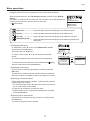
Menu operations
Navigate and perform menu operations on the control panel as follows.
After the printer starts up, the Tab Selection screen is shown on the Display
Screen.
Information is organized in four tabs, and you can press control panel buttons to
access menus and set or execute items for each tab.
(→ , Menu Map)
Ready
OK: Paper Menu
Plain Paper
ISO A2 Roll
(Paper tab) • • • • • • • • • A tab indicating status and showing menus related to paper.
(Ink tab) • • • • • • • • • • • A tab indicating status and showing menus related to ink.
(Job tab) • • • • • • • • • • A tab indicating status and showing menus related to print jobs.
(Settings/Adj. tab) • • • A tab indicating status and showing menus related to settings and
adjustment.
• Accessing tab menus
To select tabs, press ◄ or ► on the Tab Selection screen,
and then press the OK button.
Tab menus are now displayed.
To select a menu, press ▲ or ▼, and then press the OK
button.
The menu is selected, and menu items are now displayed.
To access lower-level menus for menus labeled with
select the menu and press the OK button.
at left,
• Specifying menu items
Press ▲ or ▼ to select desired settings, and then press the
OK button.
The check box at left is selected, and the setting is confirmed.
After two seconds, the display reverts to the upper-level menu.
• Specifying numerical values
Follow these steps to enter numbers. In this example, network
settings items are entered.
1. For numerical input, press ◄ or ► to move the cursor (shown
as an underscore) to other fields.
2. Press the ▲ or ▼ button to enter the value.
3. Repeat steps 1 and 2, and when the settings are complete,
press the OK button.
• Executing menu commands
Press ▲ or ▼ to select the action to execute, and then press
the OK button.
The menu command is now executed.
11
Ready
OK: Paper Menu
Plain Paper
ISO A2 Roll
OK button
Paper Menu
Back button
㪈㪆㪉
Load Paper
Eject Paper
Chg. Paper Type
Chg. Paper Size
ManageRemainRoll
Paper Menu
OK button
Back button
Roll Paper
Cut Sheet
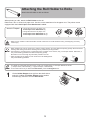
Attaching the Roll Holder to Rolls
Attach the roll holder to rolls as follows.
When printing on rolls, attach the Roll Holder to the roll.
Rolls have a two- or three-inch paper core. Use the correct attachment for the paper core. The printer comes
equipped with the 2-Inch Paper Core Attachment installed.
Items to Prepare
• Using rolls with a 2-inch paper core
2-Inch Paper Core Attachment (a)
• Using rolls with a 3-inch paper core
3-Inch Paper Core Attachment #1 (b)
3-Inch Paper Core Attachment #2 (c)
a
b
c
• Set the roll on a table or other flat surface so that it does not roll or fall. Rolls are heavy, and dropping a roll may
cause injury.
• When handling the roll, be careful not to soil the printing surface. This may affect the printing quality. We recommend
wearing clean cloth gloves when handling rolls to protect the printing surface.
• Use scissors or a cutting tool to cut the edge of the roll paper if it is uneven, dirty, or has tape residue. Otherwise, it
may cause feeding problems and affect the printing quality.
Be careful not to cut through any barcodes printed on the roll.
• Align the edges of the paper on both ends of the roll. Misalignment
may cause feeding problems.
• For details on supported sizes and types of rolls, see "Paper Sizes" or the Paper Reference Guide.
(→"Paper Sizes," User Manual), (→"Types of Paper," User Manual)
• To view instructions as you attach the Roll Holder, press the Navigate button.
1
Lift the Holder Stopper lever (a) from the shaft side to
unlock it. Holding the Holder Stopper at the position
indicated (b), remove it from the Roll Holder.
12
a
b
Attaching the Roll Holder to Rolls
2
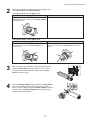
Insert the respective attachments for the roll paper core
on the Roll Holder and Holder Stopper.
• Using rolls with a 2-inch paper core
Holder Stopper Side
Roll Holder Side
Align the tips (a) of the 2-Inch Paper Core
Attachment with the holes (b) of the Holder Stopper
and insert it firmly.
No attachment is needed.
b
a
• Using rolls with a 3-inch paper core
Holder Stopper Side
Roll Holder Side
Align the tips (a) of 3-Inch Paper Core Attachment
#2 with the holes (b) of the Holder Stopper and
insert it firmly.
Align the tips (a) of 3-Inch Paper Core Attachment
#1 with the holes (b) of the Roll Holder and insert it
firmly.
b
b
a
a
3
4
a
With the edge of the roll paper facing forward as shown,
insert the Roll Holder from the right of the roll. Insert
it firmly until the roll touches the flange (a) of the Roll
Holder, leaving no gap.
Insert the Holder Stopper from the left in the Roll Holder
as shown. Holding it at the position shown (b), push it
firmly in until the flange (a) of the Holder Stopper touches
the roll. Lock the Holder Stopper lever (c) by pushing it
down toward the shaft side.
a
c
13
b
Loading Rolls in the Printer
Load rolls in the printer as follows.
• Always load rolls when the printer is on. If the printer is off when you load a roll, the paper may not be advanced
correctly when you turn the printer on.
• Before loading rolls, make sure the printer is clean inside the Top Cover and around the Ejection Guide. If these
areas are dirty, we recommend cleaning them in advance. (→ , If Paper is Soiled)
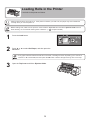
1
2
Press the Load button.
Press ▲ or ▼ to select Roll Paper, and then press the
OK button.
• If any paper has been advanced that will not be used, a message is shown requesting you to remove it.
Press ▲ or ▼ to select Yes, and then press the OK button. Remove the paper and go to the next step.
3
Open the Top Cover and lift the Ejection Guide.
14
Loading Rolls in the Printer
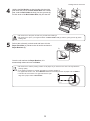
4
Holding the Roll Holder so that the side with the white
gear faces the side of the Roll Holder Slot with a white
gear, load the Roll Holder shaft (a) into the grooves (b)
on both ends of the Roll Holder Slot, fully into the slot.
b
a
a
b
• Be careful not to drop the roll and hurt yourself when loading it.
• Be careful not to pinch your fingers between the Roll Holder shaft (a) and the guide grooves (b) when
loading rolls.
5
Pull out the roll evenly on both ends and insert it in the
Paper Feed Slot (a). Advance the roll until it touches the
Paper Retainer (b).
b
a
a
Once the roll reaches the Paper Retainer, it is
automatically advanced over the Platen.
• Be careful not to soil the printing surface of roll paper as you insert it in the slot. This may affect the
printing quality.
• If the paper is wrinkled or warped, straighten it out before loading it.
• For paper that tends to curl, lift the Release Lever and manually pull the roll paper over the Platen.
• Load the roll so that there is no gap between the right
edge of the paper and the Roll Holder.
15
Loading Rolls in the Printer
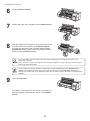
6
7
8
Lower the Ejection Guide.
Holding the edge of the roll paper, lift the Release Lever.
Hold the edge of the roll paper as you gently pull it evenly
with both hands to the position of the Ejection Guide
(a). Align the right side of the roll paper with the Paper
Alignment Line (b), keeping this side parallel to the line,
and then lower the Release Lever.
a
b
• Do not omit steps 7 and 8. If paper cannot be advanced straight or if it wrinkles, it may jam or rub
against the Printhead.
• Do not force the roll paper into alignment with the paper alignment line (b). This may prevent the paper
from being advanced straight.
• You can adjust the strength of suction holding paper against the Platen when the Release Lever is
released. If it is difficult to load paper, press the ▲ or ▼ button on the Control Panel to adjust the
strength. Set suction stronger by pressing the ▲ button or weaker with the ▼ button. Three settings are
available.
9
Close the Top Cover.
The paper is now advanced, and a menu for selection of
the type of paper is automatically shown on the Display
Screen.
16
Loading Rolls in the Printer
10
Press ▲ or ▼ to select the type of paper, and then press
the OK button.
• For details on types of paper to select, see the Paper Reference Guide.
(→ , Types of Manuals)
17
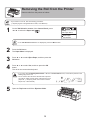
Removing the Roll from the Printer
Remove rolls from the printer as follows.
• If you need to cut a roll, see the following procedure.
(→"Specifying the Cutting Method for Rolls," User Manual)
1
On the Tab Selection screen of the Control Panel, press
◄ or ► to select the Paper tab (
).
Ready
OK: Paper Menu
Plain Paper
ISO A2 Roll
• If the Tab Selection screen is not displayed, press the Menu button.
2
3
4
Press the OK button.
The Paper Menu is displayed.
Press ▲ or ▼ to select Eject Paper, and then press the
OK button.
Press ▲ or ▼ to select Yes, and then press the OK
button.
The roll is now rewound and ejected.
• If you have selected ManageRemainRoll > On in the Control Panel menu, a barcode is printed on the
leading edge of the roll.
• Do not remove the roll before the barcode is printed.
You will be unable to keep track of the amount of roll
paper left. (→"Keeping Track of the Amount of Roll
Paper Left," User Manual)
5
Open the Top Cover and lift the Ejection Guide.
18
Removing the Roll from the Printer
6
Using both hands, rotate the Roll Holder in the direction
of the arrow to rewind the roll.
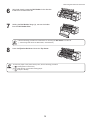
7
Holding the Roll Holder flange (a), remove the holder
from the Roll Holder Slot.
a
• See the following procedure for instructions on removing the Roll Holder from the roll.
(→"Removing Rolls From the Roll Holder," User Manual)
8
Lower the Ejection Guide and close the Top Cover.
• To load new paper in the printer at this point, see the following procedure.
(→ , Loading Rolls in the Printer)
• Clean inside the top cover before loading paper.
(→ , If Paper is Soiled)
19
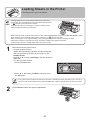
Loading Sheets in the Printer
Load sheets in the printer as follows.
• Loading sheets when a roll is already loaded in the printer may
cause jams. We recommend removing rolls before loading sheets.
(→ , Removing the Roll from the Printer)
To prevent the roll from unwinding if you leave it loaded, wrap a
sheet of paper around the roll and tape it.
• Before loading sheets, make sure the printer is clean inside the Top Cover and around the Ejection Guide. If these
areas are dirty, we recommend cleaning them in advance. (→ , If Paper is Soiled)
• Store unused paper in the original package, away from high temperature, humidity, and direct sunlight.
• Paper that is wrinkled or warped may jam. If necessary, straighten the paper and reload it.
• Load the paper straight. Loading paper askew will cause an error.
1
Select sheets as the paper source.
• If a print job was received
Sheets are automatically selected, and the media type
and size specified by the print job are shown on the
Display Screen.
Press ▲ or ▼ to select Load Paper, and then press the
OK button.
• If no print job was received
1. Press the Load button.
2. Press ▲ or ▼ to select Cut Sheet, and then press
the OK button.
• If any paper has been advanced that will not be used, a message is shown requesting you to remove it.
Press ▲ or ▼ to select Yes, and then press the OK button. Remove the paper and go to the next step.
2
Lift the Release Lever and open the Top Cover.
20
Loading Sheets in the Printer
3
With a sheet lengthwise and printing-side up, insert it
between the Platen (a) and the Paper Retainer (b). Align
the edges of the sheet as follows.
1. Align the sheet with the Paper Alignment Line (c) at
right.
2. Align the inserted edge of the sheet with the leading
edge of the Paper Alignment Line (d), as shown.
When inserted, sheets are automatically held by suction
against the Platen.
d
b
a
c
• Load a sheet so that it is parallel to the Paper Alignment Line at right (c). Loading paper askew will
cause an error.
• Warped paper may rub against the Printhead. Straighten paper if it is warped before loading it.
• You can adjust the strength of suction holding paper against the Platen when the Release Lever is up.
If it is difficult to load paper, press the ▲ or ▼ button on the Control Panel to adjust the strength. Set
suction stronger by pressing the ▲ button or weaker with the ▼ button. Three settings are available.
However, even if you increase the suction, it may not be sufficient to hold some types of paper against
the Platen well. In this case, use your hand to load the paper.
• Sheets are held in place by suction through holes on the Platen. Although the suction may produce a
noise when paper is loaded in some positions, it does not indicate a problem. If the noise is distracting,
try moving the paper over slightly to the left or right (up to 1 mm [0.039 in]) while keeping it parallel to
the Paper Alignment Line.
• The suction remains on for about 30 seconds during loading. If you cannot finish loading a sheet during
this time, pull the sheet away and reinsert it to start the suction again.
4
Lower the Release Lever and close the Top Cover.
• If a print job was received
Pressing the OK button will advance the paper, and then
printing will begin.
• If no print job was received
A menu for selection of the type of paper is automatically
shown on the Display Screen.
Press ▲ or ▼ to select the type of paper, and then press
the OK button.
The printer now starts feeding the paper.
• For details on types of paper to select, see the Paper Reference Guide.
(→ , Types of Manuals)
• When using the Output Stacker, if you will print on large, stiff sheets, we recommend adjusting the
Output Stacker into the lowest position to prevent printed sheets from being bent.
(→"Using the Output Stacker," User Manual)
21
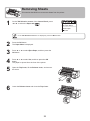
Removing Sheets
This section describes how to remove sheets from the printer.
1
On the Tab Selection screen of the Control Panel, press
◄ or ► to select the Paper tab (
).
Ready
OK: Paper Menu
Plain Paper
ISO A2
• If the Tab Selection screen is not displayed, press the Menu button.
2
3
4
5
6
Press the OK button.
The Paper Menu is displayed.
Press ▲ or ▼ to select Eject Paper, and then press the
OK button.
Press ▲ or ▼ to select Yes, and then press the OK
button.
The paper is ejected from the front of the printer.
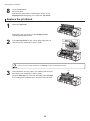
Open the Top Cover, lift the Release Lever, and remove
the sheet.
Lower the Release Lever and close the Top Cover.
22
Consumables
Ink Tanks
When purchasing ink tanks, make sure the following Ink Tank serial numbers are printed on the label.
330 ml (11.2 fl oz)
• PC Ink Tank PFI-304PC
• C Ink Tank PFI-304C
• MBK Ink Tank PFI-304MBK
• Y Ink Tank PFI-304Y
• M Ink Tank PFI-304M
• PM Ink Tank PFI-304PM
• R Ink Tank PFI-304R
• G Ink Tank PFI-304G
• B Ink Tank PFI-304B
• PGY Ink Tank PFI-304PGY
• GY Ink Tank PFI-304GY
• BK Ink Tank PFI-304BK
700 ml (23.7 fl oz)
• PC Ink Tank PFI-704PC
• C Ink Tank PFI-704C
• MBK Ink Tank PFI-704MBK
• Y Ink Tank PFI-704Y
• M Ink Tank PFI-704M
• PM Ink Tank PFI-704PM
• R Ink Tank PFI-704R
• G Ink Tank PFI-704G
• B Ink Tank PFI-704B
• PGY Ink Tank PFI-704PGY
• GY Ink Tank PFI-704GY
• BK Ink Tank PFI-704BK
Printhead
• Printhead PF-05
Maintenance Cartridge
The maintenance cartridge is provided with a shaft cleaner.
• Maintenance Cartridge MC-08
23
Replacing Ink Tanks
Replace ink tanks as follows.
PM
M
BK
R
G
B
Compatible ink tanks
Replacement ink tanks in 330 ml (11.2 fl oz) and 700 ml (23.7 fl oz) capacities are supported.
(→ , Consumables)
Precautions when handling ink tanks
Take the following precautions when handling ink tanks.
• There may be ink around the ink supply section of ink tanks you removed. Handle ink tanks carefully during
replacement. The ink may stain clothing.
• We recommend using up an Ink Tank in the course of printing within six months after breaking the seal. Printing
quality may be affected if you use older ink tanks.
• Do not leave the printer without ink tanks installed for extended periods (a month or more). Residual ink may
become clogged inside the printer and affect printing quality.
Make sure the printer is ready for ink tank replacement
Ink Tank replacement is possible in the following cases.
You can replace ink tanks if the Display Screen advises you to check the
amount of ink left or replace ink tanks.
Printing
OK: Ink Menu
P C M Y M P
C
If a message requests you to replace ink tanks, press the OK button.
In this case, go to "Remove the ink tanks" without following the instructions in
"Access the menu for ink tank replacement."
B
K
Printing
OK: Ink Menu
Not much ink is
left. Prepare to
replace the ink.
R G B P G B
G
Y
M
Y K
No ink left.
Replace ink tank.
OK
P C M Y M P
C
B
K
M
R G B P G B
G
Y
Y K
• Do not remove an Ink Tank during initialization immediately after turning on the printer, or during printhead cleaning.
• Ink Tank replacement is possible even during printing, when print jobs are being canceled, or when paper is being
advanced.
24
Replacing Ink Tanks
Access the menu for ink tank replacement
1
On the Tab Selection screen of the Control Panel, press
◄ or ► to select the Ink tab (
).
Printing
OK: Ink Menu
P C M Y M P
C
B
K
M
R G B P G B
G
Y
Y K
• If the Tab Selection screen is not displayed, press the Menu button.
2
3
Press the OK button.
The Ink Menu is displayed.
Press ▲ or ▼ to select Rep. Ink Tank, and then press the
OK button.
A message on the Display Screen requests you to open
the Ink Tank Cover. Remove the Ink Tank at this point.
Remove the ink tanks
1
Open the Ink Tank Cover of the tank for replacement and
check the Ink Lamp.
The Ink Lamp flashes quickly if there is no ink left.
25
B
Replacing Ink Tanks
PM
PM
M
M
2
Lift the stopper (a) of the Ink Tank Lock Lever for the
color to replace. Lift the Ink Tank Lock Lever until it
stops, and then push it down to the front.
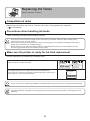
BK
BK
R
R
G
G
GG
B
B
B
a
330 ml tanks
PM
PM
M
M
BK
BK
R
R
GG
GG
B
B
B
a
700 ml tanks
• Push the Ink Tank Lock Lever down until it locks.
• Make sure the Ink Tank Lock Lever does not return to the original position.
3
Hold the Ink Tank by the grips (a) or handle (b) and
remove it. Press the OK button.
a
PM
M
BK
R
G
B
330 ml tanks
b
PM
M
BK
R
G
B
700 ml tanks
• Store the Ink Tank you removed in the box with the ink hole (a)
facing up. Otherwise, ink may leak and cause stains.
26
a
Replacing Ink Tanks
Install the ink tanks
1
Before opening the pouch, tilt the Ink Tank to the left
and right gently seven or eight times. Hold 330 ml ink
tanks in one hand and 700 ml ink tanks in two hands,
as shown.
330 ml tanks
700 ml tanks
• If you do not agitate the Ink Tank, the ink may settle, which may affect printing quality.
2
Open the pouch and remove the Ink Tank.
330 ml tanks
700 ml tanks
• Never touch the ink hole or electrical contacts. This may cause stains, damage the Ink Tank, and affect
printing quality.
• Do not remove and agitate ink tanks that have already been installed in the printer. Ink may leak out.
27
Replacing Ink Tanks
3
Press the OK button and insert the Ink Tank into the
holder with the ink hole facing down, as shown.
PM
M
BK
R
G
B
330 ml tanks
PM
M
BK
R
G
B
700 ml tanks
• Ink tanks cannot be loaded in the holder if the color or orientation is incorrect.
If the Ink Tank does not fit in the holder, do not force it into the holder. Make sure the color of the Ink
Tank Lock Lever matches the color of the Ink Tank, and check the orientation of the Ink Tank before
reloading it.
4
Lift the Ink Tank Lock Lever until it stops, and then push
it down until it clicks into place.
PM
M
B
BK
R
G
330 ml tanks
PM
M
B
BK
R
G
700 ml tanks
28
Replacing Ink Tanks
5
Make sure the Ink Lamp is lit.
PM
M
BK
R
G
B
• If the Ink Lamp is not lit, reload the tank.
6
Close the Ink Tank Cover.
• After Ink Tank replacement, always close the Ink Tank Cover. If the Ink Tank Cover cannot close,
some Ink Tank Lock Lever may not be closed completely. Make sure all ink tank lock levers are fully
closed.
• To close the Ink Tank Cover when no Ink Tank is
installed (as when moving the printer), push the release
lever (a) as shown while returning the Ink Tank Lock
Lever to the original position.
a
PM
M
BK
R
G
B
29
Replacing the Maintenance Cartridge
Replace the Maintenance Cartridge as follows.
Compatible maintenance cartridges
Use Maintenance Cartridge MC-08.
Precautions when handling the maintenance cartridge
Take the following precautions when handling the Maintenance Cartridge.
• To prevent ink from leaking from a used Maintenance Cartridge, avoid dropping the cartridge or storing it at an
angle. Otherwise, ink may leak and cause stains.
• Ink adheres to the top of the Maintenance Cartridge after it has been used. Handle the Maintenance Cartridge
carefully during replacement. The ink may stain clothing.
• Do not remove the Maintenance Cartridge except to replace it.
Make sure the printer is ready for maintenance cartridge
replacement
Maintenance Cartridge replacement is possible in the following cases.
You can replace cartridges if the Display Screen advises you to check the
remaining capacity or replace the Maintenance Cartridge.
If a message is displayed requesting Maintenance Cartridge replacement,
skip the step "Access the menu for maintenance cartridge replacement."
Follow the instructions in "Replace the maintenance cartridge."
Printing
OK:Setting/Adj. Menu
Maint. cart.
The level is low
䇭䇭Maintenance
cartridge full.
Replace
the maintenance
cartridge.
• Do not replace the Maintenance Cartridge during initialization immediately after turning on the printer, during
Printhead cleaning, or when ink is being absorbed. Ink may leak out.
30
Replacing the Maintenance Cartridge
Access the menu for maintenance cartridge replacement
1
On the Tab Selection screen of the Control Panel, press
).
◄ or ► to select the Settings/Adj. tab (
• If the Tab Selection screen is not displayed, press the Menu button.
2
3
4
Press the OK button.
The Set./Adj. Menu is displayed.
Press ▲ or ▼ to select Maintenance, and then press the
OK button.
Press ▲ or ▼ to select Repl. Maint. C, and then press
the OK button.
A message on the Display Screen advises you to open
the Maintenance Cartridge Cover.
31
Printing
OK:Setting/Adj. Menu
Maint. cart.
The level is low
Replacing the Maintenance Cartridge
Replace the maintenance cartridge
1
2
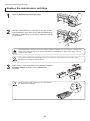
Open the Maintenance Cartridge Cover.
Hold the used Maintenance Cartridge by the grip (a) with
one hand and put your other hand under the Maintenance
Cartridge to hold it firmly on the bottom, keeping it level as
you pull it out.
a
• Used maintenance cartridges are heavy. Always grasp the cartridge firmly and keep the cartridge level
during removal and storage. If you drop a used Maintenance Cartridge or store it at an angle, ink may
leak and cause stains.
• The remaining Maintenance Cartridge capacity is recorded on each printer. Do not install a used
Maintenance Cartridge in another printer.
3
Open the box, remove the plastic bag, packaging material,
and Shaft Cleaner, and take out the Maintenance
Cartridge.
• Never touch the metal contacts (a). This may damage
the Maintenance Cartridge.
a
32
Replacing the Maintenance Cartridge
4
5
Attach the packaging material to the used Maintenance
Cartridge and put it in the box. Keep it level as you put it in
the plastic bag. Expel excess air from the plastic bag and
seal the zipper.
Confirm the Maintenance Cartridge is right-side up, put it
in the box, and store it so that it stays level.
• Always put the used Maintenance Cartridge back in the box and store the box on a flat surface.
Otherwise, ink may leak and cause stains.
6
Wipe away any soiling on the Maintenance Cartridge
Cover.
• Support the Maintenance Cartridge Cover from underneath as you wipe it.
7
8
Keeping the new Maintenance Cartridge level, insert it all
the way in.
Close the Maintenance Cartridge Cover.
33
Replacing the Maintenance Cartridge
9
Press the OK button.
The printer now initializes the Maintenance Cartridge.
Next, replace the Shaft Cleaner.
34
Replacing the Maintenance Cartridge
Replace the shaft cleaner
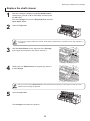
1
2
After the message is displayed regarding Shaft Cleaner
replacement, press ▲ or ▼ to select Yes, and then press
the OK button.
After the Carriage is moved, the Display Screen indicates
Open Upper Cover.
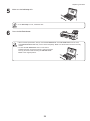
Open the Top Cover.
• If you do not respond within two minutes, shaft cleaner replacement is canceled. In this case, repeat the
procedure.
3
Hold the Shaft Cleaner on the right side of the Carriage
by the grips (a) and pull it to the right to remove it.
a
4
Holding the new Shaft Cleaner by the grips (a), attach it
to the Carriage.
a
• Be sure to put the used Shaft Cleaner in the small box before putting it in the larger box with the used
Maintenance Cartridge for disposal.
5
Close the Top Cover.
The Carriage moves back into position.
35
Replacing the Printhead
Replace the Printhead as follows.
When to replace the printhead
This printer is equipped with two printheads.
Replace one or both printheads in the following situations.
• If the printing quality does not improve even after one or two cycles of Head Cleaning B from the printer
menu
Replace any printheads with poor printing performance.
• If the Display Screen indicates Open top cover and replace the left printhead.
Replace the Printhead on the left side.
• If the Display Screen indicates Open top cover and replace the right printhead.
Replace the Printhead on the right side.
• If your Canon dealer has advised you to replace the Printhead
Replace the Printhead as directed.
Compatible printheads
Use Printhead PF-05.
Precautions when handling the printhead
Take the following precautions when handling the Printhead.
• There may be ink around the nozzles of the Printhead you remove. Handle the Printhead carefully during
replacement. The ink may stain clothing.
• Do not open the Printhead pouch until immediately before installation. After removing the Printhead from the pouch,
install it right away. If the Printhead is left after the pouch is opened, the nozzles may dry out, which may affect
printing quality.
36
Replacing the Printhead
Access the menu for printhead replacement
• When replacing the Printhead immediately after printing, wait a few minutes before replacing it. The metal parts of
the Printhead become hot during printing, and there is a risk of burns from touching these parts.
• Prepare a new Ink Tank when ink levels are low.
• Your hands may become dirty during Printhead replacement. Use the gloves provided with the new Printhead for
replacement.
1
2
3
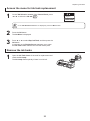
If the roll is not ejected because of the cutting method
selected, cut it manually and remove it.
(→"Cutting Roll Paper After Printing," User Manual)
Clean inside the Top Cover. (→
, If Paper is Soiled)
On the Tab Selection screen of the Control Panel, press
◄ or ► to select the Settings/Adj. tab (
).
• If the Tab Selection screen is not displayed, press the Menu button.
4
5
6
7
Press the OK button.
The Set./Adj. Menu is displayed.
Press ▲ or ▼ to select Maintenance, and then press the
OK button.
Press ▲ or ▼ to select Replace P.head, and then press
the OK button.
Press ▲ or ▼ to select the Printhead for replacement.
Select Printhead L when replacing the left printhead,
Printhead R when replacing the right printhead, and L
& R Printheads when replacing both. Make sure your
selection is correct.
37
Ready
OK:Setting/Adj. Menu
Maint. cart.
Remaining Amount
㪏㪇㩼
Replacing the Printhead
8
Press the OK button.
Ink is now filled.
After about three minutes, a message is shown on the
Display Screen instructing you to open the Top Cover.
Replace the printhead
1
Open the Top Cover.
Instructions are now shown on the Display Screen
regarding head replacement.
2
If the Carriage Cover is dirty, use a damp cloth that you
have wrung out completely to wipe it clean.
• Never touch the metal contacts of the Carriage. This may damage the printer.
3
If the ventilation duct (a) is dirty, use a damp cloth that you
have wrung out completely to wipe it clean.
Move the Carriage out of the way manually if the Carriage
is concealing the ventilation duct, and then clean the duct.
38
a
Replacing the Printhead
4
5
6
7
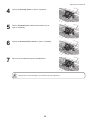
Pull up the Carriage Cover to open it completely.
Pull the Printhead Fixer Lever forward all the way to
open it completely.
Pull up the Printhead Fixer Cover to open it completely.
Remove the Printhead and press the OK button.
• Dispose of the used Printhead in accordance with local regulations.
39
Replacing the Printhead
8
Holding the new Printhead by the grips (a), remove it from
the pouch.
a
a
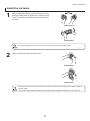
• When handling the Printhead, always hold it by the
grips (a). Never touch the nozzles (b) or metal contacts
(c). This may damage the Printhead and affect printing
quality.
• Never touch the ink supply section (d). This may cause
printing problems.
a
d
c
b
• If you need to put a Printhead somewhere temporarily before installation, do not keep the nozzles and
metal contacts facing down. If the nozzles or metal contacts are damaged, it may affect the printing
quality.
9
b
While firmly holding the Printhead you have removed,
use your other hand to remove the orange Protective Part
(a). Squeeze the grips (c) of Protective Part (b) and pull it
down to remove it.
c
a
• The inside surface of the Protective Part (a) and Protective Part (b) is coated with ink to protect the
nozzles. Be careful not to touch these surfaces when removing the caps.
• The Printhead contains ink to protect the nozzles. We recommend removing Protective Part (b) as you
hold it over the Printhead package or safely out of the way to avoid spilling ink and staining your clothes
or the surrounding area. If ink accidentally spills, wipe off the ink with a dry cloth.
• Do not reattach the Protective Part or protective material. Dispose of these materials in accordance with
local regulations.
10
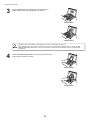
With the nozzles facing down and the metal contacts
toward the back, tilt the Printhead slightly forward and
insert it into the Carriage. Carefully push the printhead
firmly into the Carriage, ensuring that the nozzles and
metal contacts do not touch the carriage.
40
Replacing the Printhead
11
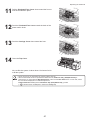
Pull the Printhead Fixer Cover down toward the front to
lock the Printhead in place.
12
Push the Printhead Fixer Lever toward the back of the
printer until it clicks.
13
14
Push the Carriage Cover down toward the front.
Close the Top Cover.
Ink now fills the system. It takes about 13 minutes for ink
to fill the system.
• Never remove an Ink Tank while the system is filling with ink.
• After the Printhead has been replaced and filled with ink, Head Posi. Adj. (Auto(Advanced)) is
performed if you have selected Rep.P.head Print > On in the Control Panel menu. In this case, follow
the instructions displayed for Printhead adjustment.
If Rep.P.head Print is Off, perform Head Posi. Adj. (Auto(Advanced)) yourself.
(→ , If Vertical Lines are Warped or Colors are Misaligned)
41
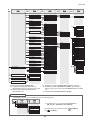
Menu Map
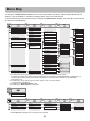
The structure of Tab Selection screen menus on the control panel is as follows. Values at right labeled with an
asterisk (*) are the defaults. For details on settings values, refer to the User Manual.
To access tab menus, press the Menu button to display the Tab Selection screen, press ◄ or ► to select the tab,
and then press the OK button.
Paper Menu
OK
OK
Back
OK
Back
Back
Roll Paper
Cut Sheet
Load Paper
Eject Paper
*1
Chg. Paper Type
Chg. Paper Size
Roll Paper
(The paper type is
*1
displayed here.)
Cut Sheet
(The paper type is
*1 displayed here.)
Sheet Size
(The paper size is
*2 displayed here.)
*4
Roll Length
*3 Roll Width
*4
Off
On
ManageRemainRoll
Skew Check Lv.
*
(The paper type is
*1 displayed here.)
Paper Details
A
B
Head Height
Cutting Mode
Automatic
Eject
Manual
Cut Speed
Fast
Standard
Slow
Trim Edge First
Automatic
Off
On
CutDustReduct.
Off
On
C
D
E
VacuumStrngth
Scan Wait Time
Roll DryingTime
Paper Details
Off
On
Keep Paper Type
*
NearEnd RollMrgn
5mm
20mm
NearEnd Sht Mrgn
5mm
20mm
Bordless Margin
Automatic
Fixed
Width Detection
Off
On
Return Defaults
A
Automatic
Highest
High
Standard
Low
Lowest
Super Low
*
B
Standard
Loose
Off
*
C
Automatic
Strongest
Strong
Standard
Weak
Weakest
*
D
Off
1 sec.
3 sec.
5 sec.
7 sec.
9 sec.
E
Off
30 sec.
1 min.
3 min.
5 min.
10 min.
30 min.
60 min.
*
*1: For information on the types of paper the printer supports, refer to the Paper Reference Guide.
The paper type setting in the printer driver and related software (as well as on the Control Panel) is updated when you
install the printer driver from the User Software CD-ROM or if you change paper information by using the Media
Configuration Tool.
*2: For information on the sizes of paper the printer supports, refer to the User Manual.
(→"Paper Sizes," User Manual)
*3: Available only if ManageRemainRoll is On.
*4: Available only if Width Detection is set to Off.
Ink Menu
Rep. Ink Tank
Head Cleaning A
Job Menu
OK
OK
Back
Print Job
OK
Back
Job List
OK
Back
(Select Print Job.)
*14
Stored Job
Mailbox List
(Enter a password if one
has been set.)
Back
Delete
Preempt Jobs
Job List
Print Job List
a
*14: Print Anyway is displayed when a job being held is selected.
42
Print
Delete
Menu Map
a
OK
OK
Back
Job Log
OK
Back
OK
Back
Back
Document Name
(Choose from information
about the latest three
print jobs.)
User Name
Page Count
Job Status
OK
CANCELED
Print Start Time
yyyy/mm/dd hh:mm:ss
Print End Time
yyyy/mm/dd hh:mm:ss
Print Time
xxxsec.
Print Size
xxxxxxxxsq.mm
Media Type
USB
Network
HDD
Interface
Ink Consumed
xxx.xxx ml
(The total amount of ink
consumed and ink
colors are displayed
here.)
Print Job Log
Pause Print
Off
On
HDD Information
Total capacity
Box free space
Set./Adj. Menu
OK
*
OK
Back
OK
Back
Test Print
Nozzle Check
Status Print
Interface Print
Paper Details
Print Job Log
Menu Map
Adjust Printer
Head Posi. Adj.
*5
*5
Feed Priority
*8
*6*8
*7*8
OK
Back
Back
Auto(Standard)
Auto(Advanced)
Auto(Expansion)
Manual
Adj. Priority
Automatic
Print Quality
Print Length
Adj. Quality
Auto(GenuinePpr)
Auto(OtherPaper)
Manual
Adjust Length
AdjustmentPrint
*
A:High
B:Standard/Draft
Change Settings
Calibration
Auto Adjust
Calibration Log
Date
Paper Type
Use Adj. Value
Disabled
Enabled
Return Defaults
Maintenance
A:High
B:Standard/Draft
Head Cleaning
*
Head Cleaning A
Head Cleaning B
Nozzle Check
Replace P.head
Printhead L
Printhead R
L & R Printheads
Repl. maint cart
Head Info
Printhead L
Printhead R
Repl. S. Cleaner
b
Change Cutter
*5: Available after Auto(Advanced) in Head Posi. Adj. has
been used once.
*6: Available when you have specified Feed Priority > Adj.
Priority > Automatic or Print Quality.
43
*7: Available when you have specified Feed Priority > Adj.
Priority > Automatic or Print Length.
*8: Displayed if a sheet is loaded in the printer.
Menu Map
OK
b
OK
Back
Interface Setup
*15
*15
OK
Back
EOP Timer
OK
Back
OK
Back
OK
Back
Back
F
TCP/IP
Automatic
IPv4 Mode
IPv4
Manual
*9
Protocol
*
On
DHCP
*
Off
On
BOOTP
*
Off
On
RARP
*
Off
*16
*16
IPv4 Settings
DNS Settings
IP Address
xxx.xxx.xxx.xxx
Subnet Mask
xxx.xxx.xxx.xxx
Default G/W
xxx.xxx.xxx.xxx
DNS Dync update
On
*
Off
Pri. DNS SrvAddr
Sec. DNS SrvAddr
DNS Host Name
DNS Domain Name
IPv6
On
IPv6 Support
Off
*11
*11
*11*16
On
IPv6 StlessAddrs
Off
*
*
On
DHCPv6
Off
*
DNS Dync update
DNS Settings
Statefull Addr
On
*
Off
Stateless Addr
On
*
Off
Pri. DNS SrvAddr
Sec. DNS SrvAddr
DNS Host Name
*15
NetWare
On
NetWare
Off
*10
*10
G
Frame Type
Print Service
Off
Ethernet Driver
10 sec.
30 sec.
1 min.
2 min.
RPrinter
NDSPServer
10 min.
5 min.
*
30 min.
*
Auto Detect
G
On
Off
Auto Detect
Ethernet 2
*
Ethernet 802.2
Ethernet 802.3
*13
*13
Comm.Mode
Half Duplex
Full Duplex
10 Base-T
Ethernet Type
100 Base-TX
*
*
H
5 min.
10 min.
20 min.
Not Use
Spanning Tree
*15
System Setup
Use
Interface Print
*9:
*10:
*11:
*13:
*15:
*16:
xxxxxxxxxxxx
MAC Address
Return Defaults
Sleep Timer
30 min.
40 min.
50 min.
60 min.
240 min.
H
Buzzer
Off
Contrast Adj.
-4,-3,-2,-1,0*,+1,+2,+3,+4
On
c
*
*
d
Not shown if you have set IPv4 Mode to Manual.
Not shown if you have set NetWare to Off.
Not displayed if IPv6 Support is Off.
Not shown if you have set Auto Detect to On.
Viewing and configuration is possible for administrators, and only viewing for other users.
Viewing and configuration is possible for administrators only.
44
*
Ethernet SNAP
15 min.
1000 Base-T
*15
*
60 min.
On
*15
*15
F
BinderyPServer
NPrinter
AppleTalk
DNS Domain Name
*
*
Menu Map
c
OK
OK
Back
OK
Back
OK
Back
Back
d
*15
*15
Date & Time
Date
Date Format
yyyy/mm/dd
dd/mm/yyyy
mm/dd/yyyy
*
Length Unit
meter
feet/inch
*
Detect Mismatch
Pause
Warning
None
Hold Job
Language
*15
Time Zone
Paper Size Basis
*15
*15
*15
*15
*17
Take-up Reel
*18
*19
Admin. Menu
yyyy/mm/dd
Time
hh:mm
I
J
I
*
Sht Selection 1
ISO A3+
13"x19"(Super B)
*
Sht Selection 2
ISO B1
28"x40" (ANSI F)
*
Keep Paper Size
Off
On
Rep.P.head Print
Off
On
Nozzle Check
Frequency
Standard
1 page
*
Warning
Off
On
*
*
J
Automatic
Fixed
*
Use RemoteUI
On
Off
*
Reset PaprSetngs
Erase HDD Data
High Speed
Secure High Spd.
Secure
Output Method
Print
Print (Auto Del)
Save: Box XX
*
Print After Recv
Off
On
*
Common Box Set.
Print
Print (Auto Del)
Use Take-up Reel
Disable
Enable
*
*
Off
On
*
Auto Feed
Skip Take-Up Err
*
0:London(GMT)
+1:Paris,Rome
+2:Athens,Cairo
+3:Moscow
+4:Eerevan,Baku
+5:Islamabad
+6:Dacca
+7:Bangkok
+8:Hong Kong
+9:Tokyo,Seoul
+10:Canberra
+11NewCaledonia
+12:Wellington
-12:Eniwetok
-11:Midway is.
-10Hawaii(AHST)
-9:Alaska(AKST)
-8:Oregon (PST)
-7:Arizona(MST)
-6:Texas(CST)
-5:NewYork(EST)
-4:Santiago
-3:Buenos Aires
-2:
-1:Cape Verde
*
CarriageScanWdth
English
ᣣᧄ⺆
Français
Italiano
Deutsch
Español
K
Paper Info
Ink Info
Head Info
System Info
Error Log
Other Counter
Level 1
Level 2
Level 3
Prep.MovePrinter
*15
*12
*16
*16
Change Password
Init.Admin.Pswd
K
Printer Info
*12: Follows the setting in Date Format.
*15: Viewing and configuration is possible for
administrators, and only viewing for other users.
*16: Viewing and configuration is possible for
administrators only.
*17: Displayed only when the Media Take-up Unit is attached.
*18: Available if: (a) Use Take-up Reel is Enable, (b) roll paper is
loaded, and (c) you have not executed Auto Feed for the loaded
roll.
*19: Available when Use Take-up Reel is Enable.
Menu When Printing
The following operations are available from the menu during printing.
OK
Set./Adj. Menu
Back
Adj. Fine Feed
Printer Info
*6: Available when you have specified Feed Priority >
Adj. Priority > Automatic or Print Quality.
*6
Paper Info
Ink Info
Head Info
System Info
Error Log
Other Counter
The same menus as usual are shown in
and
(Job Menu).
45
(Ink Menu)
Index
Numerics
T
2-Inch Paper Core Attachment ................................... 12
3-Inch Paper Core Attachment ................................... 12
Tab Selection screen ............................................ 11, 42
U
C
User Manual ................................................................. 5
Consumables.............................................................. 23
F
Flange......................................................................... 13
I
imagePROGRAF Support Information ......................... 5
Ink hole ....................................................................... 26
Ink Lamp ............................................................... 25, 29
Ink tab ................................................................... 11, 25
Ink Tank Lock Lever.............................................. 26, 28
Ink tank replacement .................................................. 24
J
Job tab ........................................................................ 11
M
Maintenance cartridge replacement ........................... 30
Menu map (menu structure) ....................................... 42
Menu operations ......................................................... 11
P
Paper Reference Guide ................................................ 5
Paper tab ........................................................ 11, 18, 22
Parts ............................................................................. 8
Printhead Fixer Cover........................................... 39, 41
Printhead Fixer Lever ........................................... 39, 41
Printhead replacement ............................................... 36
R
Roll loading in the printer ............................................ 14
Roll loading on the Roll Holder ................................... 12
Roll removal................................................................ 18
S
Settings/Adj. tab ............................................. 11, 31, 37
Shaft Cleaner.................................................. 23, 32, 35
Sheet loading.............................................................. 20
Sheet removal ............................................................ 22
46
Canon Inc.
30-2, Shimomaruko 3-chome, Ohta-ku, Tokyo 146-8501, Japan
Canon U.S.A., Inc.
One Canon Plaza, Lake Success, NY 11042 U.S.A
Canon Europe Ltd.
3 The Square, Stockley Park, Uxbridge, Middlesex, UB11 1ET United Kingdom
Canon (China) Co., Ltd.
15F Jinbao Building No.89 Jinbao Street, Dongcheng District, Beijing 100005, China
Canon Australia Pty. Ltd.
1 Thomas Holt Drive, North Ryde, Sydney, N.S.W.2113, Australia
*
QT5-2367-V1
©CANON INC. 2010
Q
T
5
2
3
6
7
V
1
*
Printed in JAPAN