1
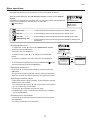
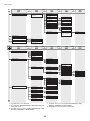
Menu Map
OK
b
OK
Back
Interface Setup
*15
*15
OK
Back
EOP Timer
OK
Back
OK
Back
OK
Back
Back
F
TCP/IP
Automatic
IPv4 Mode
IPv4
Manual
*9
Protocol
*
On
DHCP
*
Off
On
BOOTP
*
Off
On
RARP
*
Off
*16
*16
IPv4 Settings
DNS Settings
IP Address
xxx.xxx.xxx.xxx
Subnet Mask
xxx.xxx.xxx.xxx
Default G/W
xxx.xxx.xxx.xxx
DNS Dync update
On
*
Off
Pri. DNS SrvAddr
Sec. DNS SrvAddr
DNS Host Name
DNS Domain Name
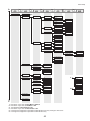
IPv6
On
IPv6 Support
Off
*11
*11
*11*16
On
IPv6 StlessAddrs
Off
*
*
On
DHCPv6
Off
*
DNS Dync update
DNS Settings
Statefull Addr
On
*
Off
Stateless Addr
On
*
Off
Pri. DNS SrvAddr
Sec. DNS SrvAddr
DNS Host Name
DNS Domain Name
*15
NetWare
On
NetWare
Off
*10
*10
G
Frame Type
Print Service
BinderyPServer
RPrinter
NDSPServer
NPrinter
AppleTalk
*
On
*15
*15
*
Off
Ethernet Driver
Auto Detect
*
On
Off
*13
*13
Comm.Mode
Half Duplex
Full Duplex
Ethernet Type
10 Base-T
100 Base-TX
*
F
10 sec.
30 sec.
1 min.
2 min.
*
5 min.
10 min.
*
30 min.
*
60 min.
1000 Base-T
Spanning Tree
Not Use
Use
*
G
Auto Detect
Ethernet 2
Ethernet 802.2
MAC Address
xxxxxxxxxxxx
Ethernet 802.3
Ethernet SNAP
*15
*15
Interface Print
Return Defaults
c
*9:
*10:
*11:
*13:
*15:
*16:
Not shown if you have set IPv4 Mode to Manual.
Not shown if you have set NetWare to Off.
Not displayed if IPv6 Support is Off.
Not shown if you have set Auto Detect to On.
Viewing and configuration is possible for administrators, and only viewing for other users.
Viewing and configuration is possible for administrators only.
43
*