1
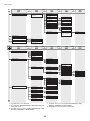
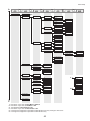
Menu Map
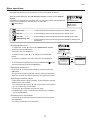
The structure of Tab Selection screen menus on the control panel is as follows. Values at right labeled with an
asterisk (*) are the defaults. For details on settings values, refer to the User Manual.
To access tab menus, press the Menu button to display the Tab Selection screen, press ◄ or ► to select the tab,
and then press the OK button.
Paper Menu
OK
OK
Back
Back
Roll Paper
Manual Paper
Load Paper
Eject Paper
*1
OK
Back
Roll Paper
*1
Chg. Paper Type
Chg. Paper Size
(The paper type is
*1 displayed here.)
Manual PaperSize
Roll Length
(The paper size is
*2 displayed here.)
Skew Check Lv.
*
(The paper type is
*1 displayed here.)
Paper Details
A
B
Head Height
Off
On
ManageRemainRoll
Cutting Mode
Automatic
Eject
Manual
Cut Speed
Fast
Standard
Slow
Trim Edge First
Automatic
Off
On
CutDustReduct.
Off
On
C
D
E
VacuumStrngth
Scan Wait Time
Roll DryingTime
Paper Details
Off
On
Keep Paper Type
*
Automatic
Highest
High
Standard
Low
Lowest
Super Low
B
High Accuracy
Standard
Loose
Off
(The paper type is
displayed here.)
Manual Paper
*3
A
NearEnd RollMrgn
3mm
20mm
NearEnd Sht Mrgn
3mm
20mm
Bordless Margin
Automatic
Fixed
Manual Feed
Front
Top
Return Defaults
C
Automatic
Strongest
Strong
Standard
Weak
Weakest
D
Off
1 sec.
3 sec.
5 sec.
7 sec.
9 sec.
E
Off
30 sec.
1 min.
3 min.
5 min.
10 min.
30 min.
60 min.
*1: For information on the types of paper the printer supports, refer to the Paper Reference Guide.
The paper type setting in the printer driver and related software (as well as on the Control Panel) is updated when you
install the printer driver from the User Software CD-ROM or if you change paper information by using the Media
Configuration Tool.
*2: For information on the sizes of paper the printer supports, refer to the User Manual.
(→"Paper Sizes," User Manual)
*3: Available only if ManageRemainRoll is On.
Ink Menu
Rep. Ink Tank
Head Cleaning A
Job Menu
OK
OK
Back
*4
Print Job
OK
Back
Job List
OK
Back
(Select Print Job.)
*14
*4
Stored Job
Mailbox List
(Enter a password if one
has been set.)
Back
Delete
Preempt Jobs
Job List
Print Job List
a
*4: Available only on the iPF6350.
*14: Print Anyway is displayed when a job being held is selected.
41
Print
Delete
*
*
*