Transcript
ADDONICS TECHNOLOGIES
ADDONICS TECHNOLOGIES
Model: AEUDMACF, AEUDMACFWP (read-only)
Model: AEUDMACF, AEUDMACFWP (read-only)
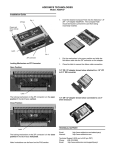
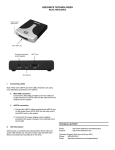
4-Pin Molex
Power Connector
Power & drive
activity LED
40-Pin IDE
Connector
Master or Slave
Setting
CF/MD Slot
4-Pin Molex
Power Connector
Power & drive
activity LED
40-Pin IDE
Connector
Master or Slave
Setting
CF/MD Slot
Step 1 Mount the IDE-CF Adapter PRO on a 3.5” drive bay.
Step 1 Mount the IDE-CF Adapter PRO on a 3.5” drive bay.
Step 2 Connect a 4-pin Molex power cable from the PC power supply to
the 4-pin Molex power connector on the IDE-CF Adapter PRO.
Step 2 Connect a 4-pin Molex power cable from the PC power supply to
the 4-pin Molex power connector on the IDE-CF Adapter PRO.
Step 3 By default, the IDE-CF Adapter PRO is set as a master device. Set
jumper on IDE Master mode or Slave mode (J5 ON = Master, J5 OFF =
Slave)
Step 3 By default, the IDE-CF Adapter PRO is set as a master device. Set
jumper on IDE Master mode or Slave mode (J5 ON = Master, J5 OFF =
Slave)
Step 4 Connect 40-pin IDE connector to IDE controller on motherboard
using IDE flat cable.
Step 4 Connect 40-pin IDE connector to IDE controller on motherboard
using IDE flat cable.
Note:
The IDE-CF Adapter PRO supports hot swap.
Note:
The IDE-CF Adapter PRO supports hot swap.
TECHNICAL SUPPORT (8:30 am to 6:00 pm PST)
Phone:
408 453-6212
Email:
http://www.addonics.com/support/query/
TECHNICAL SUPPORT (8:30 am to 6:00 pm PST)
Phone:
408 453-6212
Email:
http://www.addonics.com/support/query