1
Product Specification
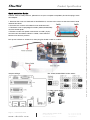
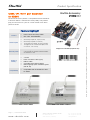
Quick Installation Guide:
1. Remove the cover on the back of the X50V4 first, unscrew four screws of the stand mount and
remove the stand.
2. Unscrew four screws of the back cover and remove it.
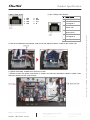
3. The back cover to prejudge the holes (COM3,COM4,DIO)
must first break open.
4. Please connect the power connectors to CON1 (4-pin)
and connect the ribbon cable to "CON2", then slide two
latches into the lock position.
Pull up two latches of "CON2" first, then plug the ribbon cable to "CON2".
Jumper settings:
JP2: COM1,COM2 PIN9 Fuction Select
J1 PIN3: Power Select
Default:
Page 2 | 19 December 2014
www.shuttle.com
24V
12V
JP3
JP3
JP7
JP7
Shu t tl e Computer Han dels GmbH
Fritz- Strassmann-S t r. 5
25337 Elmshorn | Germany
Tel. +49 (0) 4121-47 68 60
Fax +49 (0) 4121-47 69 00
[email protected]
© 2015 by Shuttle Computer Handels GmbH (Germany). All information subject to change without notice. Pictures for illustration purposes only.
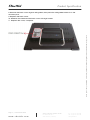
Caution: Due to safety reasons, please turn off your computer completely first and unplug it from
the adapter.