1
SPECIFICATIONS
LightRaise 60wi2 interactive projector – Models SLR60wi2 and SLR60wi2-SMP
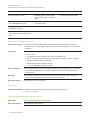
Connector
Connects to
Cable provided
7-pin mini-DIN for XCP data
LightRaise projector control (XCP)
harness cable (cable connected to
XCP)
Included with SLR60wi2-SMP
4-pin power mini-DIN 5V/2A output for
XCP USB HUB/switch power
LightRaise projector control (XCP) (cable
connected to XCP)
Included with SLR60wi2-SMP
RCA composite video input (and left and
right RCA audio input)
Video source (not included)
Not included
Stereo 3.5 mm phone jack audio input for
stereo input associated with the VGA
input
Computer (not included)
Not included
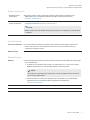
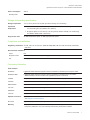
Interactive touch and pen features
Interactive technology
Pen features
A computer vision-based SMART touch detection system tracks dual finger touch using an
infrared source, as well as dual interactive and synchronized infrared pen, on any reasonably
flat surface.
l
Active tip switch
l
Power switch
l
Pen automatically turns off when not in use to prolong battery life
l
One tri-colored LED: green (operational), amber (battery charging required), red (fault)
l
SoftTouch texture for improved finger grip
l
USB mini-B connection for battery charging
l
9' 10" (3 m) USB cable for battery charging
Power requirements
Approximately two hours to charge the lithium-ion battery using the included 9' 10" (3 m) USB
mini-B cable and USB charger. A complete charge typically provides at least two days of
continuous use.
Pen holder
The lockable pen holder protects up to two interactive pens while they charge. It also has a
magnetic mounting option and storage space for the remote control.
Pen battery charger
USB charger for direct pen charging.
Installation
Installation instructions Installation instructions are included in the projector box and are online at
smarttech.com/support.
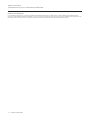
Electrical requirements and interface details
Power cable
Country-specific IEC 60320 C14 power cable
Power requirements
100V–240V AC at 50 Hz–60 Hz
6
smarttech.com/kb/170603