1
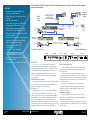
The ServSwitch CX with IP is great for small and mid-size data centers. Access and switch remotely between servers via the Internet! Network Operations Center Up to 2 Remote PS/2 Consoles with ServSwitch CX Remote Units with Audio and Skew Compensation (KV04AS-REM) Main Server Room ServSwitch CX with IP (KV1424A-R2) Up to 24 Servers ServSwitch CX (KV0424A-R2) CATx Cable Connecting to KV140xA ServSwitch CX Server Access Modules Up to 24 Servers Up to 24 Servers Second Floor Server Closet Third Floor Data Center PLATFORMS CONNECTORS CABLE PERIPHERALSSWITCHING FEATURES U U U® FLASH U U PC Sun Mac® PS/2® USB 8-Pin VGA CAT5, 5e, 6 Speaker OSD Push Button Hotkey IP Upgradable Cascadable OVERVIEW Reaches as far as your network. Access and switch remotely between servers over a private intranet or over the Internet. All you need is a Java ™ enabled Web browser. Password security keeps out unauthorized users. It’s secure, too. Although the ServSwitch CX with IP can be installed behind the security of your network firewall, it also has the robust security features it needs to be safe on its own. Sophisticated 128-bit public/ private key protection locks the switch tight against unauthorized access. Two-tier password protection—administrative and nonadministrative—adds another layer of protection. You can also restrict client IP addresses, limit access to dialup connections only, or use nonstandard port numbers to further confound would-be hackers. 724-746-5500 Remote User’s Laptop ServSwitch CX (KV0424A-R2) The ServSwitch ™ CX with IP may just be our most versatile ServSwitch ever—it has all the features you’re looking for to help manage your enterprise network. Like the ServSwitch CX, this model is compatible with all major computer platforms and connects via lightweight, inexpensive twisted-pair cable. But the ServSwitch CX with IP also enables you to access servers across any IP network— even the Internet. 04/27/2010 #26631 Internet U U U Features » Connect remotely using real VNC client software or Java Web browser. » 1600 x 1200 remote resolution with scalable windows. » Supports DDC emulation. » Remote users can connect to a KVM switch using ServSwitch CX Remote Units. » Easily switch between computers locally by hotkeys, the on-screen display, or a mouse. » Both the ServSwitch CX with IP and the SAMs are flash upgradable. » Connect over IP using enterprise-grade security including AES 128-bit encryption and RGA 2048-bit public key authentication. » Simplify cabling with CAT5, CAT5e, or CAT6 UTP cable. » Supports PC, Macintosh, and Sun. » Connect traditional PS/2 or newer USB keyboards and mice. » Order SAMs with optional audio to hear audio prompts from servers. » Cascade switches to control up to 128 servers. Easier connections than ever! There are no bulky KVM cables to deal with. Connect both user stations and servers via lightweight and inexpensive CAT5, CAT5e, or CAT6 UTP cable. UTP cable provides more distance than KVM cable—you can connect two user stations up to 984.2 feet (300 m) from the switch. This extra distance makes it practical to set up duplicate workstations within your building—in your server room, in your office, wherever it’s convenient for you. The servers connect with UTP cable, too. At the server end, a Server Access Module (SAM) provides keyboard, video, mouse, and speaker connections. Servers may be placed up to 164 feet (50 m) from the switch. Multiplatform operation. You can mix and match different kinds of servers—PC, Mac ®, and Sun ® —on the same CX switch! Simply choose the appropriate SAM for each server and you’re set! What’s more, you can connect the ServSwitch CX to either a PS/2 ® or USB (including Macintosh ®) keyboard and mouse—it includes both connector types! blackbox.com 2 of 4 BLACK BOX ®