1
Chapter 3: BIOS Setup Utility
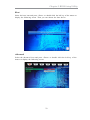
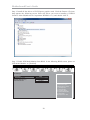
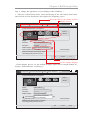
Step 4. Change the appearance of your displays under Windows 7.
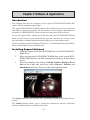
1. Enter the Control Panel menu, select the Display in the All Control Panel Items
and click the Screen Resolution, then appears the following screen.
Show the path of the setting location
Display devices
Control Panel
All Control Panel Items
Display
Screen Resolution
Search Control Panel
Change the appearance of your displays
2
1
3
Display:
1. DELL U2410
Resolution:
1920 x 1200 (recommended)
Orientation:
Landscape
Multiple displays:
Extend desktop to this display
4
This is currently your main display.
Detect
Identify
Advance settings
Make text and other items larger or smaller
What display settings should I choose?
OK
Cancel
Apply
The type of the display
Set the multiple displays
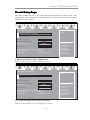
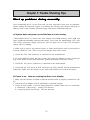
2.Select display devices, set the multiple displays option and to extend desktop for
display “Multi-Monitor technology”.
Control Panel
All Control Panel Items
Display
Screen Resolution
Search Control Panel
Change the appearance of your displays
2
1
3
Display:
3. DELL U2410
Resolution:
1920 x 1200 (recommended)
Orientation:
Landscape
4
Multiple displays:
!
Disconnect this display
Extend desktop to this display
You must select Apply
beforethis
making
additional changes.
Disconnect
display
Make this my main display
Detect
Identify
Advance settings
Make text and other items larger or smaller
What display settings should I choose?
OK
37
Cancel
Apply