1
2
Part 1: The Vista User Experience
Aero Glass Interface
In Windows Vista, A is for Aero Glass, the name given to the operating system’s
graphical user interface (GUI). The name is a combination of the acronym
AERO — Authentic, Energetic, Reflective, and Open — which describes the
original design goals for the new operating system, and glass (the stuff of which
actual windows are made), this stunning new user interface is all about clarity,
in the sense of both brightness and simplicity.
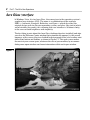
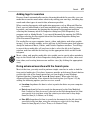
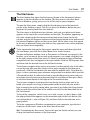
The first thing to note about the Aero Glass desktop when first installed (and after
you close the Welcome Center window that automatically appears) is the overall
openness of the screen (due to a decided lack of program icons) and a rather minimalist Start button and taskbar, as shown in Figure 1-1. This open screen makes
the most of your screen space, whatever the size of your monitor, by accommodating more open windows and more information within each open window.
Figure 1-1