1
Chapter 1: Rewriting the Web
The Host header is used to specify the name of the host machine on which the client is trying to access a
resource. At first glance, that seems a somewhat redundant piece of information — after all, surely the
host machine knows what it is called? It is specified in the header of the message because a single web
server might be responsible for hosting many different sites. Each web site is a virtual host configured
within the web server. Probably the majority of the web sites on the Internet are, in fact, virtual hosts,
each one sharing a web server with many other web sites.
The other header of interest here is the Cookie header. Many web sites use cookies to store information
within the client browser. This is typically how web sites remember who you are — every time you visit,
your browser presents your cookie to the web server, and the web server can use that to identify you.
Cookies are sent in the HTTP headers. In this case, the cookie is sent from the client to the server. When
the cookie value is initially set, or whenever it changes, a Set-Cookie header is sent from the server
back to the client in the response.
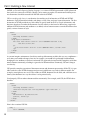
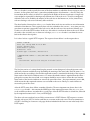
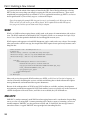
Let’s take a look at a typical HTTP response. The response shown below is to the request above:
HTTP/1.1 200 OK
Date: Sun, 10 Sep 2006 15:14:23 GMT
Server: Apache/2.0.52
Cache-Control: private
Connection: close
Content-Type: text/html; charset=utf-8
<!DOCTYPE HTML PUBLIC “-//W3C//DTD HTML 4.01 Transitional//EN”>
<html>
<head>
<title>Flickr: Photos from everyone in Flickr</title>
...
The first line consists of a string identifying the protocol version being used, a three-digit status code,
and finally a human-readable message describing the meaning of the status code. Here the status is 200,
which means that everything is fine and the requested resource is contained in the body of the response.
Status codes of the form 2xx indicate success. 3xx means that further action is required from the client —
perhaps the resource has moved and a new request should be sent to retrieve it from the new location.
Status codes of the form 4xx indicate an error on the part of the client — the most commonly seen is 404,
which means that the requested resource was not found on the server. Finally, 5xx codes indicate an
error on the part of the server.
After the HTTP status, there follow a number of headers. The most important one shown here is the
Content-Type header — this contains the MIME type of the requested resource. Here it is text/html,
so the web browser knows to render this as a web page. After the HTTP headers is a blank line, followed
by the requested resource itself — here, an HTML page.
The other web server method you are likely to come across is POST. Whereas GET requests a resource
from the web server, POST is used to send data to a resource on the web server. The most common use
of POST is for filling in a form on a web page: the data included in the form are sent in the body of the
POST request.
15