1
Part I: Building a New Internet
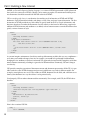
<book>
<title>Amazon.com Mashups</title>
<author>Francis Shanahan</author>
<isbn>0470097779</isbn>
</book>
<book>
<title>Yahoo! Maps Mashups</title>
<author>Charles Freedman</author>
<isbn>0470097787</isbn>
</book>
</books>
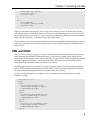
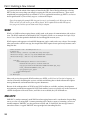
Every XML document must start with a header that declares it as XML:
<?xml version=”1.0”?>
The header is then followed by a single root element — in this case <books>. Within the root element sits
the rest of the document. In the example here, the <books> element contains a list of individual <book>
elements. Each <book> element contains, in turn, <title>, <author>, and <isbn> elements.
XPath, or XML Path Language, enables you to address different parts of an XML document. It is a very
powerful tool often used in processing and manipulating XML. XPath treats an XML document as a tree
of nodes, with each element and each attribute represented by a node in that tree. An XPath query returns
a set of nodes from the tree. A typical XPath query consists of an expression representing the path to one
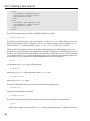
or more nodes. So, for example, in the sample XML document here, the XPath query
/books
will return the root <books> node, while the query
/books/book
returns the set of <book> nodes contained within <books>, and
/books/book/title
returns the set of <title> nodes.
To return the third book in the list, you would use the following XPath query:
/books/book[3]
And the last book could be found with
/books/book[last()]
If you don’t want to specify the whole path to an element, you can use the following notation:
//title
— which in this example will return all the <title> nodes within the document — regardless of location.
10