1
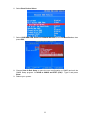
6. Select Boot Device Select.
7. Select USB RMD-FDD Generic STORAGE DEVICE for the 1st Boot Device, then
press ESC.
8. Choose Save & Exit Setup to save the new configuration to CMOS and exit the
CMOS Setup program. At SAVE to CMOS and EXIT (Y/N)? Type Y and press
Enter.
9. Reboot your system.
11