1
The Looper
Using a Switch-3 for looping
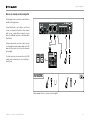
Connecting a Switch-3 (optional) to your Play
Electric will give you permanent access to looping without having to use the DOWN and UP
footswitches. It frees up those footswitches, so
you can assign them to key/scale selection. This
will also allow you to change presets without
having to go in and out of Loop mode.
The Switch-3 buttons are mapped as follows:
►►
►►
►►
Rec/Play/Odub
Stop/Erase (Hold for Erase)
Undo
The benefit of having the Undo feature assigned
to a separate footswitch is the ability to perfectly
time your undo instead of waiting a moment for
a “hold” to be registered.
Play Electric footswitch assignments
when using a Switch-3
When a Switch-3 is plugged in and Switch-3
mode is set to Looping, key/scale selection is
automatically assigned to the DOWN and UP
footswitches of your Play Electric.
When the Switch-3 is unplugged, the DOWN and
UP footswitches revert to whatever the UP/DN
setting was prior to connecting the Switch-3.
For more info on Switch-3, check out:
tc-helicon.com/products/switch-3/
Play Electric – Reference manual (2014-07-16)65