1
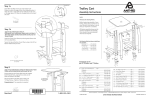
STEP 1 - S E T T H E D O C K L O C K E R I N PLA C E A ND O PEN I T Select the installation location for your locker. Provide at least 5" of clearance behind the unit. Place the unit in its spot and open it. To unlock the unit, insert the key and turn. To open the unit, push the button on the lock and lift the cover back. IF YOU WILL SECURE YOUR LOCKER TO THE WORKSURFACE USING A BOLT-THROUGH OR SCREW-MOUNT METHOD, GO TO STEP 2. IF YOU WILL SECURE YOUR LOCKER TO THE WORKSURFACE WITH A SECURITY CABLE, OR IF YOU WILL NOT SECURE YOUR LOCKER, GO TO STEP 3. STEP 2 - S E C U R E YO U R D O C K L OC K ER WI TH SCRE W- M O UN T O R B O LT- T H R O U G H M ETH O D. Locate the two round installation holes near the back of the bottom plate. Mark the holes. Set aside the unit. Pre-drill the holes. For screw-mount installation, use a 1/8" drill bit to drill 1/2" into the worksurface. For bolt-through installation, use a 1/4" drill bit to drill all the way through the worksurface. For added security for your cords and cables, you can route them through the cord pass-through opening in the base plate. To use that pass-through, mark and drill an opening in your worksurface now. Attach the unit to the worksurface. For screw-mount installation, fasten the unit to the worksurface with two 1" PB screws (325-5580-00) using your drill and the Anthro driver bit provided. For bolt-through installation, slide one bolt (325-5747-00) through each hole in the bottom plate and through the worksurface. Capture with the #10-24 Nylock Nut (325-5186-00). 9-1/8" 1” Button Hd PB Screw 325-5580-00 Nylock Nuts 325-5186-00 10-24x2.5” Bolt 325-5747-00 Ergotron Dock Locker Assembly Instructions 3