1
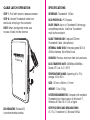
CABLE LATCH OPERATION
SPECIFICATIONS
STEP 1: Pull latch down to release connector.
Interface: Thunderbolt 10Gb/s
STEP 2: Unwind Thunderbolt cable from
enclosure, and plug in the connector.
Data Protocol: PCI Express
Note: When storing cable make sure
to press it back into the channel.
Daisy Chain: Up to six Thunderbolt Technologycompatible products. OverDrive Thunderbolt
must be the end point.
Cable Technology: Captured 300mm
Thunderbolt Cable (Active/Active)
Internal Hard Disk: Enterprise grade SATA III
(6Gb/s interface) Solid State Drives
Cooling: Passive, aluminum heat sink enclosure
OV ERD RIV E
2
1
Data Transfer Rate: 500MBps/450MBps Tested ATTO ver 2.47, NTFS
Temperature Range: Operating 0℃to 70°c,
storage -40 to 95°c℃
Size: 133mm x 85mm x 15mm
Weight: 7.0oz, 200g
System Requirements: Computer with available
Thunderbolt port, latest version of Windows® 7,
Windows 8 / Mac OS X 10.6 or higher
LED INDICATOR: The blue LED
is on when the drive is active.
Certifications and Declarations:
CE, FCC, Thunderbolt, IC, Microsoft WHQL