1
Contents
Contents
1
2
3
4
5
6
6.1
6.2
6.3
6.4
Introduction
Getting Started
Overview
Your Balanced Stereo Audio Matrix Switcher
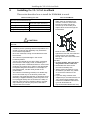
Installing the VS-1616A in a Rack
Installing the Balanced Stereo Audio Matrix Switcher
Connecting the Balanced/Unbalanced Stereo Audio Input/Output
Operating a Single Machine
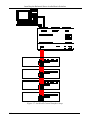
Assembling a Multi-channel Audio Switcher
Assembling an Expanded Matrix Switcher
1
1
2
3
6
7
7
8
8
9
6.4.1
6.4.2
Assembling a 32x16 Switcher
Assembling a 32x32 Switcher
10
12
6.5
6.6
Assembling a System of Interconnected Switchers
Setting the DIP-switches
14
16
6.6.1
6.6.2
6.6.3
6.6.4
Setting the MACHINE #
Setting the MACHINE ADDRESS #
Understanding the SYSTEM Mode
Understanding the SLAVE Mode
16
17
17
18
6.7
Connecting a Control Interface
18
6.7.1
6.7.1.1
6.7.1.2
6.7.1.3
6.7.1.4
6.7.1.5
6.7.1.6
6.7.2
Connecting the RS-232 Control Interface
Connecting Two VS-1616As with a Null-modem Adapter
Connecting Two VS-1616As without a Null-modem Adapter
Connecting to a 9-pin D-sub COM Port with a Null-modem Adapter
Connecting to a 9-pin D-sub COM Port without a Null-modem Adapter
Connecting to a 25-pin D-sub COM Port with a Null-modem Adapter
Connecting to a 25-pin D-sub COM Port without a Null-modem Adapter
Connecting the RS-485 Control Interface
19
20
20
20
21
21
21
22
6.8
6.9
7
7.1
7.2
Configuring the Sync
Connecting the KEYBOARD EXTENSION
Operating Your Balanced Stereo Audio Matrix Switcher
Viewing the Startup Display
Using the Front Panel Buttons
25
25
26
26
27
7.2.1
7.2.1.1
7.2.2
7.2.2.1
7.2.2.2
7.2.2.3
7.2.3
7.2.3.1
7.2.3.2
7.2.3.3
7.2.4
Confirming the Settings
Toggling between the AT ONCE and CONFIRM Modes
Switching Inputs to Outputs
Switching One Input to One Output
Switching Several Inputs to Several Outputs
Switching One Input to All Outputs
Clearing Outputs
Clearing an Output
Clearing Several Outputs
Clearing All Outputs
Storing and Recalling Setups
27
28
28
28
29
30
31
31
32
33
33
i