1
Rolleramic by Draper
Page 2 of 2
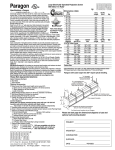
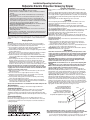
Case Dimensions
Rolleramic Mounting Bracket
For suspended mount
63/8"
1 3 /8 "
For wall mount
Screens through 14' wide have 2 mounting
brackets; wider screens have 3. Brackets
should be located along case to line up
with supporting beams or studding. Motor
end bracket must be located 1"-6" to right
of access door. Idler end bracket must
be located 6"-12" from right end of case.
Failure to mount brackets as directed could
cause case to bow and result in damage
to screen.
Conduit
connection
111/2"
Please Note: Mount the case using the two end brackets first. If
a center bracket is provided, mount it last. The center bracket is
designed to prevent sagging of the case, and must be mounted so
that it is level with the others and does not force the screen case
up. Make sure the top of the screen case's bottom board at no
point touches the roller/viewing surface.
L = W+24" (through 12' x 12')
L = W+30" (over 12' x 12')
9 5/8" 91/8"
9 5/8"
91/8"
Front
1"-6" from
Case access door
¾" thick
Through 12' x 12' 14¾"
Over 12' x 12' 21¼"
Screen
surface
6"-12" from
case edge
45/8"
Fabric width – W
4" - 41/8"
Opening for fabric
Bottom board
Access
Door
Bottom
Rolleramic Wiring Diagrams
Please Note: Do not wire motors in parallel.
Two-Way Serial Communication
(RS232) with MC1
Multiple Station Control
Junction box at
left end of screen
Red
Black
Blue
Single gang box by others
Min. 4" x 2 1/8" x 1 7/8" deep.
3 shown. More or less equally
feasible.
Location of key
operated on-off
switch if furnished
To 110-120V Line
Low Voltage & Wireless Control
Eye Port for IR Eye. For RF Receiver or LED
Wall Switch, a Splitter and a Power Supply
is required. Plug RF Receiver or LED Wall
Switch and Power Supply into splitter, then
run cable from Splitter to MC1 Eye Port.
Red
To 110-120V Line
RS232 Data FROM Control System
RS232 Data TO Control System
Signal Ground & Manual Switch Common
Manual Switch Up
Manual Switch Down
Black
Low Voltage Wiring by others
AC Wiring by electrician
Blue
Location of key
operated on-off
switch if furnished
White (Common)
Red (Down)
Black (Up)
Green (Ground)
Dashed wiring by electrician
Low voltage wiring by others
Eye Port for IR Eye, RF Receiver or LED
Wall Switch. For more than one of
these, a splitter is required.
3 Button Wall Switch
DOWN - Red
COM - White
UP - Black
Aux Port for connecting additional LVC-III
modules (up to six total can be linkedconnect from Aux to Eye).
www.draperinc.com
To
110-120V
Line
STOP
STOP
Location of key
operated on-off
switch if furnished
Control
Switches
24v DC
(765) 987-7999
MC1
Internal Screen Wiring
White-Common to screen & 110-120V AC Neutral
Red-to screen (directional)
Brown-to screen (directional)
Yellow-to 110-120V AC-Hot
Black-to 110-120V AC-Hot
Green-Ground
Fuse
Rolleramics over 12' x 12'
have a blue wire lead
instead of a black wire lead
coming from the motor.
Dashed wiring
by electrician
Black
STOP
Black
Control
Switches
24v DC
Blue
Program LED
Red
Red
White-Common to screen & 110-120V AC Neutral
Red-to Screen (directional)
Brown-to Screen (directional)
Black-Hot to 110-120V AC
Green/Yellow-Ground
Blue
Single gang box by others
Min. 4" x 2 1/8" x 1 7/8" deep
STOP
Cap off with wire
nut and tape
Dashed wiring
by electrician
Location of key
operated on-off
switch if furnished
Red (Down)
Black, or Blue (Up)
Green (Ground)
Black, or Blue (Up)
Green (Ground)
Control
switch
See separate Serial CommunicationRS232 Instruction sheet for enabling
RS232 with the MC1.
Internal Screen Wiring
White (Common)
To
110-120V
Line
Internal Screen Wiring
White (Common)
Red (Down)
Internal Screen Wiring
Junction box at
left end of screen
White (Common)
Red (Down)
Black (Up)
Green (Ground)
Single Station Control