1
Firmware User’s Manual V6.08.30
Troubleshooting
Although the default settings of the camera are ideal for 90% of the cases, there may be some
rare cases when the settings need to be adjusted or the device has to be examined. The
following section provides easy troubleshooting solutions for most cases. In some occasions, the
unexpected symptoms may be the result of selecting the product that is not suitable for given
environment.
For more detailed explanations and instructions of each situation, please refer to the complete
Troubleshooting Guide at http://www.acti.com/kb/detail.asp?KB_ID=KB20130130001
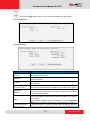
Image Quality Troubleshooting
Problem
Solution
Motion blur
Increase shutter speed
Blurry image
Auto Focus: Refocus button; Manual focus: adjust manually
Too narrow DoF
Reduce aperture size, widen the viewing angle, install camera farther from objects
Vari-focal lens: widen the viewing angle; Zoom lens: press the zoom-out button; Fixed
Too narrow viewing
lens: replace it with wide angle fixed lens or choose another model with wide angle
angle
lens
Increase video resolution; zoom-in (zoom lens) or adjust lens to telephoto position
Objects too small
(vari-focal); Install the camera closer to target; Change to the lens with longer focal
length; Change the camera model with higher resolution or longer focal length
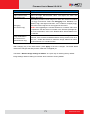
Use Auto Exposure Mode and increase AE Reference Target; set the Slowest Auto
Underexposed
Shutter Speed to slowest possible (1/5s); Add external light source to illuminate the
image
area the camera is shooting
Overexposed
Use Auto Exposure Mode and reduce AE Reference Target if necessary
image
Enable DNR; Enlarge the aperture; Lower AE Reference Target in Auto Exposure
Noise
mode; Lower the Exposure Gain in Manual Exposure mode; Lower video resolution;
Add extra visible or IR lights
Blocking & mosaic
Increase the bitrate
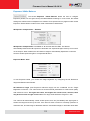
Wrong
Manually correct the colors by using white paper “Hold” button in Auto White Balance
colors
color rolling
or
mode; Adjust the camera’s position or viewing direction; Adjust the light source
Make sure there is sufficient light; Make sure the Day/Night Mode and IR LED Control
are both in Auto mode; Make sure that the “Switch from Day mode to Night mode” does
Black image
NOT have the most extreme value – 100; Manual iris: open the iris by rotating the ring
towards “O”; Remove the protective cap of the lens during installation
117
www.acti.com