1
SLIDE OUT PAST THE HEAD FRAME IN THE DIRECTION OPPOSITE OF USB SOCKET)
STEP3:
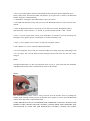
Please plug into the USB Bluetooth control center into the computer USB port. Please make sure
it is inserted in the correct position and it is not upside down. If it is inserted in the wrong position,
the Bluetooth headset will not show up on your computer. It is shown correctly in the picture
below.
1: Connect the USB plug the correct way into your computer USB socket or other USB charger.
2. Or if using the USB cable, connect the USB connector into the USB port of your computer.
3. Charging will automatically begin. It will take up to 120-160 minutes to completely
Recharge a fully discharged battery, depending on your computer. The LED Status will flash red
while charging. The LED will become blue after fully charged.
STEP 4:
After recharging the Bluetooth headset hold the headset frame with one hand and slide USB
Bluetooth control center into USB socket located on the top of the headset frame with the other
hand.
STEP 5:
Press the USB Bluetooth control center down into the frame until it clicks tight into the frame and
creates a waterproof seal.
(WARNING: Be sure the contact points between the USB Bluetooth control center and the USB
socket are free of dirt, sand or any other debris otherwise it won't seal properly)