1
The configuration option can be found
in Configuration > Media > Image >
General settings > Day/Night settings >
IR cut filter.
IV Hardware Installation
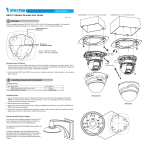
1. Loosen two screws on both sides of the camera bracket, and then adjust the position of
camera bracket by sliding it up and down.
2. Use the supplied L-type hex key wrench to fix the camera on the camera bracket.
3. Connect the power cable and Ethernet cable to the camera.
Side View
L-type hex key wrench
2
1
Zoom ring
Focus ring
5
English
Configure the camera's IR cut filter
setting (if your camera comes with it) to
"Synchronize with digital input."