1
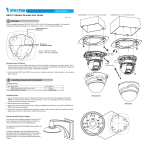
4. Assemble the mounting bracket arm (A).(B).(C).
110.00mm
83.00mm
(B)
(C)
95.00mm
(A)
8.00mm
Dimensions of Bracket Base
5. Feed the Ethernet cable and power cord from hole (D) on the bottom of the enclosure
through the mounting bracket arm.
6. Pan and tilt the enclosure to aim at the monitored area.
6
5
(D)
Ethernet cable
Power cord
7. Mount the enclosure to the mounting plate (C) with supplied four screws.
8. Use the supplied long screw to secure (C) with (B).
9. Use the supplied big screw to secure (B) with (A).
10. Use the supplied three screws to mount the enclosure to a desired location.
7
10
8
9
6