1
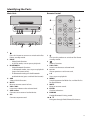
Identifying the Parts Main Unit: Remote Control AUX AUX AUX AC ~ 1 Press this button to turn on or switch to the Eco Power standby mode. 2 DOCK - Select Dock function. - In DOCK mode, start or pause playback. 3 BLUETOOTH - Select Bluetooth function. - In Bluetooth mode, start or pause playback (press the button once). - In Bluetooth mode, pair the Bluetooth- enabled device (press and hold the button). 4 AUX Select AUX IN function. 5 MUTE Mute or resume sound of unit. 6 VOL+/VOL Increase or decrease the volume level. 7 AUX socket Connect to an external audio device. 8 AC~ Connect to power cord. 1 Turn on this product or switch to Eco Power standby mode. 2 Select a function. 3 VOL+/VOL Increase or decrease volume level. 4 H , G Skip to previous track/next track. 5 BF Start or pause playback. 6 MENU Switch between the folder list and the file list for iPod/iPhone. 7 MUTE Mute or resume sound. 8 ENTER Confirm selections. 9 PAIRING Enable Bluetooth Pairing mode. 10 , Navigate through iPod/iPhone/iPad menu. 3