1
20
Using the Camera Server
AXIS 200+ and 240 User’s Guide
Comments
It is good programming practice to start each new entry with a comment to describe its function.
Comments are optional but must be proceeded by a # character, as detailed below:
# <comment>
Example:
# This cron entry will...
Trigger Condition
The commands contained within each specific entry are triggered by a defined trigger condition.
The trigger condition is specified by six separate fields and must be terminated with a colon “:”.
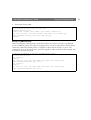
<Minute> <Hour> <Day> <Month> <Day of the week>
<Input and Boot (optional)> :
Time and Date Event Fields
The first five fields specify the time and date events, i.e. Minute, Hour, Day, Month and Day of
the week.
The syntax for each field within a trigger condition is governed by the following rules:
• Each time and date field can contain several numerical event variables that are delimited by
commas and hyphens.
• Each field is delimited by an open space.
• An asterisk (*) represents the full range of event variables within the relative time and date field,
i.e. * * * * * means every minute, every hour, every day, every month, every day of the week.
• Numerical event variables separated by a hyphen indicates an inclusive range, i.e. 2-6 means 2 to
6.
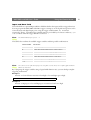
Example:
Trigger every month, between the fourth and eighth at 10.03, 12.03 and 14.03, using the 24 hr
clock:
3 10,12,14 4-8 * * :