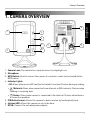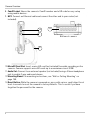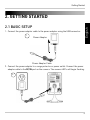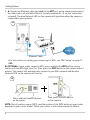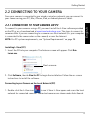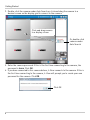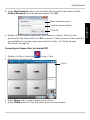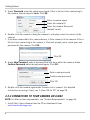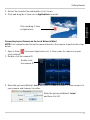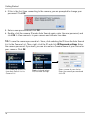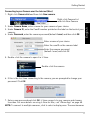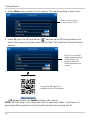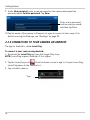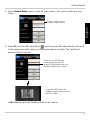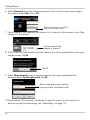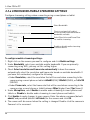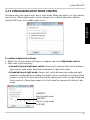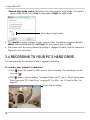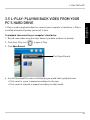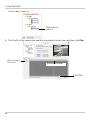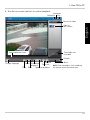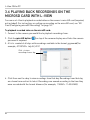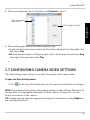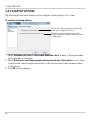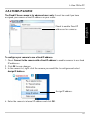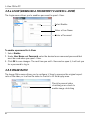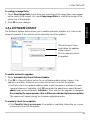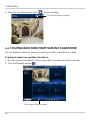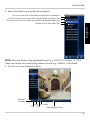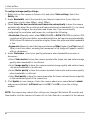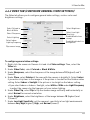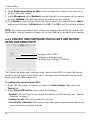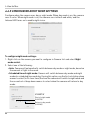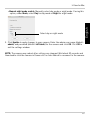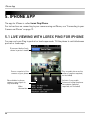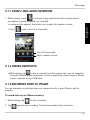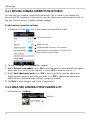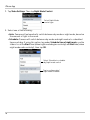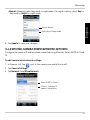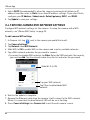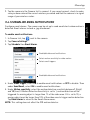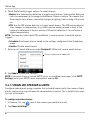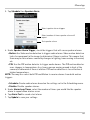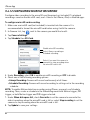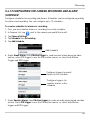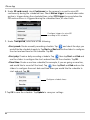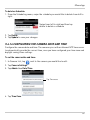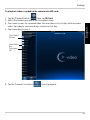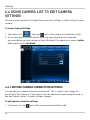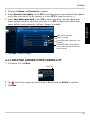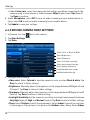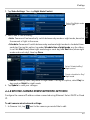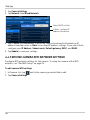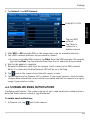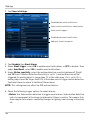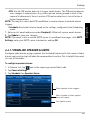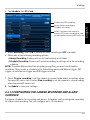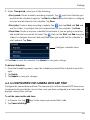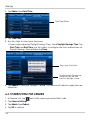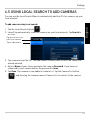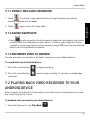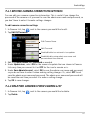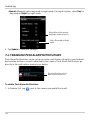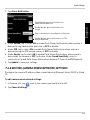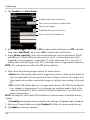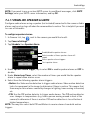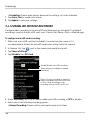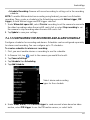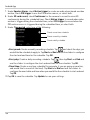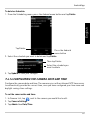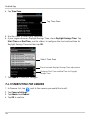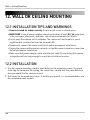
1
WIRELESS NETWORK CAMERA USER’S GUIDE ENGLISH VERSION 3.0 LNC100 Series www.lorextechnology.com NEED HELP? CO NTACT US F I R S T DO NOT RETURN THIS PRODUCT TO THE STORE Please make sure to register your product at www.lorextechnology.com to receive product updates and technical support. 2 Easy Ways to Contact Us Online: Product Support is available 24/7 including product information, user manuals, quick start up guides and FAQ’s at www.lorextechnology.com/support For all other matters, visit www.lorextechnology.com By Phone: North America: Customer Service (for warranty matters): 1-888-425-6739 (1-888-42-LOREX) Tech Support (for technical/installation issues): 1-877-755-6739 (1-877-75-LOREX) Mexico: 001-800-681-9263, 001-800-514-6739 International: +800-425-6739-0 (Example: From the UK, dial 00 instead of +) FEB 12 2013 - R15 VIEW YOUR WORLD™ VOIR VOTRE MONDEMD VEA SU MUNDO™ ¿NECESITA AYUDA? BESOIN D’ASSISTANCE? COMUNÍQUESE PRIMERO CON NOSOTROS COMMUNIQUEZ D’ABORD AVEC NOUS NO DEVUELVA ESTE PRODUCTO A LA TIENDA NE RETOURNEZ PAS CE PRODUIT AU MAGASIN Por favor, registre su producto en www.lorextechnology. com para recibir actualizaciones del producto y asistencia técnica. Veuillez enregistrer votre produit sur le site www.lorextechnology.com afin de recevoir des mises à jour et le soutien technique pour votre produit. Hay 2 maneras fáciles de comunicarse con nosotros: 2 façons simples de communiquer avec nous : En línea: En ligne : Apoyo al cliente está disponible 24/7, incluyendo información del producto, manuales para el usuario, guías de inicio rápido y preguntas más frecuentes en: À votre disposition 24/7, le soutien pour les produits comprend les renseignements sur les produits, guides d’utilisation, guides de départ rapide et FAQ : Para todo lo demás, visite www.lorextechnology.com Pour toutes les autres questions, visitez www.lorextechnology.com Por teléfono: Par téléphone : Norte América: En Amérique du Nord : www.lorextechnology.com/support Atención al cliente (para asuntos de la garantía - garantía válida sólo en E.U.A., vea la garantía ofrecida por el importador): 1-888-425-6739 (1-888-42-LOREX) Asistencia técnica (para asuntos técnicos o de instalación): 1-877-755-6739 (1-877-75-LOREX) www.lorextechnology.com/support Service à la clientèle (pour tout ce qui concerne la garantie) : 1-888-425-6739 (1-888-42-LOREX) Soutien technique (pour les questions d’ordre technique ou relatives à l’installation) : 1-877-755-6739 (1-877-75-LOREX) Mexique : 001-800-681-9263, 001-800-514-6739 Teléfono y Servicios Válidos Sólo en E.U.A.: 001-800-681-9263, 001-800-514-6739 International : +800-425-6739-0 (par exemple : à partir du Royaume-Uni, composez le 00 au lieu de +) Internacional: +800-425-6739-0 FEB 12 2013 - R15 B E F O R E Y O U S TA R T Please make sure to register your product at www.lorextechnology.com to receive product updates and technical support THIS PRODUCT MAY REQUIRE PROFESSIONAL INSTALLATION LOREX IS COMMITTED TO FULFILLING YOUR SECURITY NEEDS • We have developed user friendly products and documentation. Please read the Quick Start Guide and User Manual before you install this product. • Consumer Guides and Video Tutorials are available on our web site at www.lorextechnology.com/support • If you require further installation assistance, please visit www.lorextechnology.com/installation or contact a professional installer. • Please note that once the components of this product have been unsealed, you cannot return this product directly to the store without the original packaging. FEB 12 2013 - R9 AVANT DE COMMENCER ANTES DE EMPEZAR Veuillez enregistrer votre produit sur le site www.lorextechnology.com afin de recevoir des mises à jour et le soutien technique pour votre produit. Cerciórese de por favor colocar su producto en www.lorextechnology.com para recibir actualizaciones y la información del producto y soporte técnico. CE PRODUIT PEUT NÉCESSITER UNE INSTALLATION PROFESSIONNELLE ESTE PRODUCTO PUEDE EXIGIR UNA INSTALACIÓN PROFESIONAL LOREX S’ENGAGE À RÉPONDRE À VOS BESOINS EN MATIÈRE DE SÉCURITÉ LOREX SE COMPROMETE A SATISFACER SUS NECESIDADES EN SEGURIDAD • Nous avons conçu et développé une documentation et des produits extrêmement conviviaux. Veuillez lire le Guide de départ rapide et le Guide d’utilisation avant d’installer ce produit. • Favor de leer la guía de instalación rápida y la guía del usuario antes de instalar este producto. • Des guides pour consommateurs et des tutoriels vidéo vous sont offerts sur notre site Web : www.lorextechnology.com/support • Si vous avez besoin de plus d’assistance pour l’installation de ce produit, veuillez visiter le site www.lorextechnology/installation ou communiquez avec un installateur professionnel. • Veuillez prendre note que lorsque vous avez déballé les pièces et composantes de ce produit, vous ne pouvez pas retourner celui-ci directement au magasin sans son emballage original. • Puede conseguir las guías del consumidor y los cursos en enseñanza video sobre el Internet visitando www.lorextechnology.com/support • Si necesita ayuda para la instalación, visite www.lorextechnology.com/installation o contacte un especialista en instalaciones. • Favor de notar que una vez que los componentes de este producto han sido removidos del embalaje, no podrá devolver este producto directamente a la tienda. www.lorextechnology.com VIEW YOUR WORLD™ VOIR VOTRE MONDEMD VEA SU MUNDO™ FEB 12 2013 - R9 Welcome! Thank you for purchasing this Lorex wireless network camera. This user’s guide refers to the following models: • LNC101 • LNC104 Contents Before you start, make sure you have the contents listed below. • 1 x Camera • 1 x Camera power adapter and USB power cable • 1 x Ethernet cable • 1 x Mounting kit • 1 x Quick Start Guide • 1 x Software/documentation CD i Safety Instructions • Read this guide carefully and keep it for future reference. • Camera is rated for indoor use only. • Do not use in wet or humid areas. • Use the camera within given temperature, humidity, and voltage levels noted in the Technical Specifications. • Do not use the camera near a heat source, such as a radiator. • Do not point the camera directly towards the sun or a source of intense light. • Do not disassemble the camera. • Periodic cleaning may be required. Use a damp cloth only. Do not use harsh cleaners or aerosol cleaners. • Do not cover the camera with a towel or blanket. • Keep all power and network cables out of reach of children. • Use only the included power adapter or USB power adapters rated for 1A or higher. ii If using this product as a baby monitor: We advise you to take the following precautions to avoid possible injury to infants: • DO NOT place the camera too close to cribs, bassinets, play yards, and other safe sleep environments for infants. • MAKE SURE to run all power adapter cords and network cables where they are unlikely to be tripped over and are out of arms reach of your infant. Keep them at least 3ft / 1m away. • MAKE SURE the camera is on a stable footing so it cannot be easily knocked over. NOTE: These precautions are important even if your infant is not yet standing or mobile 3ft / 1m iii Features • iOS, Android, PC and Mac compatible1 • Wi-Fi & wired internet connectivity2 • Easy connection to Wi-Fi networks with WPS3 • Night vision up to 30ft with single high-power IR LED4 • microSD recording & playback supported5 • Dual motion detection: PIR & video • Sound activated alerts • Push notification of events & email alerts with snap shot attachment • Bandwidth-efficient VGA (640x480) resolution • H.264 video compression • Supports up to 20 simultaneous users • Two-way audio supported6 • Flexible indoor mounting (counter, wall, ceiling) As our product is subject to continuous improvement, Lorex Technology & subsidiaries reserve the right to modify product design, specifications & prices without notice and without incurring any obligation. 1. Up to 4 simultaneous camera views available on PC, Mac, and tablets. Selectable single camera viewing on smartphones. 2. Connection speed may vary depending on internet bandwidth. 3. Compatible with WPS enabled routers (not included). 4. Infrared illumination range under ideal conditions. Actual range and clarity may vary depending on scene/object reflection and camera application. 5. microSD Card not included (supports up to 32GB). 6. External speaker required, not included. iv TABLE OF CONTENTS English 1. Camera Overview . . . . . . . . . . . . . . . . . . . . . . . . . . . . . . . 1 2. Getting Started . . . . . . . . . . . . . . . . . . . . . . . . . . . . . . . . . 3 2.1 Basic Setup . . . . . . . . . . . . . . . . . . . . . . . . . . . . . . . . . . . . . . . . . . .3 2.2 Connecting to your Camera . . . . . . . . . . . . . . . . . . . . . . . . . . . . . .5 2.2.1 Connecting to your Camera on PC . . . . . . . . . . . . . . . . . . . . . . . . . . . . . .5 2.2.2 Connecting to your Camera on a Mac . . . . . . . . . . . . . . . . . . . . . . . . . . .8 2.2.3 Connecting to your Camera on iPhone . . . . . . . . . . . . . . . . . . . . . . . . .12 2.2.4 Connecting to your Camera on iPad . . . . . . . . . . . . . . . . . . . . . . . . . . . .15 2.2.5 Connecting to your Camera on Android . . . . . . . . . . . . . . . . . . . . . . . . .18 2.3 WiFi Setup . . . . . . . . . . . . . . . . . . . . . . . . . . . . . . . . . . . . . . . . . . .21 2.3.1 PC/Mac WiFi Setup . . . . . . . . . . . . . . . . . . . . . . . . . . . . . . . . . . . . . . . . .21 2.3.2 iPhone WiFi Setup . . . . . . . . . . . . . . . . . . . . . . . . . . . . . . . . . . . . . . . . . .23 2.3.3 iPad WiFi Setup . . . . . . . . . . . . . . . . . . . . . . . . . . . . . . . . . . . . . . . . . . . .25 2.3.4 Android WiFi Setup . . . . . . . . . . . . . . . . . . . . . . . . . . . . . . . . . . . . . . . . .26 3. L-View 104 for PC. . . . . . . . . . . . . . . . . . . . . . . . . . . . . . 28 3.1 System Requirements . . . . . . . . . . . . . . . . . . . . . . . . . . . . . . . . .28 3.2 L-View for PC Interface . . . . . . . . . . . . . . . . . . . . . . . . . . . . . . . .29 3.2.1 Display Sub-Menu . . . . . . . . . . . . . . . . . . . . . . . . . . . . . . . . . . . . . . . . . .32 3.2.2 All Camera Action . . . . . . . . . . . . . . . . . . . . . . . . . . . . . . . . . . . . . . . . . .33 3.3 Camera List (Managing Cameras) . . . . . . . . . . . . . . . . . . . . . . .33 3.3.1 Adding Cameras to Camera List . . . . . . . . . . . . . . . . . . . . . . . . . . . . . . .34 3.3.2 Saving Camera Passwords . . . . . . . . . . . . . . . . . . . . . . . . . . . . . . . . . . .34 3.3.3 Deleting Cameras . . . . . . . . . . . . . . . . . . . . . . . . . . . . . . . . . . . . . . . . . .35 3.3.4 Configuring Mobile Streaming Settings . . . . . . . . . . . . . . . . . . . . . . . . .36 3.3.5 Configuring Night Mode Control . . . . . . . . . . . . . . . . . . . . . . . . . . . . . . .37 3.4 Recording to your PC’s Hard Drive . . . . . . . . . . . . . . . . . . . . . . .38 3.5 L-Play: Playing back Video from your PC’s Hard Drive . . . . . .39 3.6 Playing Back Recordings on the microSD card with L-View . .42 3.7 Configuring Camera Video Settings . . . . . . . . . . . . . . . . . . . . . .43 3.7.1 Quality Tab (Configuring Resolution, Frame Rate, and Bandwidth) . .44 3.7.2 Video Tab (Configure General Video Settings) . . . . . . . . . . . . . . . . . . . .45 3.7.3 Control Tab (Configure Status LED’s and Motion Detection Sensitivity) 47 v 3.7.4 Camera Info Tab . . . . . . . . . . . . . . . . . . . . . . . . . . . . . . . . . . . . . . . . . . . 48 3.8 Configuring L-View . . . . . . . . . . . . . . . . . . . . . . . . . . . . . . . . . . . 49 3.8.1 Directories (Opening or Changing the Snapshot Folder) . . . . . . . . . . . 49 3.8.2 Startup Options . . . . . . . . . . . . . . . . . . . . . . . . . . . . . . . . . . . . . . . . . . . . 50 3.8.3 Fixed IP Access . . . . . . . . . . . . . . . . . . . . . . . . . . . . . . . . . . . . . . . . . . . . 51 3.8.4 Login (Enabling a Password to Access L-View) . . . . . . . . . . . . . . . . . . 52 3.8.5 Image Ratio . . . . . . . . . . . . . . . . . . . . . . . . . . . . . . . . . . . . . . . . . . . . . . . 52 3.8.6 Software Update . . . . . . . . . . . . . . . . . . . . . . . . . . . . . . . . . . . . . . . . . . . 53 4. L-View for Mac. . . . . . . . . . . . . . . . . . . . . . . . . . . . . . . . 54 4.1 System Requirements . . . . . . . . . . . . . . . . . . . . . . . . . . . . . . . . 54 4.2 L-View for Mac Interface . . . . . . . . . . . . . . . . . . . . . . . . . . . . . . 54 4.3 Camera List (Managing Cameras) . . . . . . . . . . . . . . . . . . . . . . . 56 4.3.1 Adding Cameras to Camera List . . . . . . . . . . . . . . . . . . . . . . . . . . . . . . 56 4.3.2 Deleting Cameras from Camera List . . . . . . . . . . . . . . . . . . . . . . . . . . 57 4.4 Recording Video to your Mac’s Hard Drive . . . . . . . . . . . . . . . . 57 4.4.1 Playing Back Video from your Mac’s Hard Drive . . . . . . . . . . . . . . . . . 58 4.5 Playing Back Recordings on the microSD card with L-View . . 60 4.6 Using Camera List to Modify Camera Settings . . . . . . . . . . . . 61 4.6.1 Quality Tab (Configure Bandwidth, Resolution, and Frame Rate) . . . 61 4.6.2 Video Tab (Configure General Video Settings) . . . . . . . . . . . . . . . . . . . 63 4.6.3 Control Tab (Configure Status LED’s and Motion Detection Sensitivity) 64 4.6.4 Camera Info Tab . . . . . . . . . . . . . . . . . . . . . . . . . . . . . . . . . . . . . . . . . . . 65 4.6.5 Configuring Night Mode Settings . . . . . . . . . . . . . . . . . . . . . . . . . . . . . . 66 5. iPhone App . . . . . . . . . . . . . . . . . . . . . . . . . . . . . . . . . . . 68 5.1 Live Viewing with Lorex Ping for iPhone . . . . . . . . . . . . . . . . . . 68 5.1.1 Using 2-Way-Audio (Intercom) . . . . . . . . . . . . . . . . . . . . . . . . . . . . . . . . 69 5.1.2 Taking Snapshots . . . . . . . . . . . . . . . . . . . . . . . . . . . . . . . . . . . . . . . . . . 69 5.1.3 Recording Video to iPhone . . . . . . . . . . . . . . . . . . . . . . . . . . . . . . . . . . . 69 5.2 Playing Back Video Recorded on iPhone . . . . . . . . . . . . . . . . . 70 5.2.1 Using Playback . . . . . . . . . . . . . . . . . . . . . . . . . . . . . . . . . . . . . . . . . . . . 70 5.3 Playing Back Video Recorded on microSD on iPhone . . . . . . . 70 5.4 Using Camera List to Edit Camera Settings . . . . . . . . . . . . . . . 71 5.4.1 Editing Camera Connection Settings . . . . . . . . . . . . . . . . . . . . . . . . . . . 72 5.4.2 Deleting Cameras from Camera List . . . . . . . . . . . . . . . . . . . . . . . . . . 72 5.4.3 Editing Alarm Notification Settings (Push Notifications) . . . . . . . . . . . 73 5.4.4 Editing Camera Mobile Streaming Settings . . . . . . . . . . . . . . . . . . . . . 74 vi 5.4.5 Editing Camera Video Settings . . . . . . . . . . . . . . . . . . . . . . . . . . . . . . . . 75 5.4.6 Configuring LED Control and Motion Detection Sensitivity . . . . . . . . . 76 5.4.7 Configuring Night Mode Settings . . . . . . . . . . . . . . . . . . . . . . . . . . . . . . 77 5.4.8 Editing Camera Wired Network Settings . . . . . . . . . . . . . . . . . . . . . . . 79 5.4.9 Editing Camera WiFi Network Settings . . . . . . . . . . . . . . . . . . . . . . . . . 80 5.4.10 Enabling Email Notifications . . . . . . . . . . . . . . . . . . . . . . . . . . . . . . . . 81 5.4.11 Enabling Speaker Alarms . . . . . . . . . . . . . . . . . . . . . . . . . . . . . . . . . . . 82 5.4.12 Configuring microSD Recording . . . . . . . . . . . . . . . . . . . . . . . . . . . . . 84 5.4.13 Configuring the Camera Recording and Alarm Schedule . . . . . . . . . 85 5.4.14 Configuring the Camera Date and Time . . . . . . . . . . . . . . . . . . . . . . . 87 5.4.15 Rebooting the Camera . . . . . . . . . . . . . . . . . . . . . . . . . . . . . . . . . . . . . 88 5.5 Using Local Search to Add Cameras . . . . . . . . . . . . . . . . . . . . . 89 6. iPad App . . . . . . . . . . . . . . . . . . . . . . . . . . . . . . . . . . . . . 90 6.1 Live Viewing with Lorex Ping HD . . . . . . . . . . . . . . . . . . . . . . . . 90 6.1.1 Using 2-Way Audio (Intercom) . . . . . . . . . . . . . . . . . . . . . . . . . . . . . . . . 91 6.1.2 Taking Snapshots . . . . . . . . . . . . . . . . . . . . . . . . . . . . . . . . . . . . . . . . . . 91 6.1.3 Recording Video to iPad . . . . . . . . . . . . . . . . . . . . . . . . . . . . . . . . . . . . . 91 6.2 Playing Back Video Recorded to iPad . . . . . . . . . . . . . . . . . . . . 91 6.3 Playing Back Video Recorded to microSD on iPad . . . . . . . . . . 92 6.4 Using Camera List to Edit Camera Settings . . . . . . . . . . . . . . . 94 6.4.1 Editing Camera Connection Settings . . . . . . . . . . . . . . . . . . . . . . . . . . . 94 6.4.2 Deleting Cameras from Camera List . . . . . . . . . . . . . . . . . . . . . . . . . . 95 6.4.3 Editing Alarm Notifications Settings (Push Notifications) . . . . . . . . . . 96 6.4.4 Editing Camera Mobile Streaming Settings . . . . . . . . . . . . . . . . . . . . . 97 6.4.5 Editing Camera Video Settings . . . . . . . . . . . . . . . . . . . . . . . . . . . . . . . . 98 6.4.6 Configuring LED Control and Motion Detection Sensitivity . . . . . . . . . 99 6.4.7 Configuring Night Mode Settings . . . . . . . . . . . . . . . . . . . . . . . . . . . . . 100 6.4.8 Editing Camera Wired Network Settings . . . . . . . . . . . . . . . . . . . . . . 101 6.4.9 Editing Camera WiFi Network Settings . . . . . . . . . . . . . . . . . . . . . . . . 102 6.4.10 Enabling Email Notifications . . . . . . . . . . . . . . . . . . . . . . . . . . . . . . . 103 6.4.11 Enabling Speaker Alarms . . . . . . . . . . . . . . . . . . . . . . . . . . . . . . . . . . 105 6.4.12 Configuring MicroSD Recording . . . . . . . . . . . . . . . . . . . . . . . . . . . . 106 6.4.13 Configuring the Camera Recording and Alarm Schedule . . . . . . . . 107 6.4.14 Configuring the Camera Date and Time . . . . . . . . . . . . . . . . . . . . . . 109 6.4.15 Rebooting the Camera . . . . . . . . . . . . . . . . . . . . . . . . . . . . . . . . . . . . 110 6.5 Using Local Search to Add Cameras . . . . . . . . . . . . . . . . . . . . 111 7. Android App . . . . . . . . . . . . . . . . . . . . . . . . . . . . . . . . . 112 vii 7.1 Live Viewing with Lorex Ping for Android . . . . . . . . . . . . . . . . 112 7.1.1 Using 2-way Audio (Intercom) . . . . . . . . . . . . . . . . . . . . . . . . . . . . . . . 113 7.1.2 Saving Snapshots . . . . . . . . . . . . . . . . . . . . . . . . . . . . . . . . . . . . . . . . . 113 7.1.3 Recording Video to Android . . . . . . . . . . . . . . . . . . . . . . . . . . . . . . . . . 113 7.2 Playing Back Video Recorded to your Android Device . . . . . . 113 7.3 Playing Back Video Recorded on microSD on Android . . . . . 115 7.4 Using Camera List to Edit Camera Settings . . . . . . . . . . . . . . 116 7.4.1 Editing Camera Connection Settings . . . . . . . . . . . . . . . . . . . . . . . . . . 117 7.4.2 Deleting Cameras from Camera List . . . . . . . . . . . . . . . . . . . . . . . . . 117 7.4.3 Editing Camera Mobile Streaming Settings . . . . . . . . . . . . . . . . . . . . 118 7.4.4 Editing Camera Video Settings . . . . . . . . . . . . . . . . . . . . . . . . . . . . . . . 118 7.4.5 Configuring LED Control and Motion Detection Sensitivity . . . . . . . . 120 7.4.6 Configuring Night Mode Settings . . . . . . . . . . . . . . . . . . . . . . . . . . . . . 121 7.4.7 Enabling Push Alarm Notifications . . . . . . . . . . . . . . . . . . . . . . . . . . . 122 7.4.8 Editing Camera Wired Network Settings . . . . . . . . . . . . . . . . . . . . . . 123 7.4.9 Editing Camera WiFi Network Settings . . . . . . . . . . . . . . . . . . . . . . . . 124 7.4.10 Enabling Email Notifications . . . . . . . . . . . . . . . . . . . . . . . . . . . . . . . 125 7.4.11 Enabling Speaker Alarms . . . . . . . . . . . . . . . . . . . . . . . . . . . . . . . . . . 127 7.4.12 Enabling microSD Recording . . . . . . . . . . . . . . . . . . . . . . . . . . . . . . . 128 7.4.13 Configuring the Recording and Alarm Schedule . . . . . . . . . . . . . . . 129 7.4.14 Configuring the Camera Date and Time . . . . . . . . . . . . . . . . . . . . . . 131 7.4.15 Rebooting the Camera . . . . . . . . . . . . . . . . . . . . . . . . . . . . . . . . . . . . 132 7.5 Using Local Search to Add Cameras . . . . . . . . . . . . . . . . . . . . 133 8. Configuring Camera Settings using a Web Browser 134 8.1 Web Configure Overview . . . . . . . . . . . . . . . . . . . . . . . . . . . . . 135 8.2 Network . . . . . . . . . . . . . . . . . . . . . . . . . . . . . . . . . . . . . . . . . . . 136 8.2.1 Wired Network (DHCP or Fixed IP) . . . . . . . . . . . . . . . . . . . . . . . . . . . 136 8.2.2 WiFi Security (Configuring Wifi settings) . . . . . . . . . . . . . . . . . . . . . . 137 8.3 Video . . . . . . . . . . . . . . . . . . . . . . . . . . . . . . . . . . . . . . . . . . . . . . 138 8.3.1 Display . . . . . . . . . . . . . . . . . . . . . . . . . . . . . . . . . . . . . . . . . . . . . . . . . . 138 8.3.2 Video Settings . . . . . . . . . . . . . . . . . . . . . . . . . . . . . . . . . . . . . . . . . . . . 139 8.3.3 Mobile Video . . . . . . . . . . . . . . . . . . . . . . . . . . . . . . . . . . . . . . . . . . . . . 141 8.3.4 Night Mode . . . . . . . . . . . . . . . . . . . . . . . . . . . . . . . . . . . . . . . . . . . . . . . 142 8.4 Schedule . . . . . . . . . . . . . . . . . . . . . . . . . . . . . . . . . . . . . . . . . . 144 8.4.1 Email/FTP Alarm Settings (Configuring Email Alarms) . . . . . . . . . . 144 8.4.2 Speaker Alarm (Configuring Audio Alarms) . . . . . . . . . . . . . . . . . . . . 146 8.4.3 SD Card (Configuring microSD Recording) . . . . . . . . . . . . . . . . . . . . . 147 viii 8.4.4 Scheduling (Configuring Recording and Alarm Schedules) . . . . . . . 148 8.5 Admin . . . . . . . . . . . . . . . . . . . . . . . . . . . . . . . . . . . . . . . . . . . . . 149 8.5.1 Admin Login . . . . . . . . . . . . . . . . . . . . . . . . . . . . . . . . . . . . . . . . . . . . . . 150 8.5.2 LED Control . . . . . . . . . . . . . . . . . . . . . . . . . . . . . . . . . . . . . . . . . . . . . . 151 8.5.3 Date/Time . . . . . . . . . . . . . . . . . . . . . . . . . . . . . . . . . . . . . . . . . . . . . . . 152 8.5.4 Upgrade . . . . . . . . . . . . . . . . . . . . . . . . . . . . . . . . . . . . . . . . . . . . . . . . . 152 8.5.5 Reboot . . . . . . . . . . . . . . . . . . . . . . . . . . . . . . . . . . . . . . . . . . . . . . . . . . 154 9. Technical Specifications. . . . . . . . . . . . . . . . . . . . . . . 10. Cleaning and Disposal . . . . . . . . . . . . . . . . . . . . . . . 11. Notices . . . . . . . . . . . . . . . . . . . . . . . . . . . . . . . . . . . . 12. Wall or Ceiling Mounting . . . . . . . . . . . . . . . . . . . . . 155 156 157 158 12.1 Installation Tips and Warnings . . . . . . . . . . . . . . . . . . . . . . . 158 12.2 Installation . . . . . . . . . . . . . . . . . . . . . . . . . . . . . . . . . . . . . . . . 158 13. Troubleshooting . . . . . . . . . . . . . . . . . . . . . . . . . . . . 160 ix x Camera Overview 1. CAMERA OVERVIEW 1 English 8 3 4 5 2 7 9 6 1. Camera Lens: The camera has separate lenses for day/night use. 2. Microphone 3. WPS Button: Used to connect the camera to a wireless router (not included) with a WPS button. 4. Indicator Lights: • SD: Glows when a microSD card (not included) is inserted. Flashes during recording. • / Network: Glows when connected to an ethernet or WiFi network. Flashes when sending or receiving data. • / Status: Glows when camera is connected to the Internet. Flashes when there is a connection problem. 5. PIR Motion Sensor: Allows the camera to detect motion by tracking body heat. 6. Infrared LED: Allows the camera to see in the dark. 7. DC/IN: Connect the included power adapter. 1 Camera Overview 8. CamID Label: Shows the camera’s CamID number and a QR code for easy setup using mobile devices. 9. NET: Connect an Ethernet cable and connect the other end to your router (not included). 10 13 11 Bottom of camera 12 10.MicroSD Card Slot: Insert a microSD card (not included) to enable recording on the camera. Camera supports microSD cards up to a maximum size of 32GB. 11.Audio Out: Connect to an external speaker (not included) using a 3.5mm headphone jack to enable 2-way audio and alarms. 12.Mounting Stand: For mounting instructions, see “Wall or Ceiling Mounting” on page 158. 13.Reset Button: While the camera is powered on, press with a pin or small object for at least 4 seconds to reset the camera to factory defaults. This is useful if you have forgotten the password for the camera. 2 Getting Started 2. GETTING STARTED English 2.1 BASIC SETUP 1. Connect the power adapter cable to the power adapter using the USB connector. 1 Power Adapter Power Adapter Cable 2. Connect the power adapter to a surge protector or power outlet. Connect the power adapter cable to the DC/IN port on the camera. The camera LED’s will begin flashing. 2 3 Getting Started 3. A: Connect an Ethernet cable (included) to the NET port on the camera and connect the other end to an available LAN port (usually numbered 1~4) on your router (not included). The blue Network LED on the camera will glow blue when the camera is connected to your network. 3A Router Ethernet Cable • For instructions on setting your camera up for WiFi, see “WiFi Setup” on page 21. • OR: B: OPTIONAL: If your router supports WPS, press and hold the WPS button on your router until the WPS light turns on. Then, press the WPS button on the camera within 1 minute. The camera will automatically connect to your WiFi network and the blue Network LED on the camera will turn on. 3B Press and hold the WPS button on the router Then, press the WPS button on the camera NOTE: Not all routers support WPS, and the location of the WPS button on your router depends on your router model. Check your router’s instruction manual for details. 4 Getting Started 2.2 CONNECTING TO YOUR CAMERA Once your camera is connected to your wired or wireless network, you can connect to your camera using your PC, Mac, iPhone, iPad, or Android phone or tablet. To connect to your cameras using a PC, you must install the L-View software provided on the CD or as a free download at www.lorextechnology.com. The steps to connect to cameras differ if you are connecting to a camera on a local network (i.e. your computer is connected to the same router as the camera) or over the Internet. NOTE: For PC system requirements, see “System Requirements” on page 28. Installing L-View (PC) 1. Insert the CD into your computer. The Autorun screen will appear. Click Run Lorex.exe. Run Lorex.exe 2. Click Software, then L-View for PC to begin the installation. Follow the on-screen instructions to install the software. Connecting to your Camera on the Local Network (PC) 1. Double-click the L-View icon to run L-View. L-View opens and scans the local network for connected cameras. Connected cameras are shown under Auto Search. 5 English 2.2.1 CONNECTING TO YOUR CAMERA ON PC Getting Started 2. Double-click the camera under Auto Search or click and drag the camera to a desired screen on the display grid to connect to the camera. Click and drag camera to a display screen Or, double-click camera under Auto Search 3. Enter the camera password. If this is the first time connecting to the camera, the password is lorex. Click OK. 4. If you have connected to this camera before, L-View connects to the camera. If this is the first time connecting to the camera, L-View will prompt you to create your own password for the camera. Click OK. Click OK 6 Getting Started 5. Under New Password, enter a password that will be used for the camera. Under Confirm Password, enter the password again. Click OK. Enter a new password Click OK 6. Double-click the camera again under Auto Search to connect. Enter the new password for the camera then click OK to connect. L-View connects to the camera. If you would like to save the camera password in L-View, see “Saving Camera Passwords” on page 34. Connecting to a Camera Over the Internet (PC) 1. Double-click the L-View icon 2. Click + next to Camera List. to run L-View. Click + 3. Under Name, enter a camera name of your choice. 4. Under CamID, enter the Cam ID number printed on the camera. 7 English Confirm new password Getting Started 5. Under Password, enter the camera password. If this is the first time connecting to the camera, the password is lorex. Click OK. Enter a camera name Enter the camera ID Enter the camera Password (default: lorex) 6. Double-click the camera or drag the camera to a display screen to connect to the camera. 7. If you have connected to this camera before, L-View connects to the camera. If this is the first time connecting to the camera, L-View will prompt you to create your own password for the camera. Click OK. Click OK 8. Under New Password, enter a password that will be used for the camera. Under Confirm Password, enter the password again. Click OK. Enter a new password Confirm new password Click OK 9. Double-click the camera again under Camera List to connect. For detailed instructions on using L-View, see “L-View 104 for PC” on page 28. 2.2.2 CONNECTING TO YOUR CAMERA ON A MAC NOTE: For Mac system requirements, see “System Requirements” on page 54. 1. Install the L-View software from the CD or download it from www.lorextechnology.com. 8 Getting Started 2. Extract the installer file and double-click it to run. 3. Click and drag the L-View icon to Applications to install. English Click and drag L-View to Applications Connecting to your Camera on the Local Network (Mac) NOTE: Your computer must be on the same network as the camera to perform the steps below. ) from your Applications list. L-View scans for cameras on your 1. Open L-View ( local network. 2. Double-click the camera ID. Double-click the camera ID 3. Enter the password (default: lorex) and then click OK to connect. L-View connects to your camera and streams live video. Enter the password (default: lorex) and then click OK 9 Getting Started 4. If this is the first time connecting to the camera, you are prompted to change your password. Click OK. 5. Enter a new password and click OK. 6. Double-click the camera ID under Auto Search again, enter the new password, and click OK. L-View connects to your camera and streams live video. TIP: To save the camera password in L-View, click and drag the ID from the Auto Search List to the Camera List. Then, right-click the ID and click ID/Password settings. Enter the camera password. If you want, you can also enter a Camera Name of your choice for your camera. Click OK. Click and drag camera ID from Auto Search List to Camera List 10 Right-click and select ID/Password settings Enter a name of your choice. Enter the camera password and click OK Getting Started Connecting to your Camera over the Internet (Mac) 1. Right-click Camera List and then click New camera. 2. Under Camera Name, enter a name for your camera of your choice. 3. Under Camera ID, enter the CamID number printed on the label on the back of your camera. 4. Under Password, enter the camera password (default: lorex) and then click OK. Enter a name of your choice Enter the camID on the camera label Enter the camera password (default: lorex) and click OK 5. Double-click the camera to open it in L-View. Double-click the camera 6. If this is the first time connecting to the camera, you are prompted to change your password. Click OK. 7. Enter a new password and click OK. L-View connects to your camera and streams live video. For more details on using L-View for Mac, see “iPhone App” on page 68. NOTE: To connect to multiple cameras, click to select a display area. The area becomes 11 English Right-click Camera List and click New Camera Getting Started highlighted. Then, double-click the camera to open it in the selected area. Then, double-click a camera to open it Click to select a display area 2.2.3 CONNECTING TO YOUR CAMERA ON IPHONE The app for iPhone is called Lorex Ping iPhone. To connect to your camera using an iPhone: 1. Download Lorex Ping iPhone from the App Store. NOTE: Lorex Ping is a free application, but it requires a valid iTunes account to download. Lorex Ping requires iOS v4.0 and higher. 2. Tap the Lorex Ping icon ( opens to the Camera List. 12 ) from the home screen to open Lorex Ping. Lorex Ping Getting Started 3. Tap + to add a camera. English Tap + 4. Under Name, enter a name for your camera. This can be anything of your choice. Enter a name for your camera of your choice 5. Under ID, press the QR code button ( ) and line up the QR code printed on the back of the camera using the camera on the phone. The CamID will automatically be entered. Press to scan the QR code printed on the back of the camera, OR manually enter the CamID printed on the camera Line up the QR code to the middle using the phone camera • OR: Manually enter the CamID printed on the camera. 13 Getting Started 6. Under Password, enter the camera password. If this is the first time connecting to the camera, enter lorex. Press Done. Enter the camera password. The default password is lorex. 7. Tap the name of the camera in the Camera List to connect to the camera. Lorex Ping connects to the camera. Tap the name of the camera to connect 8. If this is the first time connecting to the camera, you will be prompted to create your own password. Tap OK. Tap OK 9. Under New password, enter a new password for the camera and repeat the password under Confirm password. Tap OK. Enter a new password, confirm your password, and then tap OK 10.Tap the name of the camera in Camera List again to connect to the camera. For details on using the iPhone app, see “iPhone App” on page 68. 14 Getting Started 2.2.4 CONNECTING TO YOUR CAMERA ON IPAD The app for iPad is called Lorex Ping HD. NOTE: Lorex Ping is a free application, but it requires a valid iTunes account to download. Lorex Ping requires iOS v4.0 and higher. 2. Tap the Lorex Ping icon ( opens to the Camera List. 3. Tap + to add a camera. ) from the home screen to open Lorex Ping. Lorex Ping Tap + 15 English To connect to your camera using iPad: 1. Download the Lorex Ping HD app from the App Store. Getting Started 4. Under Name, enter a name for your camera. This can be anything of your choice. Enter a name for your camera of your choice 5. Under ID, press the QR code button ( ) and line up the QR code printed on the back of the camera using the camera on the iPad. The CamID will automatically be entered. Press to scan the QR code printed on the back of the camera, OR manually enter the CamID printed on the camera Line up the QR code to the middle using the iPad camera • OR: Manually enter the CamID printed on the camera. NOTE: QR code setup is not compatible with 1st generation iPads. If you have a 1st generation iPad, manually enter the CamID printed on the camera into ID. 16 Getting Started 6. Under Password, enter the camera password. If this is the first time connecting to the camera, enter lorex. Press Done. English Enter the camera password. The default password is lorex. 7. Tap the name of the camera in the Camera List to connect to the camera. Lorex Ping connects to the camera. Tap the name of the camera to connect 8. If this is the first time connecting to the camera, you will be prompted to create your own password. Tap OK. Tap OK 17 Getting Started 9. Under New password, enter a new password for the camera and repeat the password under Confirm password. Tap Done. Enter a new password, confirm your password, and then tap Done 10.Tap the name of the camera in Camera List again to connect to the camera. For details on using the iPad app, see “iPad App” on page 90. 2.2.5 CONNECTING TO YOUR CAMERA ON ANDROID The app for Android is called Lorex Ping. To connect to your camera using Android: 1. Download the Lorex Ping app from the Google Play store. NOTE: Lorex Ping requires Android v.2.3 or higher. ) from the home screen or app list to open Lorex Ping. 2. Tap the Lorex Ping icon ( Lorex Ping opens to the Camera List. 3. Tap + to add a camera. Tap + 18 Getting Started 4. Under Camera Name, enter a name for your camera. This can be anything of your choice. English Enter a name for your camera of your choice 5. Under ID, press the QR code button ( ) and line up the QR code printed on the back of the camera using the camera on the Android phone or tablet. The CamID will automatically be entered. Press to scan the QR code printed on the back of the camera, OR manually enter the CamID printed on the camera Line up the QR code to the middle using the camera on the phone or tablet • OR: Manually enter the CamID printed on the camera. 19 Getting Started 6. Under Password, enter the camera password. If this is the first time connecting to the camera, enter lorex. Press OK. Enter the camera password. The default password is lorex. 7. Tap the name of the camera in the Camera List to connect to the camera. Lorex Ping connects to the camera. Tap the name of the camera to connect 8. If this is the first time connecting to the camera, you will be prompted to create your own password. Tap OK. Tap OK 9. Under New password, enter a new password for the camera and repeat the password under Confirm password. Tap OK. Enter a new password, confirm your password, and then tap OK 10.Tap the name of the camera in Camera List again to connect to the camera. For details on using the Android app, see “Android App” on page 112. 20 Getting Started 2.3 WIFI SETUP 2.3.1 PC/MAC WIFI SETUP NOTE: The camera must be connected to your router using an Ethernet cable before you can set it up to use WiFi. 1. Install L-View on a PC or Mac in your local network (must be connected to the same router as the camera) and connect to the camera. For details, see “Connecting to your Camera on PC” on page 5, or see “Connecting to your Camera on a Mac” on page 8. 2. Right-click on the camera ID in the Auto Search area and click Web Configure. Right-click the camera under Auto Search and click Web Configure 3. Enter the camera admin user name and password. By default, the admin user name is admin and the admin password field is left blank. Click Log in. The Web Configure interface opens in your default web browser. NOTE: Your camera admin user name and password differs from the password used to connect to your camera to view video. 4. Click on Network and then WiFi Security. 21 English You can setup the camera to use WiFi using your PC, Mac, iPhone, iPad, or Android phone or tablet. You can also quickly connect the camera to a WiFi network using WPS (WPS compatible router required; see step 3B on page 4 for instructions). Getting Started 5. Click WiFi Scan and select your WiFi network from the list. WiFi Scan Click your WiFi network from the list 6. Under WPA-PSK Key or WEP Key, enter the WiFi password. Click Save and Apply. Enter WiFi Password Save & Apply 22 Getting Started English 7. Click WiFi Security again and click WiFi Test (this may take up to 60 seconds). WiFi test 8. When successful, Status will say Test Success. If unsuccessful, double check your wireless password and make sure your camera is close enough to the wireless router to get a good signal. 9. Remove the Ethernet cable from the camera wait 60 seconds and then reconnect to your camera in L-View. 2.3.2 IPHONE WIFI SETUP NOTE: The camera must be connected to your router using an Ethernet cable before you can set it up to use WiFi. 1. Connect to your camera using Lorex Ping iPhone. For details, see “Connecting to your Camera on iPad” on page 15. Your iPhone must be connected to your WiFi, not your 3G/mobile network. 2. Tap to open the edit camera screen. 23 Getting Started 3. Tap Camera Settings. Enter the camera’s admin username and password. By default, the admin username is admin and the password is left blank. Tap OK. Network WiFi Network 4. Tap Network then WiFi Network. 5. Slide Wi-Fi to ON. The camera scans for available networks in range. 6. Tap the name of your WiFi network, enter the password, and tap OK. Slide Wi-Fi to ON Tap your WiFi network 7. Wait for the update to complete. 8. Remove the Ethernet cable from the camera. It will connect to the wireless network. When it is connected, the blue Network LED will be on or flashing. 9. Press Camera Settings, ID/Password, and then Back to exit the edit camera screen. 24 Getting Started 10.Tap the camera in the Camera List to connect. If you cannot connect, check to make sure you have entered the correct wireless password and that the camera is in signal range of your wireless router. NOTE: The camera must be connected to your router using an Ethernet cable before you can set it up to use WiFi. 1. Connect to your camera using Lorex Ping HD. For details, see “Connecting to your Camera on iPad” on page 15. Your iPad must be connected to your WiFi, not your 3G/mobile network. 2. Press to open the edit camera screen. 3. Tap Camera Settings. Enter the camera’s admin username and password. By default, the admin username is admin and the password is left blank. Tap OK. 4. Tap Network then WiFi Network. Camera Settings Network WiFi Network 5. Slide Wi-Fi to ON. The camera will scan for available networks. 25 English 2.3.3 IPAD WIFI SETUP Getting Started 6. Tap the name of your WiFi network, enter the password, and tap OK. Wait for the update to complete. Slide Wi-Fi to ON Tap your WiFi network 7. Remove the Ethernet cable from the camera. It will connect to the wireless network. When it is connected, the blue Network LED will be on or flashing. 8. Press next to the camera name to exit the edit camera screen. 9. Tap the camera in the Camera List to connect. If you cannot connect, check to make sure you have entered the correct wireless password and that the camera is in signal range of your wireless router. 2.3.4 ANDROID WIFI SETUP NOTE: The camera must be connected to your router using an Ethernet cable before you can set it up to use WiFi. 1. Connect to your camera using Lorex Ping. For details, see “Connecting to your Camera on Android” on page 18. Your phone or tablet must be connected to your WiFi, not your 3G/mobile network. 2. Tap 26 to open the edit camera screen. Getting Started English 3. Tap Camera Settings. Enter the admin username and password. By default, the admin username is admin and the password is left blank. Tap OK. Tap Camera Settings 4. Tap Network then WiFi Network. 5. Check the WiFi checkbox. The camera will scan for available networks. Check WiFi Tap the name of your WiFi network 6. Tap the name of your WiFi network, enter the password, then tap OK. Wait for the update to complete. 7. Remove the Ethernet cable from the camera. It will connect to the WiFi network. When it is connected, the blue Network LED will be on or flashing. 8. Press Camera Settings then Camera List to exit the edit camera screen. 9. Tap the camera in the Camera List to connect. If you cannot connect, check to make sure you have entered the correct wireless password and that the camera is in signal range of your wireless router. 27 L-View 104 for PC 3. L-VIEW 104 FOR PC L-View is a PC client software that supports up to 4 cameras. L-View is provided on the CD or available as a free download from www.lorextechnology.com. For instructions on installing and connecting to your camera using L-View, see “Connecting to your Camera on PC” on page 5. NOTE: For Mac software instructions, see “iPhone App” on page 68. 3.1 SYSTEM REQUIREMENTS Description Minimum System Requirements CPU 2.0 GHz (dual-core recommended) Memory 2GB Operating System Windows XP SP 2 and higher Windows 7 Basic, Home Premium, Ultimate Windows 8 Hard Drive Minimum 5~10 GB free for recordings and snapshots 28 L-View 104 for PC 3.2 L-VIEW FOR PC INTERFACE 3 2 4 5 6 English 7 1 8 9 10 11 12 13 14 1. Display: Shows live or recorded video from your camera(s). • Click to select a camera and scroll up/down to zoom in/out. When the camera is zoomed in, click and drag the camera image to pan the camera. • Double-click to open the display area in full-screen. Double-click again to exit full-screen. • Right-click to open the display sub-menu. See “Display Sub-Menu” on page 32. 2. Image/Recording Controls: • Video Settings: Click to edit the camera’s video settings. See “Configuring Camera Video Settings” on page 43. 29 L-View 104 for PC • microSD: Click to open a list of recordings saved on the camera’s microSD card (not included). See “Playing Back Recordings on the microSD card with L-View” on page 42. • Snapshot: Click to save a still image screenshot of the camera. To access Snapshots, see “Directories (Opening or Changing the Snapshot Folder)” on page 49. Snapshots are saved in .png format. • Record: Record video directly to your computer hard drive. For details, see “Recording to your Computer Hard Drive” on page 47. 3. Time and Date: Show the current time and date on the computer. Note that the camera time and date may differ. For instructions on setting the time and date on the camera, see “Date/Time” on page 152. 4. Minimize/Restore 5. Maximize/Revert to Window 6. Exit 7. Camera List: Shows list of saved cameras. Available cameras are in blue. Cameras in red are not available. If a camera appears in red, check the network connection. For more details, see “Camera List (Managing Cameras)” on page 33. NOTE: Cameras may appear in red before you have connected to them the first time. 8. Auto Search: Auto Search shows cameras located on your local network (LAN). • Double-click the camera name or click and drag the camera to the display area to view the camera. • Drag the camera to the Camera List to save the camera. • Right-click the camera ID and select Web Configure to configure the camera settings using a browser. See “Configuring Camera Settings using a Web Browser” on page 134. 9. Pan/Tilt/Zoom Controls: Controls for compatible PTZ cameras (not included). 10.Volume Controls: • Click to activate 2-way-audio (intercom) feature and click again to deactivate 2-way-audio. Camera speaker required (not included). Note that turning on 2-way-audio will mute audio from the camera. • Click to mute audio from the camera. Click again to unmute audio from the camera. 30 L-View 104 for PC • Use the top volume slider to control the volume for the camera speaker (not included) when the 2-way-audio is activated. • Use the bottom volume slider to control the volume of audio coming from the camera. 11.L-View Controls: L-View Settings: Click to open settings for L-View. See “Configuring L-View” on page 49. • L-Play: Click to open L-Play to view video files saved on your computer hard drive. See “L-Play: Playing back Video from your PC’s Hard Drive” on page 39. • 12. 13. Language Selector: Click to select the language for L-View. All Camera Action: Click to perform an action on all cameras. Split-Screen Selectors: Click to select single camera view or to select 4-camera view. 14. Full Screen: Click to open the camera display area in full-screen. Press ESC to exit full-screen. 31 English • L-View 104 for PC 3.2.1 DISPLAY SUB-MENU The Display sub-menu opens when you right-click on a camera’s display area. It contains additional camera controls. Right-click on a camera in the display area to open the Display sub-menu The Display sub-menu contains the following controls: • Full window: Open the camera in single camera view. • Auto reconnect: L-View will attempt to reconnect to the camera if it becomes disconnected. • Stop: Disconnect from the camera. • Pause: Pause the video. Click again to un-pause the video. • Properties: Click to view video properties. Video Properties 32 L-View 104 for PC 3.2.2 ALL CAMERA ACTION to open the All Camera Action menu. The All Camera Action Menu contains the following controls: • Snapshot all: Take a snapshot from all connected cameras. • Play all: Connect to all cameras selected in display grid. • Pause all: Pause video for all connected cameras. Click Pause all again to resume video. • Disconnect all: Disconnect from all connected cameras. • Clear all connection info: Remove all cameras from the display grid. 3.3 CAMERA LIST (MANAGING CAMERAS) The Camera List is used to save connection information for your cameras, so you don’t have to re-enter the ID or password each time you connect. The Camera List also allows you to configure certain camera settings. Cameras connected to the Internet or local network are shown in blue in the camera list. Cameras not connected are shown in red. If your camera is red, check the network connection. NOTE: Cameras may appear in red before you have connected to them the first time. 33 English Press L-View 104 for PC 3.3.1 ADDING CAMERAS TO CAMERA LIST • If the camera is on the local network, click and drag a camera from the Auto Search list to Camera List to add it. Click and drag camera from Auto Search to Camera List • If the camera is not on the local network (i.e. you are connecting to it over the Internet), see “Connecting to a Camera Over the Internet (PC)” on page 7 to add the camera to the Camera List. • Right-click on your camera to open the Camera List sub-menu. See below for instructions. Right-click to open the Camera List sub-menu 3.3.2 SAVING CAMERA PASSWORDS You can use the Camera List sub-menu to save the camera’s password in L-View, so you don’t have to enter the password to connect to the camera. 34 L-View 104 for PC To save the camera password: 1. Right-click on the camera in Camera List and click ID/Password settings. 2. Under Name, enter a name for the camera that will appear in Camera List. This can be anything of your choice. 3. Under Password, enter the camera password to save the password in L-View. Enter a name for your camera Enter the password to save it in L-View 4. Click OK. 3.3.3 DELETING CAMERAS 1. Right-click on the camera in Camera List and click Delete Camera. Right-click on the camera and click Delete Camera 2. Click Delete to confirm. 35 English NOTE: To change the camera’s password, see “Video Settings” on page 139. L-View 104 for PC 3.3.4 CONFIGURING MOBILE STREAMING SETTINGS Configure streaming settings when connecting using a smartphone or tablet. Select Bandwidth Check to automatically adjust resolution and frame rate based on bandwidth available Select Resolution and Frame Rate for mobile streaming Enable or disable audio streaming to mobile device To configure mobile streaming settings: 1. Right-click on the camera you want to configure and click Mobile settings. 2. Under Bandwidth, select your available mobile bandwidth. If you are primarily connecting using WiFi, you may set this setting higher. 3. Check Select resolution and frame rate automatically to have the camera automatically select the resolution and frame rate based on available bandwidth. If you leave this unchecked, configure the following: • Under Resolution, select the resolution that will be used when connecting to the camera using a smart phone or tablet: 640x480 (VGA), 320x240 (QVGA), or 160x120 (QQVGA). • Under Frame rate, select the frame rate that will be used when connecting to the camera using a smart phone or tablet between 30fps (highest) and 1fps (lowest). 4. Under Microphone, select Enable to enable audio streaming to smart phones and tablets or Disable to disable audio streaming to smart phones and tablets. 5. Click Update to apply changes to your camera. Enter the admin username (default: admin) and password (default: left blank) for the camera and click OK. 6. The camera will disconnect when the setting is changed. Double-click the camera in Camera List to reconnect. 36 L-View 104 for PC 3.3.5 CONFIGURING NIGHT MODE CONTROL English Configure when the camera uses day or night mode. When day mode is on, the camera sees in color. When night mode is on, the camera sees in black and white, and the Infrared LED turns on to enable night vision. To configure night mode settings: 1. Right-click on the camera you want to configure and select Night mode control. 2. Select one of the following: • Automatic day and night mode switch: Camera will automatically switch between day mode or night mode, based on the amount of light in the room. • Scheduled time of night mode: Camera will switch between day mode and night mode at a scheduled times each day. If using this option, use the first set of drop-down menus to select (in 24-hour time) the time the camera will switch to night mode and the second set of drop-down menus to select when the camera will return to day mode. EXAMPLE Start of night mode (8:00 PM) Return to day mode (6:00 AM) 37 L-View 104 for PC • Manual night mode control: Manually select day mode or night mode. If using this option, under Mode, select Day for day mode or Night for night mode. Select day or night mode 3. Click Update to apply changes to your camera. Enter the admin username (default: admin) and password (default: left blank) for the camera and click OK. 4. The camera will disconnect when the setting is changed. Double-click the camera in Camera List to reconnect. 3.4 RECORDING TO YOUR PC’S HARD DRIVE You can manually record video to your computer hard drive. To record to your computer’s hard drive: • Click above the camera's video area to start recording. The recording icon will turn red ( ). • Click again to stop recording. To playback video on PC, see “L-Play: Playing back Video from your PC’s Hard Drive” on page 39. For Mac, see “L-View for Mac” on page 62. Start/stop recording 38 L-View 104 for PC 3.5 L-PLAY: PLAYING BACK VIDEO FROM YOUR PC’S HARD DRIVE English L-Play is used to playback video files saved to your computer’s hard drive. L-Play is installed automatically when you install L-View. To playback video saved to your computer’s hard drive: 1. Record some video using the steps above if you have not done so already. 2. Click the L-Play icon ( ) to open L-Play. 3. Click Open Record. Click Open Record 4. Use the Recorded Files area to find the day you would like to playback from. • Click + next to a year to expand recordings for the year. • Click + next to a month to expand recordings for that month. 39 L-View 104 for PC • Click a day to select it. Click a day to select it 5. Click the ID of the camera you would like to playback video from and then click Play. Click the camera ID to select Available Recordings Click Play 40 L-View 104 for PC 6. Use the on-screen controls to control playback. Maximize Minimize Exit Search for video Seek to different time English Open in full-screen Time video was recorded Volume Change language Zoom in Pause Slow down Zoom out playback Play Stop Speed up playback Mute NOTE: Once zoomed in, click and drag the mouse to pan the zoom area. 41 L-View 104 for PC 3.6 PLAYING BACK RECORDINGS ON THE MICROSD CARD WITH L-VIEW You can use L-View to playback recorded video on the camera’s microSD card (required; not included). For instructions on setting up recording on the microSD card, see “SD Card (Configuring microSD Recording)” on page 147. To playback recorded video on the microSD card: 1. Connect to the camera you would like to playback recordings from. ) on top of the camera display area. Enter the camera 2. Click the microSD button ( password if required. 3. A list is created of all days with recordings available in the format yyyymmdd (for example, 20120730 is July 30, 2012. Click + to view recordings from a day 4. Click the + next to a day to view recordings from that day. Recordings from that day are shown from earliest to latest. Recordings are named according to the time they were recorded with the format hhmmss (for example, 115553 is 11:55:53 AM). 42 L-View 104 for PC 5. Click a recording from the list and then click Playback to view it. Click a recording from the list English Click Playback to play 6. The recording plays back in the camera display area. • To return to a live view of your camera, wait for the recording to finish, then right-click and select Play. • OR, while the recording is still playing, right-click in the display area and select Stop then right-click again and select Play. • 3.7 CONFIGURING CAMERA VIDEO SETTINGS The Video Settings menu allows you to adjust the quality of the camera video. To open the Video Settings menu: • Click on the top of the display area for the camera you would like to configure. NOTE: The camera will disconnect after making changes to video settings. Wait about 15 seconds after clicking Update and double-click the camera in Camera List or Auto Search to reconnect to the camera. TIP: Change only one camera image quality setting at a time before clicking Update so you can judge the effects. 43 L-View 104 for PC 3.7.1 QUALITY TAB (CONFIGURING RESOLUTION, FRAME RATE, AND BANDWIDTH) Select Internet connection speed Check to automatically adjust resolution and frame rate based on bandwidth Select Resolution Select Frame Rate Select how image quality will be affected when bandwidth is low The Quality tab allows you to configure image quality settings such as the camera resolution, frame rate, and bandwidth settings. To configure image quality settings: 1. Under Bandwidth, select the speed of your Internet connection. If your Internet connection is faster than 1.5Mbps, select 1.5Mbps. 2. Check Select the best resolution and frame rate automatically to have the camera automatically adjust the resolution and frame rate based on bandwidth. Or, un-check it to manually configure the resolution and frame rate. If you are manually configuring the resolution and frame rate, configure the following: • Resolution: Manually select either VGA (640x480) or QVGA (320x240) resolution. VGA resolution will give you a better, more detailed picture, but requires more bandwidth. QVGA allows the camera to maintain a higher frame rate when available bandwidth is low. • Frame rate: Manually select the frame rate between 30fps (highest) and 1fps (lowest). 30fps is real time video, meaning that movement in the image will appear smooth, with no choppiness. 3. Under Preference, select your quality preference when bandwidth increases or decreases: 44 • Select Video Motion to have the camera maintain the frame rate and reduce image quality when bandwidth is insufficient. • Select Image Quality to have the camera maintain image quality and reduce frame rate when bandwidth is insufficient. • Select Better Quality to have the camera maintain frame rate and increase quality when bandwidth is sufficient. • Select Best Quality to have the camera maintain the frame rate and increase quality to the maximum speed of the connection. 4. Click Update to save changes. Enter the camera admin username (default: admin) and password (default: left blank) and click OK. The camera will disconnect. Wait about 15 seconds and then double-click the camera in Camera List or Auto Search to reconnect to the camera. 3.7.2 VIDEO TAB (CONFIGURE GENERAL VIDEO SETTINGS) The Video tab allows you to configure general video settings, such as color and brightness settings. Select Color or Black & White Select Brightness Select Sharpness Select Low Light Sensitivity Select Lighting Enable/disable time stamps Select Indoor Lighting Frequency Enable/disable built-in microphone Flip camera image To configure general video settings: 1. Under Video Color, select Color or Black & White. 2. Under Sharpness, select the sharpness of the image between 10 (highest) and 1 (lowest). 45 English L-View 104 for PC L-View 104 for PC 3. Under Place, select Outdoor video if the area with the camera is brightly lit. Select Indoor Video if you notice strip lines in the image or if the picture is too dark on the Outdoor video setting. Select Indoor video + Sunlight if the picture is too bright on the Indoor Video setting. • If you select Indoor Video or Indoor Video + Sunlight, select 60Hz or 50Hz to adjust the camera for the frequency of your indoor lighting. 4. Under Video Flip, select Video Flip to flip the camera image vertically and horizontally or select Normal for normal orientation. 5. Under Brightness, select the brightness of the image between 10 (highest) and 1 (lowest). 6. Under Low Light Sensitivity, set the camera’s sensitivity in low light environments between Very High (highest), High, and Normal (lowest). 7. Check Enable time display on video to turn on video time stamps or un-check it to disable video time stamps. 8. Under Microphone, select Enabled to enable the built-in microphone on the camera or select Disabled to disable the built-in microphone on the camera. 9. Click Update to save changes. Enter the camera admin username (default: admin) and password (default: left blank) and click OK. The camera will disconnect. Wait about 15 seconds and then double-click the camera in Camera List or Auto Search to reconnect to the camera. 46 L-View 104 for PC 3.7.3 CONTROL TAB (CONFIGURE STATUS LED’S AND MOTION DETECTION SENSITIVITY) English Configure status LED’s Configure motion detection sensitivity from 1 (High) to 10 (Low) The Control tab allows you to configure the camera status LED’s to make the camera harder to spot at night. It also allows you to configure the motion detection sensitivity when using video motion detection. To configure the camera status LED’s: 1. Under Status LED Control, select one of the following: • Normal: LED’s will function as normal. For details on LED functions, see “Camera Overview” on page 1. • Always turn off: LED’s are turned off at all times. • Turn off after connected: LED’s turn on when the camera is powered on and turn off once a network connection is made. 2. Click Update to save changes. Enter the camera admin username (default: admin) and password (default: left blank) and click OK. The camera will disconnect. Wait about 15 seconds and then double-click the camera in Camera List or Auto Search to reconnect to the camera. To configure motion detection sensitivity: NOTE: The following method works when using video motion detection. It does not work when using PIR motion detection. For details on enabling motion detection and selecting video motion detection or PIR, see “Schedule” on page 144. 1. Under Motion Detection Sensitivity, select the motion detection sensitivity between 1 (High) and 10 (Low). If Motion Detection Sensitivity is set to 1, motion detection will 47 L-View 104 for PC be triggered if a moving object is larger than 1% of the video area. If it is set to 10, a moving object must be larger than 10% of the video area to trigger motion detection. 2. Click Update to save changes. Enter the camera admin User Name (default: admin) and Password (default: left blank) and click OK. The camera will disconnect. Wait about 15 seconds and then double-click the camera in Camera List or Auto Search to reconnect to the camera. 3.7.4 CAMERA INFO TAB The camera info tab shows system information about the camera. 48 L-View 104 for PC 3.8 CONFIGURING L-VIEW To configure settings for L-View, click the settings button ( ). The Directories menu shows you the folder where Snapshots are saved. It allows you to open or change the Snapshot folder. Open folder Change folder Snapshot folder location To open the Snapshot folder: • Click Open. To change the Snapshot folder: 1. Click Change. 2. Select a new Snapshot folder and click OK to save changes. 49 English 3.8.1 DIRECTORIES (OPENING OR CHANGING THE SNAPSHOT FOLDER) L-View 104 for PC 3.8.2 STARTUP OPTIONS The Startup options menu allows you to configure startup options for L-View. To configure startup options: Check for L-View to open automatically when your computer turns on Check to restore camera layout and connect to previously open cameras when L-View opens 1. Check Automatically start L-View when Windows starts to have L-View open when your computer is turned on. 2. Check Restore the last time playing/running state when L-View starts to set L-View to restore the camera layout and connect to all the previously open cameras when L-View opens. 3. Click OK to save changes. 50 L-View 104 for PC 3.8.3 FIXED IP ACCESS The Fixed IP Access menu is for advanced users only. It must be used if you have assigned your camera a fixed IP address on your router. English Check to enable Fixed IP addresses for cameras To configure your camera to use a fixed IP address: 1. Check Connect to the camera with a fixed IP address to enable cameras to use fixed IP addresses. 2. Click OK to save changes. 3. In the camera list, right-click the camera you would like to configure and select Assign IP Address. Assign IP address 4. Enter the camera’s internal IP address and click OK. 51 L-View 104 for PC 3.8.4 LOGIN (ENABLING A PASSWORD TO ACCESS L-VIEW) The Login menu allows you to enable a password to open L-View. Select Enable Enter a User Name Enter a Password To enable a password for L-View: 1. Select Enable. 2. Under User Name and Password, enter the desired user name and password that must be used when you open L-View. 3. Click OK to save changes. The next time you exit L-View and re-open it, it will ask you for a password to log in. 3.8.5 IMAGE RATIO The Image Ratio menu allows you to configure L-View to preserve the original aspect ratio of the video, or to allow the video to stretch to fill the display area. Check to prevent video stretching or un-check to enable image stretching 52 L-View 104 for PC To configure Image Ratio: 1. Check Keep Image Ratio to not allow any stretching of the image (bars may appear on the sides of the image). Un-check Keep Image Ratio to stretch the image to the entire size of the display. 2. Click OK to save changes. English 3.8.6 SOFTWARE UPDATE The Software Update menu allows you to enable automatic updates of L-View or the camera firmware. It also allows you to manually check for updates. Check to have L-View look online for updates when it opens Click to manually check for updates To enable automatic upgrades: 1. Check Automatically Check Software Update. 2. Click OK. L-View will check online for an software updates when it opens. If an update is available, follow the on-screen instructions to install the update. • It will also check for camera updates when a new firmware is available. If a new camera firmware is available, click OK and enter the admin user name (default: admin) and password (default: left blank). Then, wait for the upgrade to complete. Do not unplug the camera power cable or Ethernet cable during firmware updates. The camera will reboot during the firmware upgrade process. To manually check for an update: • Click Check for latest version now. If an update is available, follow the on-screen instructions to install the update. 53 L-View for Mac 4. L-VIEW FOR MAC L-View for Mac allows you to view your camera on a Mac computer. L-View for Mac is available as a free download from www.lorextechnology.com. For instructions on connecting to your camera using Mac, see “Connecting to your Camera on a Mac” on page 11. 4.1 SYSTEM REQUIREMENTS Description Minimum System Requirements CPU 2.0 GHz (dual-core recommended) Memory 2GB Operating System OS X 10.6.8 Snow Leopard (Intel Processors only) Hard Drive Minimum 5~10 GB free for recordings 4.2 L-VIEW FOR MAC INTERFACE 1 2 6 3 7 8 4 54 5 L-View for Mac 1. Window Controls: Click to exit or minimize L-View. 2. Camera List: Shows cameras that have been saved in L-View. Double-click cameras to connect to them. English NOTE: To connect to multiple cameras, click to select a display area. The selected area is highlighted. Then, double-click the camera to open it in the selected area. Click to select a display area Then, double-click a camera to open it 3. Auto Search List: Auto Search shows cameras located on your local network (LAN). • Double-click the camera ID to view the camera. • Drag the camera to the Camera List to save the camera. • Right-click the camera ID and select Web configure to configure the camera settings using a browser. See “Configuring Camera Settings using a Web Browser” on page 134. Right-click the camera ID and select Web configure to open the Web Configuration tool 4. Playback: Click to open Playback mode. For details, see “Playing Back Video from your Mac’s Hard Drive” on page 91. All Camera Action: Click to perform an action on all cameras. 5. 6. Recording Controls: • Record: Click to start/stop manual recording. For details, see “Recording Video to your Mac’s Hard Drive” on page 90. • Snapshot: Click to take a snapshot from the camera. To view snapshots, click and select Snapshot folder. 55 L-View for Mac • Folder: Click to open the recording folder or snapshot folder for this camera. Click to open recording or snapshot folder 7. Display Area: Shows video from your camera. • Double-click to view the camera in full-screen; double-click again to exit full-screen. • Right-click and click Stop to close the selected camera. • Click a display area to select it. The top of the area turns orange. L-View plays audio from the camera in the currently selected area. 8. Split-screen Controls: • : Click to open single camera view. • : Click to open 4-camera view. • : Click to open 6-camera view. • : Click to open the current display in full-screen. Press ESC to exit full-screen. 4.3 CAMERA LIST (MANAGING CAMERAS) The Camera List is used to save connection information for your cameras, so you don’t have to re-enter the ID or password each time you connect. It also allows you to configure certain camera settings (see “Using Camera List to Modify Camera Settings” on page 94). 4.3.1 ADDING CAMERAS TO CAMERA LIST • If the camera is on the same network as the computer, click and drag the ID from the Auto Search List to the camera list. Then right-click the ID and click ID/Password 56 L-View for Mac Click and drag camera ID from Auto Search List to Camera List Right-click and select ID/Password setting Enter a name of your choice. Enter the camera password and click OK • If you are adding a camera over the Internet, see “Connecting to a Camera Over the Internet (PC)” on page 7. 4.3.2 DELETING CAMERAS FROM CAMERA LIST • Right-click the camera in Camera List and select Delete Camera. Click OK to confirm. Right-click the camera and select Delete Camera 4.4 RECORDING VIDEO TO YOUR MAC’S HARD DRIVE You can manually record video to your computer’s hard drive. To record video to your Mac’s hard drive: 1. Press the recording button ( green during recording. ) to start recording. The recording button will turn 57 English setting. Enter the camera password. If you want, you can also enter a Camera Name of your choice for your camera. Click OK. L-View for Mac 2. Press the recording button again ( ) to stop recording. Click to Start/Stop recording 4.4.1 PLAYING BACK VIDEO FROM YOUR MAC’S HARD DRIVE You can playback video files you have saved to your Mac’s hard drive in L-View. To play back video from your Mac’s hard drive: 1. Use the instructions above to record some video if you have not done so already. 2. Click the Playback button ( ). Click to open Playback mode 58 L-View for Mac 3. Select the video file you would like to playback. Click the arrow next to Recording to expand the recording list Click the arrows next to the camera you would like to playback from Click the arrows next to the date you would like to playback video from English Double-click to open video files NOTE: Dates are shown using yyyymmdd format (e.g. 20121016 is October 16, 2012). Video timestamps are shown using hhmmss format (e.g. 103045 is 10:30:45am). 4. Use the on-screen playback controls. Return to live video Pause Full-screen Play Stop Select playback time 59 L-View for Mac 4.5 PLAYING BACK RECORDINGS ON THE MICROSD CARD WITH L-VIEW You can use L-View to play back recordings on the camera’s microSD card (not included). to set up microSD recording, you must use the camera’s web configuration tool. For details, see “SD Card (Configuring microSD Recording)” on page 147. To play back recordings on the camera’s microSD card: 1. Right-click on the camera in Camera List and select SD Card Playback. Right-click the camera and select SD Card Playback 2. Enter the password for the camera and click OK. L-View searches for recordings on the microSD card. 3. Select the file you would like to play back. Click the arrow to view video recorded on that date Double-click to open video files NOTE: Video timestamps are shown using hhmmss format (e.g. 103045 is 10:30:45am). 4. To return to live video, close the microSD window and double-click the camera in Camera List. 60 L-View for Mac 4.6 USING CAMERA LIST TO MODIFY CAMERA SETTINGS TIP: Change only one camera setting at a time before clicking Update so you can judge the effects. To configure camera settings using Camera List: • Right-click on the camera in Camera List and select Video settings or Night mode control. See below for details. Right-click on the camera and select Video settings or Night mode control 4.6.1 QUALITY TAB (CONFIGURE BANDWIDTH, RESOLUTION, AND FRAME RATE) The Quality tab allows you to configure image quality settings such as the camera resolution, frame rate, and bandwidth settings. Select Internet connection speed Check to automatically adjust resolution and frame rate based on bandwidth available Select Resolution Select Frame Rate Select how image quality will be affected when bandwidth is low 61 English You can use L-View to configure certain settings for the camera. L-View for Mac To configure image quality settings: 1. Right-click on the camera in Camera List and select Video settings. Select the Quality tab. 2. Under Bandwidth, select the speed of your Internet connection. If your Internet connection is faster than 3Mbps, select 3Mbps. 3. Check Select the best resolution and frame rate automatically to have the camera automatically adjust the resolution and frame rate based on bandwidth. Or, un-check it to manually configure the resolution and frame rate. If you are manually configuring the resolution and frame rate, configure the following: • Resolution: Manually select either VGA (640x480) or QVGA (320x240) resolution. VGA resolution will give you a better, more detailed picture, but requires more bandwidth. QVGA allows the camera to maintain a higher frame rate when available bandwidth is low. • Frame rate: Manually select the frame rate between 30fps (highest) and 1fps (lowest). 30fps is real time video, meaning that movement in the image will appear smooth, with no choppiness. 4. Under Preference, select your quality preference when bandwidth increases or decreases: • Select Video motion to have the camera maintain the frame rate and reduce image quality when bandwidth is insufficient. • Select Image quality to have the camera maintain image quality and reduce frame rate when bandwidth is insufficient. • Select Better quality to have the camera maintain frame rate and increase quality when bandwidth is sufficient. • Select Best quality to have the camera maintain the frame rate and increase quality to the maximum speed of the connection. 5. Click Update to save changes. Enter the camera admin user name (default: admin) and password (default: left blank) and click OK. Click OK to close the settings window. NOTE: The camera may reboot after settings are changed. Wait about 30 seconds and then double-click the camera in Camera List or Auto Search to reconnect to the camera. 62 L-View for Mac 4.6.2 VIDEO TAB (CONFIGURE GENERAL VIDEO SETTINGS) Select Colored or Black & White Select Brightness Select Sharpness Select Low Light Sensitivity Enable/disable time stamps Enable/disable built-in microphone Select Lighting Select Indoor Lighting Frequency Flip camera image To configure general video settings: 1. Right-click the camera in Camera List and click Video settings. Then, select the Video tab. 2. Under Video Color, select Colored or Black & White. 3. Under Sharpness, select the sharpness of the image between 10 (highest) and 1 (lowest). 4. Under Place, select Outdoor if the area with the camera is brightly lit. Select Indoor if you notice strip lines in the image or if the picture is too dark on the Outdoor video setting. Select Indoor + Sunlight if the picture is too bright on the Indoor setting. • If you select Indoor or Indoor + Sunlight, select 60Hz or 50Hz under Light Frequency to adjust the camera for the frequency of your indoor lighting. 5. Under Video Flip, select Flip to flip the camera image vertically and horizontally or select Normal for normal orientation. 6. Under Brightness, select the brightness of the image between 10 (highest) and 1 (lowest). 7. Under Low Light Sensitivity, set the camera’s sensitivity in low light environments between Very High (highest), High, and Normal (lowest). 63 English The Video tab allows you to configure general video settings, such as color and brightness settings. L-View for Mac 8. Check Enable time display on video to turn on video time stamps or un-check it to disable video time stamps. 9. Under Microphone, select Enabled to enable the built-in microphone on the camera or select Disabled to disable the built-in microphone on the camera. 10.Click Update to save changes. Enter the camera admin user name (default: admin) and password (default: left blank) and click OK. Click OK to exit the settings window. NOTE: The camera may reboot after settings are changed. Wait about 30 seconds and then double-click the camera in Camera List or Auto Search to reconnect to the camera. 4.6.3 CONTROL TAB (CONFIGURE STATUS LED’S AND MOTION DETECTION SENSITIVITY) Configure status LED’s Configure motion detection sensitivity from 1 (High) to 10 (Low) The Control tab allows you to configure the camera status LED’s to make the camera harder to spot at night. It also allows you to configure the motion detection sensitivity when using video motion detection. To configure the camera status LED’s: 1. Right-click the camera in Camera List and click Video settings. Then, select the Control tab. 2. Under Status LED Control, select one of the following: • Normal: LED’s will function as normal. For details on LED functions, see “Camera Overview” on page 1. • Always turn off: LED’s are turned off at all times. • Turn off after connected: LED’s turn on when the camera is powered on and turn off once a network connection is made. 64 L-View for Mac To configure motion detection sensitivity: NOTE: The following method works when using video motion detection. It does not work when using PIR motion detection. For details on enabling motion detection and selecting video motion detection or PIR, see “Schedule” on page 144. 1. Right-click the camera in Camera List and click Video settings. Then, select the Control tab. 2. Under Motion Detection Sensitivity, select the motion detection sensitivity between 1 (High) and 10 (Low). If Motion Detection Sensitivity is set to 1, motion detection will be triggered if a moving object is larger than 1% of the video area. If it is set to 10, a moving object must be larger than 10% of the video area to trigger motion detection. 3. Click Update to save changes. Enter the camera admin user name (default: admin) and password (default: left blank) and click OK. Click OK to exit the settings window. NOTE: The camera may reboot after settings are changed. Wait about 30 seconds and then double-click the camera in Camera List or Auto Search to reconnect to the camera. 4.6.4 CAMERA INFO TAB The camera info tab shows system information about the camera. To access the camera info tab: • Right-click on the camera in Camera List and select Video Settings. Then select the Camera Info tab. 65 English 3. Click Update to save changes. Enter the camera admin user name (default: admin) and password (default: left blank) and click OK. Click OK to exit the settings window. NOTE: The camera may reboot after settings are changed. Wait about 30 seconds and then double-click the camera in Camera List or Auto Search to reconnect to the camera. L-View for Mac 4.6.5 CONFIGURING NIGHT MODE SETTINGS Configure when the camera uses day or night mode. When day mode is on, the camera sees in color. When night mode is on, the camera sees in black and white, and the Infrared LED turns on to enable night vision. To configure night mode settings: 1. Right-click on the camera you want to configure in Camera List and select Night mode control. 2. Select one of the following: • Auto: Camera will automatically switch between day mode or night mode, based on the amount of light in the room. • Scheduled time of night mode: Camera will switch between day mode and night mode at a scheduled time each day. If using this option, use the first set of drop-down menus to select (in 24-hour time) the time the camera will switch to night mode and the second set of drop-down menus to select when the camera will return to day mode. EXAMPLE Start of night mode (8:00 PM) Return to day mode (8:00 AM) 66 L-View for Mac English • Manual night mode control: Manually select day mode or night mode. If using this option, under Mode, select Day for day mode or Night for night mode. Select day or night mode 3. Click Update to apply changes to your camera. Enter the admin user name (default: admin) and password (default: left blank) for the camera and click OK. Click OK to exit the settings window. NOTE: The camera may reboot after settings are changed. Wait about 30 seconds and then double-click the camera in Camera List or Auto Search to reconnect to the camera. 67 iPhone App 5. IPHONE APP The app for iPhone is called Lorex Ping iPhone. For instructions on connecting to your camera using an iPhone, see “Connecting to your Camera on iPhone” on page 12. 5.1 LIVE VIEWING WITH LOREX PING FOR IPHONE You can use Lorex Ping in portrait or landscape mode. Tilt the phone to switch between portrait or landscape. Disconnect button (only shown in portrait mode) Save a snapshot of the camera on your phone Record video to phone memory; press again to stop recording Video information 68 Play an audio alarm on the camera (speaker required; not included) Activate 2-way-audio (intercom) using the phone microphone (speaker required; not included) iPhone App 5.1.1 USING 2-WAY-AUDIO (INTERCOM) • Touch English 1. While viewing, touch to activate 2-way-audio (intercom) using the phone microphone (speaker required; not included). • A volume slider appears that allows you to adjust the speaker volume. again to turn off 2-way audio. Turn off 2-way-audio Adjust speaker volume 5.1.2 TAKING SNAPSHOTS • While viewing, tap to take a snapshot from the camera. You can view snapshots using the Camera app or save photos to your computer by connecting your iPhone to your computer using a USB cable. 5.1.3 RECORDING VIDEO TO IPHONE You can manually record video from your camera directly to your iPhone’s built in memory. To record video to your iPhone’s memory: 1. While viewing, tap 2. Tap to start recording. again to stop recording. To view the recorded video, see below. 69 iPhone App 5.2 PLAYING BACK VIDEO RECORDED ON IPHONE After using the record button to record video to your iPhone, you can playback video on iPhone. 5.2.1 USING PLAYBACK 1. From the Camera List, tap Playback ( ). NOTE: If you are still connected to the camera, tap Disconnect to return to the Camera List. Disconnect only appears when holding the phone in portrait mode. 2. Tap the name of the camera you would like to select. Tap the camera you would like to playback video from 3. Tap the date of the video recording you would like to playback. Then tap the desired video file to start playback. 4. Use the on-screen video controls to control playback. Tap Stop to return to the file list. 5.3 PLAYING BACK VIDEO RECORDED ON MICROSD ON IPHONE You can playback video recorded on the camera microSD card (not included) on your iPhone. For details on setting up microSD recording, see “Configuring microSD Recording” on page 84. To play back video recorded on the camera microSD card: 1. From the Camera List, tap to open the camera settings page. 2. Scroll down and tap SD card playback. 70 iPhone App 3. Select the camera you would like to playback from. Select camera for microSD playback English 4. The camera scans for recorded video files and shows a list of days with recorded video. Tap a day to view recordings created on that day. Tap a day to view recorded videos from that day. 5. Tap a recording to play it. 6. Tap Disconnect to return to the recordings list. 5.4 USING CAMERA LIST TO EDIT CAMERA SETTINGS You can use the Camera List to adjust the connections settings or other settings for your camera. To access Camera Settings: 1. Tap Camera List . Then tap next to the camera you would like to edit. 2. For certain menus, you will need to enter the camera admin user name and password before you may change settings. By default, the admin user name is admin and the password is left blank. 71 iPhone App 5.4.1 EDITING CAMERA CONNECTION SETTINGS You can edit your camera connection information. This is useful if you change the password of the camera or if you want to save the admin user name and password, so you don’t have to enter it to make settings changes. To edit camera connection settings: 1. In Camera List, tap next to the camera you would like to edit. Edit Camera Name Edit Password Enable/disable automatic icon updates Enable/disable saving admin user name and password next time entered 2. Change the Name and Password as needed. 3. Under Dynamic icon update, select ON to have the camera icon automatically update every time you connect to the camera, or select OFF to keep the icon as is. 4. Under Save admin password, select ON to have Lorex Ping save the admin user name and password the next time you enter it, or OFF to require the admin user name and password whenever settings changes are made. 5. Tap Back to save changes and return to camera list. 5.4.2 DELETING CAMERAS FROM CAMERA LIST 1. In Camera List, tap Move. Tap Move 72 iPhone App next to the camera you would like to delete then tap Delete to confirm. Then tap Delete Tap here English 2. Tap 3. Tap Done. 5.4.3 EDITING ALARM NOTIFICATION SETTINGS (PUSH NOTIFICATIONS) Push Alarm Notifications can be set up to create a notification straight to your iPhone when motion or sound is detected by the camera. Push Alarm Notifications go directly to the notifications area on your device. Example of Push Notification To enable Push Alarm Notifications: 1. In Camera List, tap next to the camera. 2. Tap Alarm notification. Enable/disable push notifications for video motion detection Enable/disable push notifications for sound Select sensitivity for sound push notifications Enable/disable push notifications for PIR motion detection 73 iPhone App 3. Under Motion, select ON to enable Push Alarm Notifications when motion is detected using video motion detection or OFF to disable. 4. Under PIR, select ON to enable Push Alarm Notifications when motion is detected using the PIR motion sensor or OFF to disable. 5. Under Sound, select ON to enable Push Alarm Notifications when sound is detected by the camera or OFF to disable. Under Sound Sensitivity, select a sensitivity for Sound Push Alarm Notifications between 1 (lowest) and 10 (highest). 6. Tap Update to save your settings 5.4.4 EDITING CAMERA MOBILE STREAMING SETTINGS Configure the camera image quality settings for streaming to mobile devices (i.e. smart phones and tablets). Please note that less bandwidth is generally available over mobile networks than over WiFi or Ethernet. To edit mobile streaming settings: 1. In Camera List, tap next to the camera. 2. Tap Stream Settings. Select Mobile Bandwidth Enable/disable auto resolution and frame rate adjustement Select Resolution Select Frame rate Enable/disable audio streaming 3. Under Bandwidth, select the bandwidth for your mobile connection. If you are mainly connecting using WiFi, you may set this setting higher. 74 4. Under Auto, select ON to have the camera automatically select the resolution and frame rate based on available bandwidth. Or, select OFF to manually select the resolution and frame rate. If you select OFF, configure the following: • Under Resolution, select the resolution that will be used when connecting to the camera using a smart phone or tablet: 320x240 (QVGA) or 640x480 (VGA). • Under Frame rate, select the frame rate that will be used when connecting to the camera using a smart phone or tablet between 30fps (highest) and 1fps (lowest). 5. Under Microphone, select OFF to turn off audio streaming to your mobile device or tap to select ON to turn on audio streaming to your mobile device. 6. Tap Update to save your settings. 5.4.5 EDITING CAMERA VIDEO SETTINGS 1. In Camera List, tap next to the camera. 2. Tap Video Settings. 3. Tap Video. Select Color or Black & White Select Brightness Select Sharpness Select Low light sensitivity Select environment settings Select quality preference Enable/disable time stamps Enable/disable video flip 75 English iPhone App iPhone App 4. Configure the following: • Video color: Select Colored to view the camera in color or select Black & white. Tap Video to return to Video settings. • Brightness: Manually adjust the brightness of the image between 10 (highest) and 1 (lowest). Tap Video to return to Video settings. • Sharpness: Manually adjust the sharpness of the image between 10 (highest) and 1 (lowest). Tap Video to return to Video settings. • Low Light Sensitivity: Set the camera's sensitivity in low light environments between Very High (highest), High , and Normal (lowest). Tap Video to return to Video settings. • Place: Select Outdoor for well lit environments. Select Indoor if you notice strip lines in the image or if the picture is too dark on the Outdoor video setting. Select Indoor + Sunlight if the picture is too bright on the Indoor Video setting. If you select an indoor setting, select 60Hz or 50Hz to adjust the camera for the frequency of your indoor lighting. Tap Video to return to Video settings. • Preference: Select whether you would like the camera to reduce the image quality or the frame rate when bandwidth increases or decreases. Select Video Motion to have the camera maintain the frame rate and reduce image quality when bandwidth is insufficient. Select Image Quality to have the camera maintain image quality and reduce frame rate when bandwidth is insufficient. Select Better Quality to have the camera maintain frame rate and increase quality when bandwidth is sufficient. Select Best Quality to have the camera maintain the frame rate and increase quality to the maximum speed of the connection. Tap Video to return to Video settings. • Time Display on Video: Select ON to enable time stamps on video or OFF to disable time stamps. • Video flip: Select ON to flip the camera image vertically and horizontally or select OFF for the normal orientation. This is useful if the camera has been mounted to a wall or ceiling upside down. 5. Tap Video Settings when finished making changes, then tap Update to save your settings. 5.4.6 CONFIGURING LED CONTROL AND MOTION DETECTION SENSITIVITY Configure the behavior of the camera status LED's. This is useful if you want the camera to be harder to spot at night. You can also configure the sensitivity for video motion detection. 76 iPhone App To configure LED’s and motion detection sensitivity: 1. In Camera List, tap next to the camera. English 2.Tap Video Settings. Then tap Control. Select LED behavior Select video motion detection sensitivity 2. Under Status LED, select one of the following: • Normal: LED's will function as normal. For details on LED functions, see "Camera Overview" on page 1. • Always turn off: LED's are turned off at all times. • Turn off after network connected: LED's turn on when the camera is powered on and turn off once a network connection is made. 3. Tap Control to return to the Control menu. 4. Under Motion Sensitivity, select the motion detection sensitivity between 1 (High) and 10 (Low). If Motion Detection Sensitivity is set to 1, motion detection will be triggered if a moving object is larger than 1% of the video area. If it is set to 10, a moving object must be larger than 10% of the video area to trigger motion detection. Tap Control to return to the Control menu. NOTE: This setting does not affect the PIR motion detector. 5. Tap Video Settings when finished making changes, then tap Update to save your settings. 5.4.7 CONFIGURING NIGHT MODE SETTINGS Configure when the camera uses day or night mode. When day mode is on, the camera sees in color. When night mode is on, the camera sees in black and white, and the Infrared LED turns on to enable night vision. To configure Day/Night mode: 1. In Camera List, tap next to the camera you would like to edit. 77 iPhone App 2. Tap Video Settings. Then tap Night Mode Control. Select Night Mode control type 3. Select one of the following: • Auto: Camera will automatically switch between day mode or night mode, based on the amount of light in the room. • Schedule: Camera will switch between day mode and night mode at a scheduled times each day. If using this option, tap under Schedule time of night mode, use the sliders to set the Start time (when night mode begins each day) and End time (when night mode ends each day), then tap OK. Select Schedule to schedule day/night mode switch Tap to configure day/ night mode schedule 78 iPhone App • Manual: Manually select day mode or night mode. If using this option, select Day for day mode or Night for night mode. English Select Manual Select Day or Night mode 4. Tap Update to save your changes. 5.4.8 EDITING CAMERA WIRED NETWORK SETTINGS Configure the camera IP address when connected using Ethernet. Select DHCP or Fixed IP. To edit camera wired network settings: 1. In Camera List, tap next to the camera you would like to edit. 2. Tap Camera Settings. 3. Tap Network then Wired Network. Select DHCP or Static If Static, configure IP address information 79 iPhone App 4. Select DHCP (recommended) to allow the camera to automatically obtain an IP address from the router or Static to use fixed IP address settings. If you select Static, configure your IP Address, Subnet mask, Default gateway, DNS1, and DNS2. 5. Tap Update to save your settings. 5.4.9 EDITING CAMERA WIFI NETWORK SETTINGS Configure WiFi network settings for the camera. To setup the camera with a WiFi network, see “iPhone WiFi Setup” on page 23. To edit camera WiFi settings: 1. In Camera List, tap 2. 3. 4. 5. next to the camera you would like to edit. Tap Camera Settings. Tap Network then WiFi Network. Slide WiFi to ON to enable WiFi on the camera and scan for available networks. Tap a WiFi network and enter the password to connect. • To connect to a hidden WiFi network, tap Other. Enter the SSID and select the security type and tap Add. Tap the network name from the list and enter the password. Slide Wi-Fi to ON Tap your WiFi network Tap Other to add a hidden WiFi network 6. Wait for the update to complete. 7. Remove the Ethernet cable from the camera. It will connect to the WiFi network. When it is connected, the blue Network LED will be on or flashing. 8. Press Camera Settings then Camera List to exit the edit camera screen. 80 iPhone App 9. Tap the camera in the Camera List to connect. If you cannot connect, check to make sure you have entered the correct wireless password and that the camera is in signal range of your wireless router. Configure email alarms. The camera can be set up to send email alerts when motion is detected. Email alarms include a .jpg attachment. To enable email notifications: 1. In Camera List, tap next to the camera. 2. Tap Camera Settings. 3. Tap Schedule then Email Alarm. Enable/disable email notifications Select motion sensitivity for video motion Select email triggers Enable/disable email notifications 4. Under Email trigger, select ON to enable email notifications or OFF to disable. Then under Send Email, select ON to enable email notifications. 5. Under Motion sensitivity, select the motion detection sensitivity between 1 (High) and 10 (Low). If Motion Detection Sensitivity is set to 1, motion detection will be triggered if a moving object is larger than 1% of the video area. If it is set to 10, a moving object must be larger than 10% of the video area to trigger motion detection. Tap Email alarm to return to the Email Alarm menu. NOTE: This setting does not affect the PIR motion detector. 81 English 5.4.10 ENABLING EMAIL NOTIFICATIONS iPhone App 6. Check the following trigger options for email alarms: • Motion: Use Video motion detection to trigger email alarms. Video motion detection looks for movement in the image to determine if there is motion. This means that there may be false alarms caused by changes in lighting, trees moving in the wind, etc. • PIR: Use the PIR motion detector to trigger email alarms. The PIR motion detector uses changes in temperatures (e.g. from a person moving around in front of the camera) to determine if there is motion. PIR motion detection is less effective at higher temperatures. NOTE: You may also select both PIR and Motion to receive alarms from both motion triggers. • Schedule: Send email alarms based on the settings configured in the Scheduling menu. • Disable: Disable email alarms. 7. Enter up to 3 email addresses under Recipient1~3 that will receive email alarms. Enter recipient email addresses 8. Tap Update to save your changes. NOTE: If you want to use a custom SMTP server to send Email messages, click SMTP Settings, enter your SMTP server information, and tap OK. 5.4.11 ENABLING SPEAKER ALARMS Configure audio alarms using a speaker (not included) connected to the camera. Audio alarms can be set up to go off when the camera detects motion. This is helpful if you want to scare off intruders. To configure speaker alarms: 1. In Camera List, tap 2. Tap Camera Settings. 82 next to the camera you would like to edit. iPhone App English 3. Tap Schedule then Speaker Alarm. Select speaker alarm triggers Select number of times speaker alarm will repeat Test speaker alarm 4. Under Speaker Alarm Trigger, check the triggers that will cause speaker alarms: • Motion: Use Video motion detection to trigger audio alarms. Video motion detection looks for movement in the image to determine if there is motion. This means that there may be false alarms caused by changes in lighting, trees moving in the wind, etc. • PIR: Use the PIR motion detector to trigger audio alarms. The PIR motion detector uses changes in temperatures (e.g. from a person moving around in front of the camera) to determine if there is motion. PIR motion detection is less effective at higher temperatures. NOTE: You may also select both PIR and Motion to receive alarms from both motion triggers. • Schedule: Create audio alarms based on the settings set in the Scheduling menu. • Disable: Disable speaker alarms. 5. Under Alarm Loop Times, select the number of times you would like the speaker alarm to repeat when alarms occur. 6. Tap Alarm Test to sound a test alarm. 7. Tap Update to save your settings. 83 iPhone App 5.4.12 CONFIGURING MICROSD RECORDING Configure video recording to the microSD card (required; not included). To playback recordings saved on the microSD card, use L-View or the iPhone, iPad, or Android apps. To configure microSD card recording: 1. Make sure a microSD card (not included) is inserted into the camera. It is recommended to format the microSD card before using it with the camera. 2. In Camera List, tap next to the camera you would like to edit. 3. Tap Camera Settings. 4. Tap Schedule then SD-Card. Enable microSD recording Select Always recording or Schedule recording Select if you want the camera to overwrite or stop recording when the microSD card is full 5. Under Recording, select ON to enable microSD recording or OFF to disable. 6. Check one of the following recording options: • Always Recording: Camera will record continuously at all times. • Schedule Recording: Camera will record according to settings set in the recording schedule. NOTE: To enable Motion detection recording using iPhone, you must use Schedule recording. Then, create a schedule in the Scheduling menu with Motion trigger, PIR trigger, or both Motion trigger and PIR trigger selected. 7. Under When disk space full, check Overwrite to set the camera to overwrite the oldest recordings when the microSD card is full or select Stop recording to set the camera to stop recording when the microSD card is full. 8. Tap Update to save your settings. 84 iPhone App 5.4.13 CONFIGURING THE CAMERA RECORDING AND ALARM SCHEDULE Configure schedules for recording and alarms. Schedules can be configured separately for alarms and recording. You can configure up to 12 schedules. 2. 3. 4. 5. English To create a schedule for alarms or recording: 1. First, you must enable alarms or recording to use the schedule. In Camera List, tap next to the camera you would like to edit. Tap Camera Settings. Tap Schedule then Scheduling. Tap Add Schedule. Add Schedule 6. Under Email Alarm, check Motion trigger to send an email alarm based on video motion, select PIR trigger to use the PIR motion sensor, or select both Motion Trigger and PIR trigger. Configure triggers for email alarms in this schedule Configure triggers for speaker alarms in this schedule 7. Under Speaker Alarm, check Motion trigger to create an audio alarm based on video motion, check PIR trigger to use the PIR motion sensor, or select both Motion trigger and PIR trigger. 85 iPhone App 8. Under SD card record, check Continuous for the camera to record to microSD continuously during the scheduled time. Check Motion trigger to record when video motion is trigger during the scheduled time, select PIR trigger to record when the PIR motion sensor is triggered during the scheduled time, or select both. Configure triggers for microSD recording in this schedule 9. Under Time period, select one of the following: and check the days you • Every week: Create a weekly recording schedule. Tap would like the schedule to apply to. Tap Start and End and use the sliders to configure the start and end time for the schedule. Tap OK. • Every day: Create a daily recording schedule. Tap then tap Start and End and use the sliders to configure the start and end time for the schedule. Tap OK. • Fixed time: Create a one time schedule (for example, if you are going on vacation, and would like to record all the time). Tap then tap Start and End and use the sliders to configure the exact date and time when you would like the schedule to start and end. Tap OK. Configure schedule times 9.Tap OK to save the schedule. Tap Update to save your settings. 86 iPhone App To delete a Schedule: 1. From the Scheduling menu, swipe the schedule you would like to delete from left to right. English Swipe from left to right and then tap delete to delete a schedule 2. Tap Delete. 3. Tap Update to save your changes. 5.4.14 CONFIGURING THE CAMERA DATE AND TIME Configure the camera date and time. The camera syncs with an Internet NTP time server to automatically provide the correct time, once you have configured your time zone and daylight savings time settings. To set the camera date and time: 1. In Camera List, tap next to the camera you would like to edit. 2. Tap Camera Settings. 3. Tap Admin then Date/Time. Tap Time zone 4. Tap Time Zone. 87 iPhone App 5. Use the slider to select your time zone. Select your time zone Enable Daylight Savings and configure start and end times for daylight savings • If your region observes Daylight Savings Time, check Daylight Savings Time. Tap Start Time and End Time, use the sliders to configure the start and end time for Daylight Savings Time and then tap OK. Tap Back to return. 6. Tap Update to save your changes. Tap OK. The camera will reboot to apply the new time zone. 5.4.15 REBOOTING THE CAMERA 1. In Camera List, tap 2. Tap Camera Settings. 3. Tap Admin then Reboot. 4. Tap OK to confirm. 88 next to the camera you would like to edit. iPhone App 5.5 USING LOCAL SEARCH TO ADD CAMERAS You can use the Local Search Menu to automatically add the ID's for cameras on your local network. 1. Tap the Local Search button ( English To add cameras using local search: ). 2. Lorex Ping automatically scans for cameras on your local network. Tap Search to re-scan. Tap Search to re-scan Tap a camera to add to camera list 3. Tap a camera from the list. The Add camera screen comes on with the camera ID already entered. 4. Enter a Name of your choice and enter the camera Password. If you have not connected to your camera before, the password is lorex. 5. Tap Done. The camera is now added to camera list. Tap the camera name in camera list to connect to the camera. 89 iPad App 6. IPAD APP The app for iPad is called Lorex Ping HD. For instructions on connecting to your camera using iPad, see “Connecting to your Camera on iPad” on page 15. 6.1 LIVE VIEWING WITH LOREX PING HD Activate 2-way-audio Snapshot Record to iPad Information Disconnect/ connect to camera Adjust volume Perform action to all cameras Mute Audio Full-screen View selected camera in single-channel view 6-camera view 4-camera view 90 iPad App 6.1.1 USING 2-WAY AUDIO (INTERCOM) 1. While viewing, touch to activate 2-way-audio (intercom) using the phone microphone (speaker required; not included). again to deactivate 2-way-audio. 6.1.2 TAKING SNAPSHOTS • While viewing, tap to take a snapshot from the camera. You can view snapshots using the Camera app or save photos to your computer by connecting your iPad to your computer using a USB cable. NOTE: There is no Camera app on 1st generation iPads. To view your snapshots, you must connect the iPad to your computer using a USB cable. 6.1.3 RECORDING VIDEO TO IPAD You can manually record video from your camera directly to your iPad’s built in memory. To record video to your iPhone's memory: 1. While viewing, tap 2. Tap to start recording. again to stop recording. To view the recorded video, see below. 6.2 PLAYING BACK VIDEO RECORDED TO IPAD After using the record button to record video to your iPad, you can playback video on iPad. To playback video recorded to iPad: ) then tap iPad. 1. Tap the Playback button ( 2. Select the camera you would like to playback video from. A list of days with recorded video appears. 3. Tap a day to see recordings from that day. Tap a recording to start playback. 91 English 2. Tap iPad App 4. During playback, tap in the display area to bring up playback controls. Tap to Select Camera Tap to Select Day Tap to play file Tap in the display area during playback for playback controls 6.3 PLAYING BACK VIDEO RECORDED TO MICROSD ON IPAD You can playback video recorded on the camera microSD card (not included) on your iPad. For details on setting up microSD recording, see “Configuring MicroSD Recording” on page 106. 92 iPad App To play back video recorded on the camera microSD card: English ) then tap SD Card. 1. Tap the Playback button ( 2. Select the camera you would like to playback from. 3. The camera scans for recorded video files and shows a list of days with recorded video. Tap a day to view recordings created on that day. 4. Tap a recording to play it. Tap to Select Camera Tap to Select Day Tap to play file 5. Tap the Camera List button ( ) to exit playback. 93 iPad App 6.4 USING CAMERA LIST TO EDIT CAMERA SETTINGS You can use the Camera List to adjust the connections settings or other settings for your camera. To access Camera Settings: 1. Tap Camera List . Then tap next to the camera you would like to edit. 2. For certain menus, you will need to enter the camera admin user name and password before you may change settings. By default, the admin user name is admin and the password is left blank. 6.4.1 EDITING CAMERA CONNECTION SETTINGS You can edit your camera connection information. This is useful if you change the password of the camera or if you want to save the admin user name and password, so you don't have to enter it to make settings changes. To edit camera connection settings: 1. In Camera List, tap 94 next to the camera you would like to edit. iPad App English 2. Change the Name and Password as needed. 3. Under Dynamic icon update, select ON to have the camera icon automatically update every time you connect to the camera, or select OFF to keep the icon as is. 4. Under Save admin password, select ON to have Lorex Ping save the admin user name and password the next time you enter it, or OFF to require the admin user name and password whenever settings changes are made. Edit Camera Name Edit Password Enable/disable automatic icon updates Enable/disable saving admin user name and password next time entered 5. Tap Done to save changes. 6.4.2 DELETING CAMERAS FROM CAMERA LIST 1. In Camera List, tap Move. Tap Move 2. Tap next to the camera you would like to delete then tap Delete to confirm. 3. Tap Done. 95 iPad App 6.4.3 EDITING ALARM NOTIFICATIONS SETTINGS (PUSH NOTIFICATIONS) Push Alarm Notifications can be set up to create a notification straight to your iPhone when motion or sound is detected by the camera. Push Alarm Notifications go directly to the notifications area on your device. Example of Push Notification To enable Push Alarm Notifications: 1. In Camera List, tap next to the camera. 2. Tap Alarm notification. Alarm Notification Enable/disable push notifications for video motion detection Enable/disable push notifications for sound Select sensitivity for sound push notifications Enable/disable push notifications for PIR motion detection 3. Under Motion, select ON to enable Push Alarm Notifications when motion is detected using video motion detection or OFF to disable. 96 iPad App 6.4.4 EDITING CAMERA MOBILE STREAMING SETTINGS Configure the camera image quality settings for streaming to mobile devices (i.e. smart phones and tablets). Please note that less bandwidth is generally available over mobile networks than over WiFi or Ethernet. To edit mobile streaming settings: 1. In Camera List, tap next to the camera. 2. Tap Stream Settings. Select Mobile Bandwidth Enable/disable auto resolution and frame rate adjustment Select Resolution Select Frame rate Enable/disable audio streaming to iPad 3. Under Bandwidth, select the bandwidth for your mobile connection. If you are mainly connecting using WiFi, you may set this setting higher. 4. Under Auto, select ON to have the camera automatically select the resolution and frame rate based on available bandwidth. Or, select OFF to manually select the resolution and frame rate. If you select OFF, configure the following: • Under Resolution, select the resolution that will be used when connecting to the camera using a smart phone or tablet: 320x240 (QVGA) or 640x480 (VGA). Tap Done to confirm. 97 English 4. Under PIR, select ON to enable Push Alarm Notifications when motion is detected using the PIR motion sensor or OFF to disable. 5. Under Sound, select ON to enable Push Alarm Notifications when sound is detected by the camera or OFF to disable. Under Sound Sensitivity, select a sensitivity for Sound Push Alarm Notifications between 1 (lowest) and 10 (highest). 6. Tap Update to save your settings. iPad App • Under Frame rate, select the frame rate that will be used when connecting to the camera using a smart phone or tablet between 30fps (highest) and 1fps (lowest). Tap Done to confirm. 5. Under Microphone, select OFF to turn off audio streaming to your mobile device or tap to select ON to turn on audio streaming to your mobile device. 6. Tap Update to save your settings. 6.4.5 EDITING CAMERA VIDEO SETTINGS 1. In Camera List, tap 2. Tap Video Settings. 3. Tap Video. next to the camera. Select Color or Black & White Select Brightness Select Sharpness Select Low light sensitivity Select environment settings Select quality preference Enable/disable time stamps Enable/disable video flip 4. Configure the following: • Video color: Select Colored to view the camera in color or select Black & white. Tap Done to return to Video settings. • Brightness: Manually adjust the brightness of the image between 10 (highest) and 1 (lowest). Tap Done to return to Video settings. • Sharpness: Manually adjust the sharpness of the image between 10 (highest) and 1 (lowest). Tap Done to return to Video settings. • Low Light Sensitivity: Set the camera's sensitivity in low light environments between Very High (highest), High, and Normal (lowest). Tap Done to return to Video settings. • Place: Select Outdoor for well lit environments. Select Indoor if you notice strip lines in the image or if the picture is too dark on the Outdoor video setting. Select Indoor 98 + Sunlight if the picture is too bright on the Indoor setting. If you select an indoor setting, select 60Hz or 50Hz to adjust the camera for the frequency of your indoor lighting. Tap Done to return to Video settings. • Preference: Select whether you would like the camera to reduce the image quality or the frame rate when bandwidth increases or decreases. Select Video Motion to have the camera maintain the frame rate and reduce image quality when bandwidth is insufficient. Select Image Quality to have the camera maintain image quality and reduce frame rate when bandwidth is insufficient. Select Better Quality to have the camera maintain frame rate and increase quality when bandwidth is sufficient. Select Best Quality to have the camera maintain the frame rate and increase quality to the maximum speed of the connection. Tap Done to return to Video settings. • Time Display on Video: Select ON to enable time stamps on video or OFF to disable time stamps. • Video flip: Select ON to flip the camera image vertically and horizontally or select OFF for the normal orientation. This is useful if the camera has been mounted to a wall or ceiling upside down. 5. Tap Update to save your settings. 6.4.6 CONFIGURING LED CONTROL AND MOTION DETECTION SENSITIVITY Configure the behavior of the camera status LED's. This is useful if you want the camera to be harder to spot at night. You can also configure the sensitivity for video motion detection. To configure LED’s and motion detection sensitivity: 1. In Camera List, tap next to the camera. 2. Tap Video Settings. Then tap Control. Set control settings for status LED’s 99 English iPad App iPad App 3. Under Status LED, select one of the following: • Normal: LED's will function as normal. For details on LED functions, see “Camera Overview” on page 1. • Always turn off: LED's are turned off at all times. • Turn off after network connected: LED's turn on when the camera is powered on and turn off once a network connection is made. 4. Tap Done to return to the Control menu. 5. Under Motion Sensitivity, select the motion detection sensitivity between 1 (High) and 10 (Low). If Motion Detection Sensitivity is set to 1, motion detection will be triggered if a moving object is larger than 1% of the video area. If it is set to 10, a moving object must be larger than 10% of the video area to trigger motion detection. Tap Control to return to the Control menu. Set video motion detection sensitivity NOTE: This setting does not affect the PIR motion detector. 6. Tap Update to save your settings. 6.4.7 CONFIGURING NIGHT MODE SETTINGS Configure when the camera uses day or night mode. When day mode is on, the camera sees in color. When night mode is on, the camera sees in black and white, and the Infrared LED turns on to enable night vision. To configure Day/Night mode: 1. In Camera List, tap 100 next to the camera you would like to edit. iPad App 2. Tap Video Settings. Then tap Night Mode Control. 3. Select one of the following: • Auto: Camera will automatically switch between day mode or night mode, based on the amount of light in the room. • Schedule: Camera will switch between day mode and night mode at scheduled times each day. If using this option, tap under Schedule time of night mode, use the sliders to set the Start time (when night mode begins each day) and End time (when night mode ends each day), then tap Done. Select Scheduled Day/ Night control Create schedule for Day/ Night mode • Manual: Manually select day mode or night mode. If using this option, select Day for day mode or Night for night mode. 4. Tap Update to save your changes. 6.4.8 EDITING CAMERA WIRED NETWORK SETTINGS Configure the camera IP address when connected using Ethernet. Select DHCP or Fixed IP. To edit camera wired network settings: 1. In Camera List, tap next to the camera you would like to edit. 101 English Select Day/Night mode control type iPad App 2. Tap Camera Settings. 3. Tap Network then Wired Network. Select DHCP or Static If Static, configure IP address information 4. Select DHCP (recommended) to allow the camera to automatically obtain an IP address from the router or Static to use fixed IP address settings. If you select Static, configure your IP Address, Subnet mask, Default gateway, DNS1, and DNS2. 5. Tap Update to save your settings. 6.4.9 EDITING CAMERA WIFI NETWORK SETTINGS Configure WiFi network settings for the camera. To setup the camera with a WiFi network, see “iPad WiFi Setup” on page 25. To edit camera WiFi settings: 1. In Camera List, tap 2. Tap Camera Settings. 102 next to the camera you would like to edit. iPad App 3. Tap Network then WiFi Network. English Slide Wi-Fi to ON Tap your WiFi network Tap Other to connect to a hidden network 4. Slide WiFi to ON to enable WiFi on the camera and scan for available networks. 5. Tap a WiFi network and enter the password to connect. • To connect to a hidden WiFi network, tap Other. Enter the SSID and select the security type and tap Done. Tap the network name from the list and enter the password. 6. Wait for the update to complete. 7. Remove the Ethernet cable from the camera. It will connect to the WiFi network. When it is connected, the blue Network LED will be on or flashing. 8. Tap next to the camera to exit the edit camera screen. 9. Tap the camera in the Camera List to connect. If you cannot connect, check to make sure you have entered the correct wireless password and that the camera is in signal range of your wireless router. 6.4.10 ENABLING EMAIL NOTIFICATIONS Configure email alarms. The camera can be set up to send email alerts when motion is detected. Email alarms include a .jpg attachment. To enable email notifications: 1. In Camera List, tap next to the camera. 103 iPad App 2. Tap Camera Settings. Enable/disable email notifications Select motion sensitivity for video motion Select email triggers Enable/disable email notifications Add up to 3 email recipients 3. Tap Schedule then Email Alarm. 4. Under Email trigger, select ON to enable email notifications or OFF to disable. Then under Send Email, select ON to enable email notifications. 5. Under Motion sensitivity, select the motion detection sensitivity between 1 (High) and 10 (Low). If Motion Detection Sensitivity is set to 1, motion detection will be triggered if a moving object is larger than 1% of the video area. If it is set to 10, a moving object must be larger than 10% of the video area to trigger motion detection. Tap Email alarm to return to the Email Alarm menu. NOTE: This setting does not affect the PIR motion detector. 6. Check the following trigger options for email alarms: • Motion: Use Video motion detection to trigger email alarms. Video motion detection looks for movement in the image to determine if there is motion. This means that there may be false alarms caused by changes in lighting, trees moving in the wind, etc. 104 iPad App • Schedule: Send email alarms based on the settings configured in the Scheduling menu. 7. Enter up to 3 email addresses under Recipient1~3 that will receive email alarms. 8. Tap Update to save your changes. NOTE: If you want to use a custom SMTP server to send Email messages, click SMTP Settings, enter your SMTP server information, and tap OK. 6.4.11 ENABLING SPEAKER ALARMS Configure audio alarms using a speaker (not included) connected to the camera. Audio alarms can be set up to go off when the camera detects motion. This is helpful if you want to scare off intruders. To configure speaker alarms: 1. In Camera List, tap next to the camera you would like to edit. 2. Tap Camera Settings. 3. Tap Schedule then Speaker Alarm. Select speaker alarm triggers Select number of times speaker alarm will repeat Test speaker alarm 105 English • PIR: Use the PIR motion detector to trigger email alarms. The PIR motion detector uses changes in temperatures (e.g. from a person moving around in front of the camera) to determine if there is motion. PIR motion detection is less effective at higher temperatures. NOTE: You may also select both PIR and Motion to receive alarms from both motion triggers. iPad App 4. Under Speaker Alarm Trigger, check the triggers that will cause speaker alarms: • Motion: Use Video motion detection to trigger audio alarms. Video motion detection looks for movement in the image to determine if there is motion. This means that there may be false alarms caused by changes in lighting, trees moving in the wind, etc. • PIR: Use the PIR motion detector to trigger audio alarms. The PIR motion detector uses changes in temperatures (e.g. from a person moving around in front of the camera) to determine if there is motion. PIR motion detection is less effective at higher temperatures. NOTE: You may also select both PIR and Motion to receive alarms from both motion triggers. • Schedule: Create audio alarms based on the settings set in the Scheduling menu. • Disable: Disable speaker alarms. 5. Under Alarm Loop Times, select the number of times you would like the speaker alarm to repeat when alarms occur. Tap Done. 6. Tap Alarm Test to sound a test alarm. 7. Tap Update to save your settings. 6.4.12 CONFIGURING MICROSD RECORDING Configure video recording to the microSD card (required; not included). To playback recordings saved on the microSD card, use L-View or the iPhone, iPad, or Android apps. To configure microSD card recording: 1. Make sure a microSD card (not included) is inserted into the camera. It is recommended to format the microSD card before using it with the camera. 2. In Camera List, tap 3. Tap Camera Settings. 106 next to the camera you would like to edit. iPad App 4. Tap Schedule then SD-Card. Select Always recording or Schedule recording Select if you want the camera to overwrite (Circular recording) or stop recording when the microSD card is full 5. Under Recording, select ON to enable microSD recording or OFF to disable. 6. Check one of the following recording options: • Always Recording: Camera will record continuously at all times. • Schedule Recording: Camera will record according to settings set in the recording schedule. NOTE: To enable Motion detection recording using iPad, you must use Schedule recording. Then, create a schedule in the Scheduling menu with Motion trigger, PIR trigger, or both Motion trigger and PIR trigger selected. 7. Check Circular recording to set the camera to overwrite the oldest recordings when the microSD card is full or select Stop recording to set the camera to stop recording when the microSD card is full. 8. Tap Update to save your settings. 6.4.13 CONFIGURING THE CAMERA RECORDING AND ALARM SCHEDULE Configure schedules for recording and alarms. Schedules can be configured separately for alarms and recording. You can configure up to 12 schedules. 107 English Enable microSD recording iPad App To create a schedule for alarms or recording: 1. First, you must enable alarms or recording to use the schedule. 2. In Camera List, tap next to the camera you would like to edit. 3. Tap Camera Settings. 4. Tap Schedule then Scheduling. 5. Tap Add Schedule. Add Schedule 6. Under Email Alarm, check Motion trigger to send an email alarm based on video motion, check PIR trigger to use the PIR motion sensor, or select both. 7. Under Speaker Alarm, check Motion trigger to create an audio alarm based on video motion, check PIR trigger to use the PIR motion sensor, or select both. 8. Under SD card record, check Continuous for the camera to record to microSD continuously during the scheduled time. Check Motion trigger to record when video motion is triggered during the scheduled time, select PIR trigger to record when the PIR motion sensor is triggered during the scheduled time, or select both. Select triggers for email alarms Select triggers for speaker alarms Select triggers for microSD recording 108 iPad App 9. Under Time period, select one of the following: • Every day: Create a daily recording schedule. Tap then tap Start and End and use the sliders to configure the start and end time for the schedule. Tap Done. • Fixed time: Create a one time schedule (for example, if you are going on vacation, and would like to record all the time). Tap then set the Start and End using the sliders to configure the exact date and time when you would like the schedule to start and end. Tap Done. Configure schedule times 10.Tap Done to save the schedule. Tap Update to save your settings. To delete a Schedule: 1. From the Scheduling menu, swipe the schedule you would like to delete from left to right. 2. Tap Delete. 3. Tap Update to save your changes. 6.4.14 CONFIGURING THE CAMERA DATE AND TIME Configure the camera date and time. The camera syncs with an Internet NTP time server to automatically provide the correct time, once you have configured your time zone and daylight savings time settings. To set the camera date and time: 1. In Camera List, tap next to the camera you would like to edit. 2. Tap Camera Settings. 109 English • Every week: Create a weekly recording schedule. Tap and check the days you would like the schedule to apply to. Tap Start and End and use the sliders to configure the start and end time for the schedule. Tap Done. iPad App 3. Tap Admin then Date/Time. Tap Time Zone 4. Tap Time Zone. 5. Use the slider to select your time zone. • If your region observes Daylight Savings Time, check Daylight Savings Time. Tap Start Time and End Time, use the sliders to configure the start and end time for Daylight Savings Time and then tap Done. Select your Time Zone Enable Daylight Savings and configure start and end times for daylight savings 6. Tap Update to save your changes. Tap OK. The camera will reboot to apply the new time zone. 6.4.15 REBOOTING THE CAMERA 1. In Camera List, tap next to the camera you would like to edit. 2. Tap Camera Settings. 3. Tap Admin then Reboot. 4. Tap OK to confirm. 110 iPad App 6.5 USING LOCAL SEARCH TO ADD CAMERAS You can use the Local Search Menu to automatically add the ID's for cameras on your local network. English To add cameras using local search: 1. Tap the Local Search button ( ). 2. Lorex Ping automatically scans for cameras on your local network. Tap Search to re-scan. Tap search to re-scan your local network Tap to add camera 3. Tap a camera from the list. The Add camera screen comes on with the camera ID already entered. 4. Enter a Name of your choice and enter the camera Password. If you have not connected to your camera before, the password is lorex. 5. Tap Done. The camera is now added to camera list. Tap the Camera List button ( ), and then tap the camera name in Camera List to connect to the camera. 111 Android App 7. ANDROID APP The app for Android is called Lorex Ping. For instructions on connecting to your camera using Android, see “Connecting to your Camera on Android” on page 18. 7.1 LIVE VIEWING WITH LOREX PING FOR ANDROID You can use Lorex Ping in portrait or landscape mode. Tilt the phone to switch between portrait or landscape. Disconnect button (only shown in portrait mode) Save a snapshot of the camera on your phone Start/stop manual recording Video information 112 Play an audio alarm on the camera (speaker required; not included) Activate 2-way-audio (intercom) using the phone microphone (speaker required; not included) Android App 7.1.1 USING 2-WAY AUDIO (INTERCOM) 1. Touch to activate 2-way-audio (intercom) using the phone microphone (speaker required; not included). again to turn off 2-way audio. English 2. Touch 7.1.2 SAVING SNAPSHOTS • Touch to take a snapshot from the camera. Snapshots are saved in .png format to the DCIM/Lorex Ping folder on your device. To view or copy Snapshots to your computer, connect your device to your computer using a USB cable. See your Android device’s Instruction Manual for details. 7.1.3 RECORDING VIDEO TO ANDROID You can manually record video to the built-in memory on your Android device. To record video to your Android device: 1. Press the record button ( ) to begin recording. 2. Press the record button ( see below. ) again to stop recording. To view the recorded video, 7.2 PLAYING BACK VIDEO RECORDED TO YOUR ANDROID DEVICE After using the record button to manually record video to your Android device, you can use Lorex Ping to play it back. To playback video recorded to your Android device: 1. From the Camera List, tap Play Back ( ). 113 Android App 2. Tap the camera you would like playback. Tap the camera 3. Select the date that you would like to playback video from, and then tap a video file to open it. Tap the date to playback Tap to open a video file 4. Use the on-screen controls to control playback. Close file Seek Pause/Play 114 Android App 7.3 PLAYING BACK VIDEO RECORDED ON MICROSD ON ANDROID English You can playback video recorded on the camera microSD card (not included) on your Android phone or tablet. For details on setting up microSD recording, see “Enabling microSD Recording” on page 128. To play back video recorded on the camera microSD card: 1. From the Camera List, tap . 2. Tap SD card playback. SD card playback 3. The camera scans for available video files. Files are shown in a list according to the date they were recorded. Tap to view recordings from that day 115 Android App 4. Tap a day to view recordings for that day. Tap a recording to view it. Tap to view a recording 5. Tap Disconnect to return to the recording list. 7.4 USING CAMERA LIST TO EDIT CAMERA SETTINGS You can use the Camera List to adjust the connection or other settings for your camera. To access Camera Settings: • Tap Camera List . Then tap next to the camera you would like to edit.The Camera List Settings Menu appears. NOTE: For certain menus, you will need to enter the camera admin user name and password before you may change settings. By default, the admin user name is admin and the password is left blank. Camera List Settings Screen 116 Android App 7.4.1 EDITING CAMERA CONNECTION SETTINGS You can edit your camera connection information. This is useful if you change the password of the camera or if you want to save the admin user name and password, so you don’t have to enter it to make settings changes. 1. In Camera List, tap English To edit camera connection settings: next to the camera you would like to edit. 2. Tap Edit ID/Password. Edit Camera Name Edit Password Enable/disable icon automatic icon updates Enable/disable saving admin user name and password next time entered 3. Edit the Camera Name and Password as needed. 4. Under Update icon, select ON for the camera to update the icon shown in Camera List every time you connect to it or OFF for the icon to remain as is. 5. Under Save Admin Account, select ON to save the admin user name and password, so you do not have to enter it when making setting changes. Or, select OFF to not save the admin user name and password. The admin user name and password will be saved the next time you enter it to make a setting change. 6. Tap OK to save changes. 7.4.2 DELETING CAMERAS FROM CAMERA LIST 1. In Camera List, tap next to the camera you would like to delete. 2. Tap Delete. 117 Android App 7.4.3 EDITING CAMERA MOBILE STREAMING SETTINGS Configure the camera image quality settings for streaming to mobile devices (i.e. smart phones and tablets). Please note that less bandwidth is generally available over mobile networks than over WiFi or Ethernet. To edit mobile streaming settings: 1. In Camera List, tap next to the camera you would like to edit. 2. Tap Stream Settings. Select Mobile Bandwidth Enable/disable auto resolution and frame rate adjustement Select Resolution Select Frame rate Enable/disable audio streaming to Android device 3. Under Bandwidth, select the bandwidth for your mobile connection. If you are mainly connecting using WiFi, you may set this setting higher. 4. Under Auto, tap to select ON to have the camera automatically select the resolution and frame rate based on available bandwidth. Or, select OFF to manually select the resolution and frame rate. If you select OFF, configure the following: • Under Resolution, select the resolution that will be used when connecting to the camera using a smart phone or tablet: 160x120 (Q2WGA), 320x240 (QVGA), or 640x480(VGA). • Under Frame rate, select the frame rate that will be used when connecting to the camera using a smart phone or tablet between 30fps (highest) and 1fps (lowest). 5. Under Microphone, tap to select OFF to turn off audio streaming to your mobile device or tap to select ON to turn on audio streaming to your mobile device. 6. Tap Update to save your settings. 7.4.4 EDITING CAMERA VIDEO SETTINGS 1. In Camera List, tap 118 next to the camera you would like to edit. Android App 2. Tap Video Settings. Then tap Video. Select Color or Black & White Select Brightness English Select Sharpness Select Low light sensitivity Select environment settings Select quality preference Enable/disable time stamps Enable/disable video flip 3. Configure the following: • Video color: Select Color to view the camera in color or select Black & white. • Brightness: Manually adjust the brightness of the image between 10 (highest) and 1 (lowest). • Sharpness: Manually adjust the sharpness of the image between 10 (highest) and 1 (lowest). • Low Light Sensitivity: Set the camera’s sensitivity in low light environments between Very High (highest), High, and Normal (lowest). • Place: Select Outdoor video for well lit environments. Select Indoor Video if you notice strip lines in the image or if the picture is too dark on the Outdoor video setting. Select Indoor video + sunlight if the picture is too bright on the Indoor Video setting. If you select an indoor settings, select 60Hz light freq or 50Hz light freq to adjust the camera for the frequency of your indoor lighting. • Favor/Preference: Select whether you would like the camera to reduce the image quality or the frame rate when bandwidth increases or decreases. Select Video Motion to have the camera maintain the frame rate and reduce image quality when bandwidth is insufficient. Select Image Quality to have the camera maintain image quality and reduce frame rate when bandwidth is insufficient. Select Better Quality to have the camera maintain frame rate and increase quality when bandwidth is sufficient. Select Best Quality to have the camera maintain the frame rate and increase quality to the maximum speed of the connection. 119 Android App • Time Display on Video: Tap to select ON to enable time stamps on video or OFF to disable time stamps. • Video flip: Tap to select Video Flip to flip the camera image vertically and horizontally or select Normal for the normal orientation. This is useful if the camera has been mounted to a wall or ceiling upside down. 4. Tap Video Settings when finished making changes, then tap Update to save your settings. 7.4.5 CONFIGURING LED CONTROL AND MOTION DETECTION SENSITIVITY Configure the behavior of the camera’s status LED’s. This is useful if you want the camera to be harder to spot at night. You can also configure the sensitivity for video motion detection. To configure LED’s and motion detection sensitivity: 1. In Camera List, tap next to the camera you would like to edit. 2. Tap Video Settings. Then tap Control. Select status LED behavior Select Video motion detection sensitivity 3. Under Status LED, select one of the following: • Normal: LED’s will function as normal. For details on LED functions, see “Camera Overview” on page 1. • Always turn off: LED’s are turned off at all times. • Turn off after network connected: LED’s turn on when the camera is powered on and turn off once a network connection is made. 4. Under Motion Sensitivity, select the motion detection sensitivity between 1 (High) and 10 (Low). If Motion Detection Sensitivity is set to 1, motion detection will be triggered if a moving object is larger than 1% of the video area. If it is set to 10, a moving object must be larger than 10% of the video area to trigger motion detection. NOTE: This setting does not affect the PIR motion detector. 5. Tap Video Settings when finished making changes, then tap Update to save your settings. 120 Android App 7.4.6 CONFIGURING NIGHT MODE SETTINGS Configure when the camera uses day or night mode. When day mode is on, the camera sees in color. When night mode is on, the camera sees in black and white, and the Infrared LED turns on to enable night vision. To configure Day/Night mode: next to the camera you would like to edit. English 1. In Camera List, tap 2. Tap Video Settings. Then tap Night Mode Control. Select Night Mode control option 3. Select one of the following: • Auto: Camera will automatically switch between day mode or night mode, based on the amount of light in the room. • Schedule: Camera will switch between day mode and night mode at scheduled times each day. If using this option, tap under Schedule time of night mode, use the sliders to set the Start time (when night mode begins each day) and End time (when night mode ends each day), then tap OK. Select Schedule to schedule day/night mode switch Tap to configure day/ night mode schedule. 121 Android App • Manual: Manually select day mode or night mode. If using this option, select Day for day mode or Night for night mode. Select Manual for manual day/night mode selection Select Day mode or Night mode 4. Tap Update to save your changes. 7.4.7 ENABLING PUSH ALARM NOTIFICATIONS Push Alarm Notifications can be set up to create a notification straight to your Android device when motion or sound is detected by the camera. Push Alarm Notifications go directly to the notifications area on your device. Push notification sent to device notifications list To enable Push Alarm Notifications: 1. In Camera List, tap 122 next to the camera you would like to edit. Android App 2. Tap Alarm Notification. Enable/disable push notifications for video motion detection English Enable/disable push notifications for sound Select sensitivity for sound push notifications Enable/disable push notifications for PIR motion detection 3. Under Motion, tap to select ON to enable Push Alarm Notifications when motion is detected using video motion detection or OFF to disable. 4. Under PIR, tap to select ON to enable Push Alarm Notifications when motion is detected using the PIR motion sensor or OFF to disable. 5. Under Sound, tap to select ON to enable Push Alarm Notifications when sound is detected by the camera or OFF to disable. Under Sound Sensitivity, select a sensitivity for Sound Push Alarm Notifications between 1 (lowest) and 10 (highest). 6. Tap Update to save your settings. 7.4.8 EDITING CAMERA WIRED NETWORK SETTINGS Configure the camera IP address when connected using Ethernet. Select DHCP or Fixed IP. To edit camera wired network settings: 1. In Camera List, tap next to the camera you would like to edit. 2. Tap Camera Settings. 123 Android App 3. Tap Network then Wired Network. Select DHCP (recommended) or Static for a fixed IP address If Static, configure IP address information as needed 4. Select DHCP (recommended) to allow the camera to automatically obtain an IP address from the router or Static to use fixed IP address settings. If you select Static, configure your IP Address, Subnet mask, Default gateway, DNS1, and DNS2. 5. Tap Update to save your settings. 7.4.9 EDITING CAMERA WIFI NETWORK SETTINGS Configure WiFi network settings for the camera. To setup the camera with a WiFi network, see “Android WiFi Setup” on page 26. To edit camera WiFi settings: 1. In Camera List, tap 2. Tap Camera Settings. 124 next to the camera you would like to edit. Android App 3. Tap Network then WiFi Network. English Check to enable WiFi Tap the network you would like to connect to and enter the password Tap Other to add a hidden WiFi network 4. Check WiFi to enable WiFi on the camera and scan for available networks. 5. Tap a WiFi network and enter the password to connect. • To connect to a hidden WiFi network, tap Other. Enter the SSID, select the security type, and tap Add. Tap the network name from the list and enter the password. 6. Wait for the update to complete. 7. Remove the Ethernet cable from the camera. It will connect to the WiFi network. When it is connected, the blue Network LED will be on or flashing. 8. Press Camera Settings then Camera List to exit the edit camera screen. 9. Tap the camera in the Camera List to connect. If you cannot connect, check to make sure you have entered the correct wireless password and that the camera is in signal range of your wireless router. 7.4.10 ENABLING EMAIL NOTIFICATIONS Configure email alarms. The camera can be set up to send email alerts when motion is detected. Email alarms include a .jpg attachment. To enable email notifications: 1. In Camera List, tap next to the camera you would like to edit. 2. Tap Camera Settings. 125 Android App 3. Tap Schedule then Email Alarm. Enable/disable email notifications Select motion sensitivity for video motion Select email triggers Enable/disable email notifications Enter recipient email addresses 4. Under Email trigger, tap to select ON to enable email notifications or OFF to disable. Then under Send Email, tap to select ON to enable email notifications. 5. Under Motion sensitivity, select the motion detection sensitivity between 1 (High) and 10 (Low). If Motion Detection Sensitivity is set to 1, motion detection will be triggered if a moving object is larger than 1% of the video area. If it is set to 10, a moving object must be larger than 10% of the video area to trigger motion detection. NOTE: This setting does not affect the PIR motion detector. 6. Select from the following trigger options for email alarms: • Motion: Use Video motion detection to trigger email alarms. Video motion detection looks for movement in the image to determine if there is motion. This means that there may be false alarms caused by changes in lighting, trees moving in the wind, etc. • PIR: Use the PIR motion detector to trigger email alarms. The PIR motion detector uses changes in temperatures (e.g. from a person moving around in front of the camera) to determine if there is motion. PIR motion detection is less effective at higher temperatures. NOTE: You may also select both PIR and Motion to receive alarms from both motion triggers. • Scheduling: Send email alarms based on the settings configured under Schedule. 7. Enter up to 3 email addresses under Recipient1~3 that will receive email alarms. 8. Tap Update to save your changes. 126 Android App NOTE: If you want to use a custom SMTP server to send Email messages, click SMTP Settings, enter your SMTP server information, and tap OK. Configure audio alarms using a speaker (not included) connected to the camera. Audio alarms can be set up to go off when the camera detects motion. This is helpful if you want to scare off intruders. To configure speaker alarms: 1. In Camera List, tap next to the camera you would like to edit. 2. Tap Camera Settings. 3. Tap Schedule then Speaker Alarm. Enable/disable speaker alarms Select number of times speaker alarm will repeat Select speaker alarm triggers Test speaker alarm 4. Under Speaker Alarm Trigger, tap to select ON to enable speaker alarms or OFF to disable. 5. Under Alarm Loop Times, select the number of times you would like the speaker alarm to repeat when alarms occur. 6. Select from the following speaker alarm triggers: • Motion: Use Video motion detection to trigger audio alarms. Video motion detection looks for movement in the image to determine if there is motion. This means that there may be false alarms caused by changes in lighting, trees moving in the wind, etc. • PIR: Use the PIR motion detector to trigger audio alarms. The PIR motion detector uses changes in temperatures (e.g. from a person moving around in front of the camera) to determine if there is motion. PIR motion detection is less effective at higher temperatures. NOTE: You may also select both PIR and Motion to receive alarms from both motion triggers. 127 English 7.4.11 ENABLING SPEAKER ALARMS Android App • Scheduling: Create audio alarms based on the settings set in the Schedule. 7. Tap Alarm Test to sound a test alarm. 8. Tap Update to save your settings. 7.4.12 ENABLING MICROSD RECORDING Configure video recording to the microSD card (required; not included). To playback recordings saved on the microSD card, use L-View or the iPhone, iPad, or Android apps. To configure microSD card recording: 1. Make sure a microSD card (not included) is inserted into the camera. It is recommended to format the microSD card before using it with the camera. 2. In Camera List, tap next to the camera you would like to edit. 3. Tap Camera Settings. 4. Tap Schedule then SD-Card. Enable/disable microSD recording Select always recording or schedule recording Select Circular recording to overwrite oldest recordings when microSD card is full or Stop recording to stop recording when microSD card is full 5. Under Recording, tap to select ON to enable microSD recording or OFF to disable. 6. Select one of the following recording options: • Always Recording: Camera will record continuously at all times. 128 Android App 7. Under When disk space full, select Circular recording to set the camera to overwrite the oldest recordings when the microSD card is full or select Stop recording to set the camera to stop recording when the microSD card is full. 8. Tap Update to save your settings. 7.4.13 CONFIGURING THE RECORDING AND ALARM SCHEDULE Configure schedules for recording and alarms. Schedules can be configured separately for alarms and recording. You can configure up to 12 schedules. To create a schedule for alarms or recording: 1. First, you must enable alarms or recording to use the schedule. 2. In Camera List, tap next to the camera you would like to edit. 3. Tap Camera Settings. 4. Tap Schedule then Scheduling. 5. Tap Add Schedule. Select alarm and recording types for the schedule 6. Under Email Alarm, check Motion trigger to send an email alarm based on video motion, select PIR trigger to use the PIR motion sensor, or select both. 129 English • Schedule Recording: Camera will record according to settings set in the recording schedule. NOTE: To enable Motion detection recording using Android, you must use Schedule recording. Then, create a schedule in the Scheduling menu with Motion trigger, PIR trigger, or both Motion trigger and PIR trigger selected. Android App 7. Under Speaker Alarm, check Motion trigger to create an audio alarm based on video motion, check PIR trigger to use the PIR motion sensor, or select both. 8. Under SD card record, check Continuous for the camera to record to microSD continuously during the scheduled time. Check Motion trigger to record when video motion is trigger during the scheduled time, select PIR trigger to record when the PIR motion sensor is triggered during the scheduled time, or select both. 9. Under Time period, select one of the following: Create a one time schedule Create a weekly schedule Create a daily schedule • Every week: Create a weekly recording schedule. Tap and check the days you would like the schedule to apply to. Tap Start and End and use the sliders to configure the start and end time for the schedule. Tap OK. • Every day: Create a daily recording schedule. Tap then tap Start and End and use the sliders to configure the start and end time for the schedule. Tap OK. • Fixed time: Create a one time schedule (for example, if you are going on vacation, and would like to record all the time). Tap Start and End and use the sliders to configure the exact date and time when you would like the schedule to start and end. Tap OK. 10.Tap OK to save the schedule. Tap Update to save your settings. 130 Android App English To delete a Schedule: 1. From the Scheduling menu, press the Android menu button and tap Delete. Tap Delete Press the Android menu button 2. Select the schedule you want to delete and tap Delete. Then tap Delete Select the schedule you want to delete 3. Tap Update to save your changes. 7.4.14 CONFIGURING THE CAMERA DATE AND TIME Configure the camera date and time. The camera syncs with an Internet NTP time server to automatically provide the correct time, once you have configured your time zone and daylight savings time settings. To set the camera date and time: 1. In Camera List, tap next to the camera you would like to edit. 2. Tap Camera Settings. 3. Tap Admin then Date/Time. 131 Android App 4. Tap Time Zone. Tap Time Zone 5. Use the slider to select your time zone. 6. If your region observes Daylight Savings Time, check Daylight Savings Time. Tap Start Time and End Time, use the sliders to configure the start and end time for Daylight Savings Time and then tap OK. Select Time Zone Check to enable Daylight Savings Time adjustments Configure Start Time and End Time for Daylight Savings Time 7. Tap Update to save your changes. 7.4.15 REBOOTING THE CAMERA 1. In Camera List, tap 2. Tap Camera Settings. 3. Tap Admin then Reboot. 4. Tap OK to confirm. 132 next to the camera you would like to edit. Android App 7.5 USING LOCAL SEARCH TO ADD CAMERAS You can use the Local Search Menu to automatically add the ID’s for cameras on your local network. 1. Tap the Local Search button ( English To add cameras using local search: ). Tap Search to re-scan your network Tap a camera to add the ID to your camera list 2. Lorex Ping automatically scans for cameras on your local network. Tap Search to re-scan. 3. Tap a camera from the list. The Add camera screen comes on with the camera ID already entered. 4. Enter a Camera Name of your choice and enter the camera Password. If you have not connected to your camera before, the password is lorex. 5. Tap OK. The camera is now added to camera list. Tap the camera name in camera list to connect to the camera. 133 Configuring Camera Settings using a Web Browser 8. CONFIGURING CAMERA SETTINGS USING A WEB BROWSER Web Configure lets you modify camera settings using a web browser. To access Web Configure: 1. Open L-View, right-click on the camera ID under Auto Search, and click Web configure. Right-click the camera under Auto Search and click Web Configure NOTE: Your computer must be on the same network as the camera to use Web Configure. You may change camera settings over the Internet using the iPhone, iPad, or Android apps. 2. Enter the camera admin user name and password. By default, the admin user name is admin and the admin password field is left blank. Click Log in. The Web Configure interface opens in your default web browser. NOTE: Your camera admin user name and password differs from the password used to connect to your camera to view video. 134 Configuring Camera Settings using a Web Browser 8.1 WEB CONFIGURE OVERVIEW English 1 2 3 4 5 6 1. Information: View information about the camera and camera settings. 2. Network: Configure wired/wireless network settings. Connect to a wireless network. 3. Video: Configure camera video and streaming settings. Watch live video from the camera (Internet Explorer only). 4. Schedule: Configure recording settings and schedules. Configure email and audio alarms (speaker required; not included). 5. Admin: Configure the camera date and time, passwords, and LED’s. Restart the camera. Perform system upgrades. 6. Language: Select the language for the Web Configure interface. 135 Configuring Camera Settings using a Web Browser 8.2 NETWORK Configure networking settings for WiFi or Ethernet connection. 8.2.1 WIRED NETWORK (DHCP OR FIXED IP) Configure the camera IP address when connected using Ethernet. Select DHCP or Fixed IP. To configure the camera to use DHCP or fixed IP: 1. Select one of the following: • Obtain an IP address automatically (recommended): Use DHCP and allow the camera to obtain an IP address from the router automatically. • Use the following IP address: Use a fixed IP address and manually enter the IP address information. 2. If you selected Use the following IP address, configure the following: • IP address: Enter the IP address the camera will use. Make sure it is available on your network. • Subnet mask: Enter the Subnet Mask. • Default Gateway: Enter the Default Gateway address. • Obtain DNS server address automatically: Select to have the camera automatically select a DNS server. 136 Configuring Camera Settings using a Web Browser • Use the following DNS server address: Select and then manually enter DNS server information. 3. Click Save & Apply. Configure the camera to connect to a WiFi network and configure WiFi settings. To configure WiFi Settings: NOTE: For instructions on connecting your camera to a WiFi network, see “WiFi Setup” on page 21. 1. Perform one of the following: Configure WiFi IP address Test WiFi configuration Scan WiFi networks • To Scan available WiFi networks, click WiFi Scan. • To connect to a hidden WiFi network, select Enable Wifi function, and manually fill out the SSID, Security mode (i.e. encryption type), and the WEP or WPA-PSK Key. Click Save & Apply. Refresh the page and select WiFi test. When the test is successful, disconnect the camera from Ethernet. • To configure a fixed IP address for the camera when connected over WiFi, click IP address, configure the settings as needed, and click Save & Apply. • To test configured WiFi settings, click WiFi test. 137 English 8.2.2 WIFI SECURITY (CONFIGURING WIFI SETTINGS) Configuring Camera Settings using a Web Browser 8.3 VIDEO Configure camera video and streaming settings. Watch live video from the camera (Internet Explorer only). 8.3.1 DISPLAY Watch live video from the camera. NOTE: Viewing live video using a web browser is only compatible with Internet Explorer on PC only. You must install ActiveX controls to view live video using Internet Explorer. An attention bar will appear to prompt you to install ActiveX controls. Click Install or click inside the attention bar and select Install ActiveX for all users on this computer and follow the prompts to install ActiveX controls. Once ActiveX controls are installed, you can view live video from the camera. Double-click inside the video area to open the video in full-screen. Double-click again to exit full screen. Double-click inside the video area for full-screen 138 Configuring Camera Settings using a Web Browser 8.3.2 VIDEO SETTINGS English Adjust the video quality settings. Set the password to access camera video through L-View or apps. To set the camera password for accessing video through L-View or apps: 1. Under Password (play video), enter a password to access the camera video using L-View or smart phone and tablet apps. 2. Click Save & Apply to save the new password. To configure camera video quality settings: TIP: Change only one camera image quality setting at a time before clicking Save & Apply so you can judge the effects. 1. Configure the following, as needed: • Internet speed: Select the speed of your Internet connection. If your Internet connection is faster than 1.5Mbps, select 1.5Mbps. • Adjust resolution and frame rate automatically: Select to allow the camera to adjust the video resolution and frame rate based on available bandwidth. 139 Configuring Camera Settings using a Web Browser • Use the following values: Select to manually select the video resolution and frame rate for the camera. Note that the image quality may decrease if there is not enough bandwidth for your selected settings. • Resolution: Manually select either VGA (640x480) or QVGA (320x240) resolution. VGA resolution will give you a better, more detailed picture, but requires more bandwidth. QVGA allows the camera to maintain a higher frame rate when available bandwidth is low. • Frame rate: Manually select the frame rate between 30fps (highest) and 1fps (lowest). 30fps is real time video, meaning that movement in the image will appear smooth, with no choppiness. • Favor/Preference: Select whether you would like the camera to reduce the image quality or the frame rate when bandwidth increases or decreases. Select Video Motion to have the camera maintain the frame rate and reduce image quality when bandwidth is insufficient. Select Image Quality to have the camera maintain image quality and reduce frame rate when bandwidth is insufficient. Select Better Quality to have the camera maintain frame rate and increase quality when bandwidth is sufficient. Select Best Quality to have the camera maintain the frame rate and increase quality to the maximum speed of the connection. • Brightness: Manually adjust the brightness of the image between 10 (highest) and 1 (lowest). • Sharpness: Manually adjust the sharpness of the image between 10 (highest) and 1 (lowest). • Low Light Sensitivity: Set the camera’s sensitivity in low light environments between Very High (highest), High, and Normal (lowest). • Video color: Select Colored to view the camera in color or select Black & white. • Video flip: Select Video Flip to flip the camera image vertically and horizontally or select Normal for the normal orientation. This is useful if the camera has been mounted to a wall or ceiling upside down. • Outdoor video/Indoor video/Indoor video + sun light: Select Outdoor video for well lit environments. Select Indoor Video if you notice strip lines in the image or if the picture is too dark on the Outdoor video setting. Select Indoor video + sunlight if the picture is too bright on the Indoor Video setting. • 60Hz light freq/50Hz light freq: If necessary, select 60Hz light freq or 50Hz light freq to adjust the camera for the frequency of your indoor lighting. These settings are not available when the camera is set to Oudoor video. 140 • Enable audio microphone/Disable audio microphone: Select Disable audio microphone to disable the built-in microphone in the camera or select Enable audio microphone to enable it. • Enable time display/Disable time display: Select Disable time display to turn off video time stamps or Enable time display to turn on video time stamps. 2. Click Save & Apply to apply the settings to the camera. You may need to reconnect to the camera after making settings changes. 8.3.3 MOBILE VIDEO Set streaming settings for connecting using a smart phone or tablet. Note that less bandwidth is generally available when connecting to the camera over a mobile cellular network than when connecting using broadband Internet. To configure mobile streaming settings: 1. Under Mobile bandwidth, select your available mobile bandwidth. If you are primarily connecting using WiFi, you may set this setting higher. 2. Select either Select resolution & frame rate automatically to have the camera automatically select the resolution and frame rate based on available bandwidth or select Use the following values to manually select the resolution and frame rate. 3. Under Resolution, select the resolution that will be used when connecting to the camera using a smart phone or tablet: VGA (640x480) or QVGA (320x240). 141 English Configuring Camera Settings using a Web Browser Configuring Camera Settings using a Web Browser 4. Under Frame rate, select the frame rate that will be used when connecting to the camera using a smart phone or tablet between 30fps (highest) and 1fps (lowest). 5. Select Enable audio to enable audio streaming to smart phones and tablets or Disable audio to disable audio streaming to smart phones and tablets. 6. Click Save & Apply to apply changes to your camera. 8.3.4 NIGHT MODE Configure when the camera uses day or night mode. When day mode is on, the camera sees in color. When night mode is on, the camera sees in black and white, and the Infrared LED turns on to enable night vision. To configure Day/Night mode: 1. Select one of the following: • Automatic day and night mode switch: Camera will automatically switch between day mode or night mode, based on the amount of light in the room. • Scheduled time of night mode: Camera will switch between day mode and night mode at a scheduled times each day. If using this option, use the first set of drop-down menus to select (in 24-hour time) what time the camera will switch to night mode 142 Configuring Camera Settings using a Web Browser Start of night mode (8:00 PM) Return to day mode (6:00 AM) • Manual night mode control: Manually select day mode or night mode. If using this option, under Mode, select Day for day mode or Night for night mode. Select day or night mode 2. Click Save & Apply to apply your settings to the camera. 143 English and the second set of drop-down menus to select when the camera will return to day mode. Configuring Camera Settings using a Web Browser 8.4 SCHEDULE Configure recording to microSD card, configure email or speaker alarms, and setup the recording/alarm schedule. 8.4.1 EMAIL/FTP ALARM SETTINGS (CONFIGURING EMAIL ALARMS) Configure email alarms. The camera can be set up to send email alerts when motion is detected. Email alarms include a .jpg attachment. Configure Triggers Check Send Email message Enter up to 3 email recipients Click Save & Apply To configure Email Alarms: 1. Under Email/FTP Trigger, select one of the following alarm triggers: • Motion: Use Video motion detection to trigger email alarms. Video motion detection looks for movement in the image to determine if there is motion. This means that there may be false alarms caused by changes in lighting, trees moving in the wind, etc. • PIR: Use the PIR motion detector to trigger email alarms. The PIR motion detector uses changes in temperatures (e.g. from a person moving around in front of the camera) to determine if there is motion. PIR motion detection is less effective at higher temperatures. 144 Configuring Camera Settings using a Web Browser • Schedule: Send email alarms based on the settings configured under Schedule. see “Scheduling (Configuring Recording and Alarm Schedules)” on page 148. • Disable: Disable email alarms. 2. If you have selected Motion, under Motion Sensitivity, select the motion detection sensitivity between 1 (High) and 10 (Low). If Motion Detection Sensitivity is set to 1, motion detection will be triggered if a moving object is larger than 1% of the video area. If it is set to 10, a moving object must be larger than 10% of the video area to trigger motion detection. NOTE: This setting does not affect the PIR motion detector. 3. Under Trigger Interval, enter the minimum time (in seconds) the camera will wait in between email alarms. If this Interval is set too low, you may receive a lot of messages. 4. Under Email Recipient, enter up to 3 email addresses that will receive email alarms. 5. Click Save & Apply to save email alarm settings. NOTE: If you want to use a custom SMTP server to send Email messages, click Advanced, enter your SMTP server information, and click Save & Apply. 145 English NOTE: You may also select both PIR and Motion to receive alarms from both motion triggers. Configuring Camera Settings using a Web Browser 8.4.2 SPEAKER ALARM (CONFIGURING AUDIO ALARMS) Configure audio alarms using a speaker (not included) connected to the camera. Audio alarms can be set up to go off when the camera detects motion. This is helpful if you want to scare off intruders. Select Audio Alarm Triggers Select the Alarm loop times To configure speaker alarms: 1. Under Speaker Alarm Trigger, select one of the following alarm triggers: • Motion: Use Video motion detection to trigger audio alarms. Video motion detection looks for movement in the image to determine if there is motion. This means that there may be false alarms caused by changes in lighting, trees moving in the wind, etc. • PIR: Use the PIR motion detector to trigger audio alarms. The PIR motion detector uses changes in temperatures (e.g. from a person moving around in front of the camera) to determine if there is motion. PIR motion detection is less effective at higher temperatures. NOTE: You may also select both PIR and Motion to receive alarms from both motion triggers. • Schedule: Create audio alarms based on the settings set in the Schedule. see “Scheduling (Configuring Recording and Alarm Schedules)” on page 148. • Disable: Disable audio alarms. 2. Under Alarm loop times, select the number of times the alarm will repeat. 3. Click Alarm Test to sound a test alarm. 4. Click Save & Apply. 146 Configuring Camera Settings using a Web Browser 8.4.3 SD CARD (CONFIGURING MICROSD RECORDING) Select Recording option Select overwrite or stop recording when the microSD card is full To configure microSD card recording: 1. Make sure a microSD card (not included) is inserted into the camera. It is recommended to format the microSD card before using it with the camera. 2. Select one of the following recording options: • Always Recording: Record continuously, all the time to microSD card. • Schedule Recording: Record according to the settings set in the Schedule. • Disable Recording: Do not record. 3. Under When disk space full, select Overwrite for the camera to record over the oldest recordings when the microSD card is full or select Stop recording for the camera to stop recording when the microSD card is full. 4. Click Save & Apply. 147 English Configure video recording to the microSD card (required; not included). To playback recordings saved on the microSD card, use L-View or the iPhone, iPad, or Android apps. Configuring Camera Settings using a Web Browser 8.4.4 SCHEDULING (CONFIGURING RECORDING AND ALARM SCHEDULES) Configure schedules for recording and alarms. Schedules can be configured separately for alarms and recording. You can configure up to 12 schedules. Select recording or alarm types for the schedule Configure schedule times Click Add Schedule To create a schedule for alarms or recording: 1. First, you must enable alarms or recording to use the schedule. 2. Check which alarm or recording types will use this schedule: • Email/ftp Alarm: Check to use this schedule for Email Alarms. Select Motion triggered to send an email alarm based on video motion, select PIR triggered to use the PIR motion sensor, or select both. • Speaker Alarm: Check to use this schedule for Email Alarms. Select Motion triggered to create an audio alarm based on video motion, select PIR triggered to use the PIR motion sensor, or select both. • SD Card Recording: Check to use this schedule for microSD recording. Select Continuous for the camera to record to microSD continuously during the scheduled time. Select Motion triggered to record when video motion is triggered during the scheduled time, select PIR triggered to record when the PIR motion sensor is triggered during the scheduled time, or select both. 3. Select one of the following to configure the times that will be used for this schedule: • Every week: Create a weekly recording schedule. Check the days you would like the schedule to apply to. Under During time, enter the start time for the schedule on the left and the end time for the schedule on the right. • Every day: Create a daily recording schedule. Under During time, enter the start time for the schedule on the left and the end time for the schedule on the right. 148 Configuring Camera Settings using a Web Browser To delete a schedule: 1. Existing schedules are shown at the top of the page. Click Delete next to the schedule you want to delete. Click Delete to delete a schedule To edit a schedule: 1. Click Edit next to the schedule you want to delete. 2. Edit the schedule settings as needed. 3. Click Update Schedule. 8.5 ADMIN Configure the camera date and time, passwords, and LED’s. Restart the camera. Perform system upgrades. 149 English • Fixed time: Create a one time schedule (for example, if you are going on vacation, and would like to record all the time). Under Start time, enter the exact date and time when you would like the schedule to start and enter the End time. 4. Click Add Schedule. Configuring Camera Settings using a Web Browser 8.5.1 ADMIN LOGIN Configure the admin user name and password for the camera. The admin user name and password are used to login to Web Configure or change settings using apps. Configure the web access port. To configure the admin user name and password used to login to Web Configure: 1. Under Username, enter the desired admin user name for the camera. The default is admin. 2. Under Password, enter the desired admin password for the camera. By default, the password field is left blank when logging in. Repeat the password under Password confirm. 3. Click Save & Apply to apply the settings to the camera. Restart the camera by disconnecting and reconnecting the power adapter or pressing the Reboot button (see “Reboot” on page 154). To configure the Web access port: For added security, you may change the camera’s web access port. Please note that if you change the web access port, you must enter the camera’s IP address, a colon (:), and the camera’s web access port when connecting to the camera’s IP address on the local network (e.g. 192.168.0.101:80). 1. Under Web access port, enter the desired web access port. It must not be used by any other device on your network. Note that L-View will automatically update the web access port when connecting to Web Configure on the local network. 150 Configuring Camera Settings using a Web Browser 2. Click Save & Apply. Restart the camera by disconnecting and reconnecting the power adapter or pressing the Reboot button (see “Reboot” on page 154). 8.5.2 LED CONTROL Configure the behavior of the camera status LED’s. This is useful if you want the camera to be harder to spot at night. To configure the LED’s: 1. Select one of the following: • Normal LED display: LED’s will function as normal. For details on LED functions, see “Camera Overview” on page 1. • Turn off LED display always: LED’s are turned off at all times. • Turn off LED display after network connected: LED’s turn on when the camera is powered on and turn off once a network connection is made. 2. Click Save & Apply to apply settings to the camera. 151 English NOTE: Your computer must be on the same network as the camera to use Web Configure. You may change camera settings over the Internet using the iPhone, iPad, or Android apps. Configuring Camera Settings using a Web Browser 8.5.3 DATE/TIME Configure the camera date and time. The camera syncs with an Internet NTP time server to automatically provide the correct time, once you have configured your time zone and daylight savings time settings. Select Time Zone Select Enable It is highly recommended to set the date and time when first setting up your system. Inaccurate time stamps may render your footage unusable for court evidence. To set the camera date and time: 1. Under Time Zone, select your time zone. 2. Select Enable under Daylight Savings Time if your region observes Daylight Savings Time. Configure the Start Time and End Time for Daylight Savings Time if needed. 3. Click Save & Apply to apply settings to the camera. 8.5.4 UPGRADE Upgrade the camera firmware. When firmware upgrades are released, they will be available as a free download from www.lorextechnology.com. NOTE: Your computer must be on the same network as the camera to upgrade the firmware. To upgrade the camera firmware: 1. Download the free firmware upgrade from www.lorextechnology.com. Unzip the contents of the firmware .zip file to a folder. 152 Configuring Camera Settings using a Web Browser 2. In L-View, right-click on the camera in Auto Search and click Web Configure. Right-click the camera under Auto Search and click Web Configure English 3. Type the camera admin User Name (default: admin) and Password (default: left blank) and click Ok to log into the camera. 4. Click Admin then click Upgrade. Admin Upgrade 5. Select Upgrade from local file. 6. Click Browse, locate the firmware upgrade file, and then click Open. 7. Click Upgrade. Wait for the firmware upgrade to complete. Do not disconnect the power or network cable during the firmware upgrade. The camera will reboot once firmware upgrade is complete. Select Upgrade from local file Click Browse and select firmware file Click Upgrade 153 Configuring Camera Settings using a Web Browser 8.5.5 REBOOT Restart the camera from your Internet browser. This is useful if you need to restart the camera to apply settings changes or if the camera encounters an error. To restart the camera: 1. Press the reboot button. 154 Technical Specifications English 9. TECHNICAL SPECIFICATIONS As our product is subject to continuous improvement, Lorex Technology & subsidiaries reserve the right to modify product design, specifications & prices without notice and without incurring any obligation. 155 Cleaning and Disposal 10. CLEANING AND DISPOSAL Clean camera with a slightly damp cloth or an anti-static cloth. Never use cleaning agents or abrasive solvents. • Do not clean any part of the product with cleaners with thinners or other solvents and chemicals. This may cause permanent damage to the product which is not covered by the warranty. When necessary, clean it with a damp cloth. • Keep your camera and monitor away from hot, humid, or wet areas or strong sunlight • Every effort has been made to ensure high standards of reliability for your video monitor. However, if something does go wrong, please do not try to repair it yourself. Contact customer service for assistance. Disposal of the Device At the end of the product lifecycle, you should not dispose of this product with normal household waste, but take the product to a collection point for the recycling of electrical and electronic equipment. The symbol on the product, User’s Guide, and/or box indicates this. Some of the product materials can be re-used if you take them to a recycling point. By reusing some parts or raw materials from used products you make an important contribution to the protection of the environment. Please contact your local authorities in case you need more information on the collection points in your area. Dispose of the battery pack in an environmentally-friendly manner according to your local regulations. 156 Notices 11. NOTICES FCC Notice This device complies with Part 15, subpart C, of the FCC Rules. Operation is subject to the following two conditions: (1) this device may not cause harmful interference, and (2) this device must accept any interference received, including interference that may cause undesired operation. The manufacturer is not responsible for any radio or TV interference caused by unauthorized modifications to this equipment. Such modifications could void the user’s authority to operate the equipment. However, it is imperative that the user follows the guidelines in this manual to avoid improper usage which may result in damage to the unit, electrical shock and fire hazard injury. In order to improve the features, functions, and quality of this product, the specifications are subject to change without notice from time to time. Caution: To maintain compliance with the FCC’s RF exposure guidelines, place the camera at least 20cm (7.87in) from nearby persons. IC Notice This device complies with Industry Canada licence-exempt RSS standard(s). Operation is subject to the following two conditions: 1)This device may not cause harmful interference, and 2)This device must accept any interference received, including interference that may cause undesirable operation. Le présent appareil est conforme aux CNR d'Industrie Canada applicables aux appareils radio exempts de licence. L'exploitation est autorisée aux deux conditions suivantes: (1) l'appareil ne doit pas produire de brouillage, et (2) l'utilisateur de l'appareil doit accepter tout brouillage radioélectrique subi, même si le brouillage est susceptible d'en compromettre le fonctionnement. 157 English Warning: Any changes or modifications not expressly approved by the grantee of this device could void the user's authority to operate the device. Wall or Ceiling Mounting 12. WALL OR CEILING MOUNTING 12.1 INSTALLATION TIPS AND WARNINGS • Camera is rated for indoor use only. Do not install in wet or humid areas. • MAKE SURE to run all power adapter and network cables at least 3ft / 1m away from cribs, bassinets, play yards, and other safe sleep environments for infants. • Do not point the camera out of a window. The camera will not be able to see at nighttime due to reflection from the Infrared LED. • Temporarily connect the camera and test it before permanent installation. • If using the camera with a wireless network, set up the camera’s wireless connection before permanent installation. • Make sure that power adapter cable and ethernet cable (if connecting the camera using ethernet) are long enough to reach the installation location. 12.2 INSTALLATION 1. Use the camera mounting stand to mark holes for the mounting screws. If you are installing the camera in the ceiling, the screw holes should face the same direction that you would like the camera to point. 2. Drill holes for the mounting screws. If installing in drywall, it is recommended to use the included drywall anchors. 158 Wall or Ceiling Mounting English 3. Attach the camera to the wall or ceiling using the included mounting screws. Adjust the camera angle as necessary. See below for suggested stand configurations. Wall Mount Ceiling Mount 4. Secure the stand position by using a Philipshead screwdriver to tighten the screw connecting the camera to the stand. Camera stand screw 5. Connect the power adapter cable and ethernet cable (if connecting the camera using ethernet) to the camera. 159 Troubleshooting 13. TROUBLESHOOTING WPS Wireless Setup does not work or router does not support WPS: • Connect the camera to the router using Ethernet and manually setup the camera to use WiFi. See “WiFi Setup” on page 21. WiFi is not working: • Camera has not been setup to use WiFi. Unless your router supports WPS, WiFi setup must be completed while the camera is connected via Ethernet. See “WiFi Setup” on page 21. • Incorrect password/network information entered. Re-complete WiFi setup and double-check your WiFi network settings. • Camera is not in range of WiFi router. Move the camera closer to the WiFi router. • Interference with other wireless devices is affecting signal strength. Move the camera and/or wireless router further away from any cordless telephones or other wireless devices. Password required to change settings different than password created: • Changing settings requires the admin user name and password for the camera. This is a different password than the one used to connect to the camera for video streaming. By default, the admin user name is admin and the password is left blank. Forgot password for camera: • Press and hold the Reset button under the camera for 4 or more seconds to reset the camera to factory default settings. The password will reset to the default password lorex. Camera does not appear in Auto Search or Local Search: • Camera may be on different network than computer. Press + next to camera list and enter the camera ID and password manually. If this does not work, check the network connection. 160 Troubleshooting Cannot access Web Configure on PC: • Camera may be on different network than computer. Connect the camera and computer to the same network (i.e. the same router), or use a mobile device to change settings over the Internet. English Bright spot in video when viewing camera at night: • Night vision reflects when pointing a camera to a window. Move the camera to a different location. 161 LNC100 Series Ve rsion 3.0 www.lorextechnology.com Copyright © 2013 Lorex Technology Inc.