1
9 Adjust system
settings
1
2
3
Press SETTINGS to access the menu of
system settings.
»» DIM is displayed.
Press / to select a menu option.
• DIM, FAC RST, or VERSION
Press
to view the system status or
change system settings.
• To return to the upper-level menu,
press
.
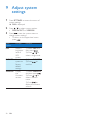
Menu
Option
Function
Remarks
DIM
Select a
brightness
level of
VFD
screen.
Rest the
system to
factory
default
settings.
Display
the
firmware
version.
1) Select DIM, and
then press
.
2) Press / to
select a bright level.
FAC RST
VERSION
20
EN
1) Select FAC RST.
2) Press
to
confirm.
1) Select VERSION,
and then press
.
2) Press / to
select a version
name.
3) Press
to
display the current
version.