1
Wireless-N PCI/PCI-E Adapter Quick Installation Guide
Indication that the product meets the requirements of 47 CFR Part 68.
Check Your Package Contents
The following items should be found in your package:
Ø Wireless-N PCI/PCI –E Adapter
Ø Quick Installation Guide
Ø CD-ROM
Make sure that the package contains above items. If any of the above items is missing or damaged,
please contact the store you bought this product from.
Before You Begin
Minimum Requirements:
Ø Available PCI/PCI-E slot
Ø 300 MHz processor and 32 MB of memory
Ø CD-ROM drive
Ø An 802.11b/g/n access point (for Infrastructure Mode) or another 802.11b/g/n wireless
adapter (for Ad-Hoc; Peer-to-Peer networking mode.)
Ø Microsoft® Windows® 7, Vista™, XP, 2000 SP4
Insert the CD
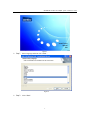
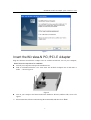
Turn on the computer and insert the included CD in the CD-ROM drive. The install screen will
appear,as figure 3-1. If not, click the Start button and choose Run and enter D:\install.exe (if ‘D’
is your CD-ROM drive)
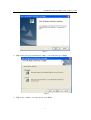
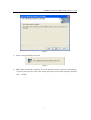
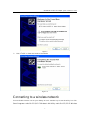
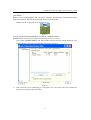
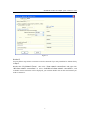
Click “Install Driver,” choose your product model, click “Install” and follow the software
instructions. The following is the step-by-step instructions in Windows XP. The steps and
screens are similar for the other Windows operating systems.
2