1
4 Play music
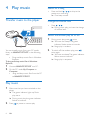
Transfer music to the player
Search for a song
•
Press and hold /
to skip to the
previous or next song.
»» One beep sounds.
Change the volume level
•
Press /
.
»» During music play, you hear the change
of volume level.
Switch the random play on or off
1
You can transfer music from your PC media
library to MINIDOT/FITDOT in the following
ways:
• Drag and drop music files in Windows
Explorer.
To drag and drop music files in Windows
Explorer,
1
2
Connect MINIDOT/FITDOT to a PC.
On the PC, under My Computer or
Computer,
• drag and drop music files from the PC
to MINIDOT/FITDOT.
Play music
1
2
8
Make sure that you have switched on the
player.
»» The green indicator lights up. Music
play starts.
»» During music play, the green indicator
flashes at intervals.
Press
EN
to pause or resume play.
2
During music play, press
twice.
»» You hear two beeps. The green
indicator flashes twice at intervals.
»» Songs play in random.
To switch off the random play, press
twice again.
»» You hear one beep. The green indicator
flashes once at intervals.
»» Songs play in sequence.