1
wLSN | Reference Guide | 14.0 wLSN Glassbreak Detector
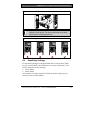
14.3.2 Testing the Detector (Flex and Audio Signals)
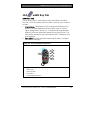
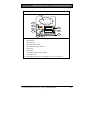
1. Set the 13-332 Tester switches to the TEST and FLEX
positions (Items 1 and 3, Figure 21 on page 54).
2. Press the red Start button (Item 2, Figure 21 on page 54).
The tester activates and starts an eight-sec armed period.
3. If window coverings are present, close them fully.
4. Hold the 13-332 Tester near the point on the glass farthest
from the detector. If window coverings are present, hold the
tester between the glass and window coverings.
5. Carefully strike the glass with a cushioned tool. The 13-332
Tester responds by producing a burst of glass break audio.
If the detector receives both the flex and audio signals properly,
its red Alarm LED lights for 3 sec.
If the red LED does not light, return to Section 2.4 Site Testing
(RFSS Mode) on page 11 to reposition the detector.
14.3.3 Exiting Test Mode
To exit the Test Mode locally:
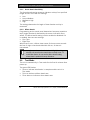
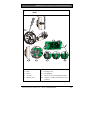
1. Carefully open the service door of the detector.
2. Insert a screwdriver into the slot next to the sensitivity
switches that contains the test pads (Item 1, Figure 20 on
page 53).
3. Touch both test pads at the same time with the tip of the
screwdriver.
When the detector exits Test Mode, the green Event LED
(Item 6, Figure 19 on page 51) stops flashing. If the Event LED
continues to flash, repeat Steps 2 and 3.
To exit the Test Mode remotely:
1. Stand within 3 m (10 ft) of the detector.
2. Move the switches on top of the 13-332 Tester to ACTIVATE
and to MAN modes (Items 1 and 3, Figure 21 on page 54).
3. Point the front of the tester towards the detector and press
the red Start button on top (Item 2, Figure 21 on page 54).
The tester buzzes.
56
Bosch Security Systems, Inc. | 3/07 | F01U009440-01