1
Switcher.biling.ii-25
11/4/98 7:58 PM
Page ii
welcome
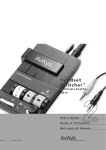
to the Headset Switcher™
Multimedia Amplifier
f ro m P l a n t ro n i c s ® .
The Headset Switcher Multimedia Amplifier adapts your telephone and computer or external audio device to a Plantronics headset and provides control
of the sound through your headset.
Amplifier Features
• Compatible with Sound Blaster™ sound cards, CD
players, tape recorders.
• SoundGuard® Plus™ Sound Compression protects
you from harsh noises, such as fax tones.
This User Guide will help you install your Switcher amplifier, learn its basic
operations and take advantage of its more advanced features.
• Call Clarity™ System improves incoming and outgoing
sound.
The Switcher amplifier is not designed to work on telephones
that have the dial pad in the handset or on cordless telephones.
• Switch easily between headset and
handset, and between phone and audio device.
PA RT I
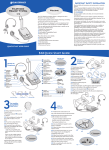
Install in 5 easy steps.
Step 1: Plug into power source.
PA RT I I
PA RT I I I
PA RT I V
ii
•Incoming volume adjustments.
• Mute
Step 2: Attach to phone and headset.
Advanced Features Enable:
Step 3: Set default settings.
• Speech recognition applications
Step 4: Set telephone/amplifier
compatibility switch.
• Training or music at the desktop
Step 5: Connect to an audio device.
• Record and play messages and music
Make a test call.
• Call recording
• Internet phone calls
Learn the basics.
Use advanced features.
iii