1
Switcher.biling.ii-25
11/4/98 7:58 PM
Page iv
Headset Switcher™
Amplifier
2
Telephone/Amplifier
Compatibility Slide Switch
3
Telephone/Amplifier
Compatibility Slide Switch Cover
4
Outgoing Volume Control
5
Incoming Volume Thumbwheel
6
Headset/Handset Selector
2
1
3
4
6
7 8 9 10
installation
overview
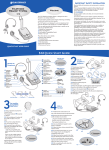
Connect the Switcher Multimedia Amplifier to your telephone and computer
or audio device as shown. Follow the five easy steps on the following pages
for complete installation details.
1
2
3
4
5
6
4
5
7
5
3
+
Battery Access Door
6
Telephone/Computer Audio
(controls direction of incoming sound)
–
+
1
8
Microphone Selection
(controls direction of microphone)
9
Headset Jack
2
_
1
10 External Audio Device Incoming Volume Control
Amplifier to QD Coil Cable
2
AC Power Supply
3
External Audio Device Jack (Mini-DIN)
4
Telephone Jack
5
Screwdriver
6
Handset Jack
7
AC Power Supply Jack
8
Audio Device Cable
9
Amplifier to Telephone Coil Cable
1
2
3
4
5
6 7
8
9
If you are not using the Switcher Multimedia Amplifier with a computer or
other external audio device, connect the Switcher amplifier to your telephone
as shown. Follow the first four easy steps on the following pages for
complete installation details.
1
iv
e n g l i s h
2
1
e n g l i s h
v