1
Switcher.biling.ii-25
11/4/98 7:58 PM
Page 2
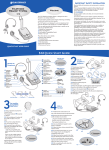
I N S TA L L AT I O N S T E P S
I N S TA L L AT I O N S T E P S
STEP
to
2 attach
phone and headset
1. Unplug your telephone’s handset cord from the
telephone base.
STEP
3 set default
settings
These are the default settings for headset use.
1. Headset/Handset Selector is switched to
Headset ( ).
2
3
4
5
6
2. Plug your telephone’s handset cord into the
Switcher amplifier handset jack ( ).
2. Telephone/Computer Audio Switch is released
(no colored indicator showing).
2
3
4
5
3. Connect your telephone base to the Switcher
amplifier telephone jack ( ) using the short curly
cord. On your telephone base, plug the short
curly cord into the outlet normally used for your
handset.
4. Plug the headset cord into the Quick Disconnect™
(QD) module on the long curly cord coming from the
front of the amplifier.
2
The QD will allow you to disconnect the headset
from the amplifier when you are not using the
phone, or need to move away from the amplifier,
while leaving your headset in place.
6
3. Microphone Switch is released
(no colored indicator showing).
4. Incoming Volume Thumbwheel is set to 4.
2
5. The Outgoing Volume Control has been pre-set.
You can adjust it when you place your first call
(see page 6).
e n g l i s h
3
4
5
6
3