1
Initial Step-3
1
Turning the Camera on
2
on
3
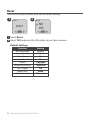
Normal
ASAP
SD
READING..
OK
2011/08/31
22:58:32
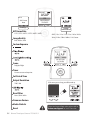
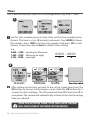
1 Rotate the Power switch to ON position.
2 Process screen
It may display other information on screen, please refer to page 3.
3 Set Up screen
Now, you can set Date and Time and Time Interval before you use your
TimeLapse Camera!
Initial Step-4
1
Set Date and Time
2
3
MENU
Date & Time
Set Date
& Time
2011/ 08 /31
22 : 58 : 32
OK
OK : Next
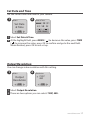
1 Press MENU button.
2 Press TIME ( ) to select Set Date & Time (MENU 7/13), and press OK.
3 At the highlight field, press MENU ( ) to decrease value, press TIME
( ) to increase value, press OK to confirm and go to the next field. When
finished press OK to exit set up.
10 Brinno TimeLapse Camera TLC200 f1.2