1
Initial Step-5
1
Set Time Interval
2
TIME
3
TIME
2 Sec
10 Min
OK
OK
Normal
2 Sec
OK
TIME
CUSTOM
22 : 58 : 32
OK
OK : Next
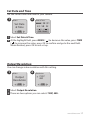
2011/08/31
22:58:32
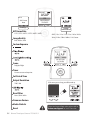
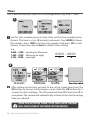
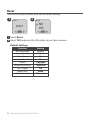
1 Press TIME button to enter time interval set up.
2 Press MENU ( ) and TIME ( ) to select a pre-set time interval or customize it by yourself. When complete, press the OK Button to confirm and
return to the Set up screen.
3 Back to the Set up screen
Now, you are ready to go to Preview screen and start recording your
Time Lapse Videos.
About Power Saving
Set up screen
Normal
ASAP
Preview screen
10 sec.
Turn off LCD
20 sec.
OK
2011/08/31
22:58:32
READY
1 At Set Up Screen
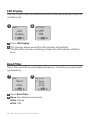
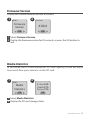
After 10 seconds without activity on the set up screen, the camera will go to
Preview screen automatically. You can press the MENU or TIME button to go
back to the set up screen.
2 At Preview Screen
After 30 seconds without activity on the set up or preview screen, the LCD
screen will turn off automatically to save power. You can press the OK button
to wake up the camera.
www.brinno.com 11