1
3.5. Connecting Multiple Displays in a Daisy-chain Configuration
You can interconnect multiple displays to create a daisy-chain configuration for applications such as a video wall.
NOTE:Maximum 9 displays can be used in a daisy-chain configuration.
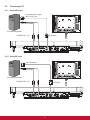
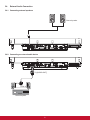
3.5.1. Video connection
Connect one of the following:
• Connect the [RS232C OUT] connector of display 1 to the [RS232C IN] connector of display 2.
• Connect the [VGA OUT] connector of display 1 to the [VGA IN] connector of display 2.
• Connect the [VIDEO OUT] connector of display 1 to the [VIDEO IN] connector of display 2.
To RS-232C IN
PC
To RS-232C OUT
To RS-232C IN
RS-232C Cable
RS-232C Cable
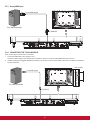
3.5.2. Audio connection
Do one the following connections:
• Connect the [AUDIO OUT] connector of display 1 to the [AUDIO IN 2] OR [AUDIO IN 3] connector of display 2.
• Connect the [VGA OUT] connector of display 1 to the [VGA IN] connector of display 2.
• Connect the [VIDEO OUT] connector of display 1 to the [VIDEO IN] connector of display 2.
PC
To [AUDIO IN 1, 2, 3]
To [AUDIO OUT]
14
To [AUDIO IN 2, 3]