1
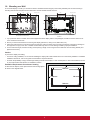
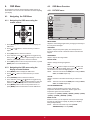
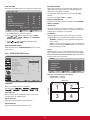
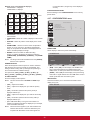
Example: 5 x 5 screen matrix (25 displays)
H MONITORS = 5 displays
V MONITORS = 5 displays
not compliant with it, images may not be displayed
correctly.
CONFIGURATION2 RESET
V MONITORS
H MONITORS
1
2
3
4
5
6
7
8
9
10
11
12
13
14
15
16
17
18
19
20
21
22
23
24
25
Reset all settings in the CONFIGURATION2 menu to factory
preset values.
Position
4.2.7. CONFIGURATION3 menu
CONFIGURATION3
POWER SAVE
HEAT STATUS
SCREEN SAVER
SIDE BORDER COLOR
CONFIGURATION3 RESET
1
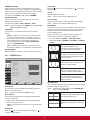
• H MONITORS - Select the number of displays on the
horizontal side.
51
PIP
2
3
• V MONITORS - Select the number of displays on the vertical
side.
• POSITION - Select the position of this display in the screen
matrix.
:SEL
• FRAME COMP. - Choose to turn the frame compensation
function on or off. If turned on, the display will adjust the
image to compensate for the width of the display bezels in
order to accurately display the image.
SET :NEXT
EXIT
:RETURN
MENU :EXIT
MENU
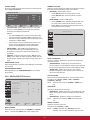
POWER SAVE
Set the display to reduce the power automatically.
• ENABLE: Choose to enable or disable the Tiling
function. If enabled, the display will apply the settings in
{H MONITORS}, {V MONITORS}, {POSITION}, and {FRAME
COMP.}.
POWER SAVE
NOTE:The Tiling function will be disabled when the [ON/OFF]
button for PIP is pressed.
POWER ON DELAY
RGB
ON
VIDEO
ON
:SEL
Select the delayed time until the power-on mode is activated
after the power is turned on manually or automatically. This
setting is useful in hiding start-up messages and powering on
the connected devices at different timings.
+-:ADJ
EXIT
:RETURN
MENU :EXIT
MENU
• {RGB} - Select {ON} to let the display enter DPMS mode
with no signal detected from the HDMI Graphic mode,
HDMI, DVI-D, or VGA inputs after three successive cycles.
The options are: {OFF}, {2 SEC.}, {4 SEC.}, {6 SEC.}, {8
SEC.}, {10 SEC.}, {20 SEC.}, {30 SEC.}, {40 SEC.}, {50 SEC.}.
• {VIDEO} - Select {ON} to let the display enter power saving
mode with no signal detected from the HDMI Video mode or
YPbPr inputs after three successive cycles.
CLOSED CAPTION
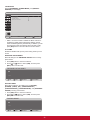
HEAT STATUS
Choose to display or hide captions.
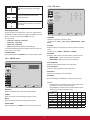
This function allows you to check the thermal status of the
display at any time.
NOTE:This item is functional for S-VIDEO or VIDEO input
only.
• {OFF} - Captions are hidden.
HEAT STATUS
• {CC1} - Captions are displayed in sync with the primary
audio.
• {CC2} - Information (related to the primary audio) is
displayed without sync.
• {CC3} - Captions are displayed in sync with the secondary
audio.
• {CC4} - Information (related to the secondary audio) is
displayed without sync.
COOLING FAN 1
COOLING FAN 2
BRIGHTNESS
OFF
OFF
NORMAL
TEMPERATURE:
SENSOR 1
SENSOR 2
35.7 C / 96.2 F
30.2 C / 86.3 F
EXIT
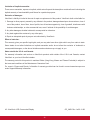
• {TT1 / TT2 / TT3 / TT4} - Four types of information not
related to the displayed images are displayed. (For example,
news and weather forecast.)
NOTE:Check with each supplier of your video software and
external video devices in advance whether they are
compliant with EIA-608-A. If their video signals are
20
:RETURN
MENU :EXIT
MENU