Transcript
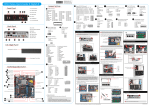
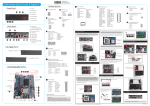
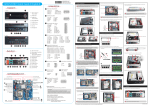
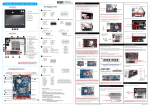
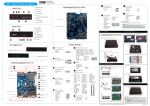
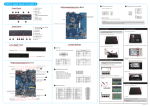
62R-XH61V0-0601 XH61V English.Spanish.Korean. Traditional Chinese.Japanese. French. German Quick Guide XH61V Quick Guide【 English 】 __p Jumper Settings Front Panel Audio Connector C1 F1 F1.Power Switch / Power LED F2.HDD LED F3 F3.ODD and Front I/O Bay F4.Slim ODD Bay F2 F5.USB2.0 Ports 1. Unscrew the two thumbscrews of the chassis cover. Power Connector Pin Assignments (JP6): 1=MIC2_L 2=AGND 3=MIC2_R 4=FRONT-JD 5=LINE2-R 6=SENSE1_RETURN 7=FRONT_SENSE 8=KEY 9=LINE2-L 10=SENSE2_RETURN 1=+HD_LED 2=PWR_LED 3=-HD_LED 4=GND 5=RST_SW 6=PWR_SW 7=GND 8=GND 9=NC 10=KEY F7.Headphone 1 2 3 4 5 6 7 8 9 10 6. Close the metal load plate, lower the CPU socket lever and lock in place. 7. Spread thermal paste evenly on the CPU surface. Metal load plate Retention tab Load lever 2. Slide the cover backwards and upwards. 2 2 4 6 8 10 1 3 5 7 9 8. Screw the ICE module to the mainboard. Note to press down on the opposite diagonal corner while tightening each screw. 1 F5 F6 F7 F5 FAN Connectors C4 3. Unfasten the racks mount screws and remove the racks. 5. Connect the ODD cable and power cable to optical drive. Pin1-2 Pin2-3 (BAT_POWER Mode) (Clear CMOS Mode) C5 B1. S/PDIF Out Port +12V B12 B7 B4. COM2 Port (RS232) 1=5V_USB 3=USB A- 5=USB A+ 7=GND 9=NC B8. USB3.0 Ports B9. USB2.0 Ports B8 B9 B10 B11 B13 B11. Line-Out Port B12. Line-In Port B13. DC Power Port LAN (x1) & USB3.0 (x2) Ports LAN (x1) & USB2.0 (x2) Ports C8 DVI-I & HDMI Ports C1 Audio Connector-JP4 C6 USB Header-USB4 Serial ATA Connectors-SATA1,2,3 COM (x2) Ports S/PDIF Out Port ATX Power Connector-CN8 Support RS232 Back panel C7 Independent External Power 12V/5V-JP3 TPM Header (LPC)-JP1 C8 Mini PCIE Slot PCI-Express X4 Slot Fan Connector-SYS_FAN C4 SATA Power Connector-J1 C5 2=5V_USB 4=USB B6=USB B+ 8=GND 10=NC 1 2 3 4 5 6 7 8 9 10 4. Carefully push down the memory module until it snaps into the locking mechanism. 7. Connect the Serial ATA and power cables to the HDD. C6 Pin Assignments (JP3): Follow the steps below to correctly install the CPU into the motherboard CPU socket. Please note this 1155 pin socket bends easily. Always apply extreme care and little force when installing a CPU and limit the number of times you remove or exchange it. Before installation, make sure to turn off the computer and unplug the power cord from the mains to avoid damage. 1 2 3 4 5 6 7 8 9 10 Pin Assignments (JP1): 1 11 1=+12V 2=5V 3=5VSB 4=SERIRQ 5=CLK-48M 6=CLK-33M 7=SIORST# 8=LFRAME 9=LAD3 10=LAD2 2 12 3 13 4 14 5 15 6 16 7 17 8 18 9 19 10 20 11=NC 12=3VSB 13=RI 14=LDRQ 15=PME 16=LAD1 17=LAD0 18=+3.3V 19=GND 20=NC Fan Connector-CPU_FAN C4 Read the following precautions before setting up a Shuttle XPC. Laser compliance statement CLASS 1 LASER PRODUCT CAUTION: INVISIBLE LASER RADIATION WHEN OPEN. AVOID EXPOSURE TO BEAM. 3 8. Slide the rack in the chassis and refasten the two screws. Latch Latch 3. First unlock and raise the socket lever. 5. Repeat the above steps to install additional memory modules, if required. D. Component Installation The optical disc drive in this PC is a laser product. The drive's classification label is located on the drive. C2 45-degree angle 2 2. Remove the ICE module from the chassis and put it aside. Incorrectly replacing the battery may damage this computer. Replace only with the same or equivalent as recommended by Shuttle. Dispose of used batteries according to the manufacturer's instructions. USB Headers-USB1,USB2 2 JUMP1 Connector Pin 1 and Pin 2 = RI1 Signal. JUMP2 Connector Pin 3 and Pin 4 = RI2 Signal. IF JUMP1 Connector Pin 5 and Pin 7 = RI1 is +5V IF JUMP2 Connector Pin 6 and Pin 8 = RI2 is +5V IF JUMP1 Connector Pin 7 and Pin 9 = RI1 is 12V IF JUMP2 Connector Pin 8 and Pin 10 = RI2 is 12V 2=COM_-XRI1 4=COM_-XRI2 6=+5V 8=COM2_PWR 10=+12V Serial ATA Power Cable 1 3 1 4 Safety Information DDR3 SODIMM slots Power Connector-JP6 3. Gently insert the module into the slot in a 45-degree angle. Serial ATA Cable CAUTION LGA1155 Package CPU Socket B. CPU and ICE Module Installation TPM Header (LPC) Mic-In/ Line-Out/ Line-In Ports C3 Clear CMOS Jumper-JP10 ODD Rack HDD Rack Rotating the fastener along the direction of arrow is to remove the ICE module, on the contrary, is to install. 1=-XRI1 3=-XRI2 5=+5V 7=COM1_PWR 9=+12V Motherboard Illustration Intel H61 Chipset 4 3 2 1 Support RS232 Back panel Independent External Power 12V / 5V C7 B10. Mic-In Port B6 6. Place the HDD in the rack and secure with the four screws from the side. Pin Assignments (USB1/USB2/USB4): B7. LAN Ports B3 B4 1=GND 2=GND 3=+5V 4=+5V USB Headers C6 B6. HDMI Port B1 SODIMM slot notch 1. Unfasten the four ICE module attachment screws. B5. DVI-I Port B10 1. Locate the SODIMM slot on the mainboard. 2. Align the notch of the memory module with the one of the memory slot. SATA Power Connector Ground CUP_FAN/SYS_FAN Slimline SATA Cable Pin Assignments (J1): SPEED_SENSE B5 2 C. Memory Module Installation PWM_CTRL B2 3 1 4 1=UL_BAT_PWR 2=-RTCRST 3=-RTCBTN B3. COM1 Port (RS232/RS422/RS485) 4. Slide the rack downward and forward and refasten it using the two screws. Please do not apply excess amount of thermal paste. Pin Assignments (JP10): B2. Kensington® Lock Port Thermal Paste application area Clear CMOS Jumper C3 Back Panel 3. Place the slimline DVD drive in the rack and fasten it with the four screws from the sides. For safety reasons, please ensure that the power cord is disconnected before opening the case. Pin Assignments (JP4): F6.Mic-In F4 C2 A. Begin Installation 4. Lift the metal load plate on the CPU socket. Tear off the protective membrane from the bottom of ICE module. Remove the protective socket mylar from the CPU socket. 1. Install the Mini PCIE card into the Mini PCIE slot and secure with screws. E. Complete 1. Replace the cover and refasten the thumbscrews. Metal load plate Remove the protective membrane DO NOT touch socket contacts. To protect the CPU socket, always replace the protective socket cover when the CPU is not installed. 5. Orientate the CPU and socket and please align the CPU notches with the socket alignment keys. Make sure the CPU is perfectly horizontal, insert it into the socket. Triangle Pin1 Marking on the CPU 2. Untie all cables for easier installation. Socket 1155 CPU 2 . Complete. Purse lock Notch on the CPU/ Alignment Key of the CPU Socket Please be aware of the CPU orientation, DO NOT force the CPU into the socket to avoid bending of pins on the socket and damage of CPU! LThe product’s color and specification will depend on the actual shipping product. Please load the optimized BIOS settings. 53R-XH61V3-2001