1
••
Ensure that the CD is not damaged or
dirty.
•• Ensure that random mode is deactivated.
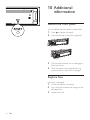
Disc cannot be ejected
•• Press and hold .
Preset stations lost.
•• Battery cable is not correctly connected.
Connect the battery cable to the terminal
that is always live.
Display show ERR-12
•• USB data error. Check the USB device.
••
For some mobile phones, the Bluetooth
connection may be deactivated
automatically as a power-saving feature.
This does not indicate any malfunction of
the system.
About Bluetooth device
Cannot pair the Bluetooth enabled device
with the car audio system.
•• The device does not support the profiles
required for the system.
•• The Bluetooth function of the device is not
enabled. Refer to the user manual of the
device for how to enable the function.
The audio quality is poor after connection
with a Bluetooth-enabled device.
•• The microphone is not correctly
positioned. Adjust the position of the
microphone. For example, stick the
microphone onto the dashboard where
close to the driver.
•• The Bluetooth reception is poor. Move the
device closer to the car audio system or
remove any obstacle between the device
and the system.
Music playback is unavailable on the system
even after successful Bluetooth connection.
The device cannot be used with the system to
play music.
The paired mobile phone connects and
disconnects constantly.
•• The Bluetooth reception is poor. Move
the mobile phone closer to the car audio
system or remove any obstacle between
the mobile phone and the system.
•• Some mobile phones may connect and
disconnect constantly when you make
or end calls. This does not indicate any
malfunction of the system.
EN
27