1
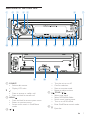
g
• USB socket.
h MP3 LINK
• Connect external audio device.
i 6281'
• Turn maximizing volume on or off.
• View clock.
j DBB
• Turn Dynamic Bass Boost (DBB) sound
on or off.
• Access to tuner auto store.
k
• Select preset radio station No.6.
• Start play.
• Pause or resume play.
l REP / SHUF
• Repeat play.
• Shuffle play.
• Select preset radio station No.3/4.
m /
• Select preset radio station No.1/2.
• Search for track/folder.
n
/
• Tune for radio station.
• Skip/search for track.
• Fast backward/forward playback.
o DISP
• Display current status.
• Select the dimmer high or low.
p EQ / AUDIO
• Select equalizer (EQ) setting.
• Access audio setting menu.
q
• Unlock the panel.
r
• Press to terminate call.
s RESET
• Restore default settings.
t SD card slot
u Disc slot
8
EN
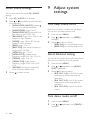
Overview of the remote
control
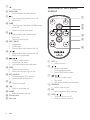
a
b
c
d
e
f
a VOL +/• Adjust volume.
b /
• Select tuner band.
• Scroll up/down menu.
• Select MP3/WMA folder.
c
/
• Tune to a radio station
• Skip track.
• Fast backward/forward playback
d SOURCE
• Select audio source.
e EQ
• Select equalizer (EQ) settings.
f OFF / /
• Turn the unit on or off.
• Mute or restore volume.