1
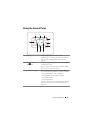
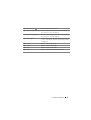
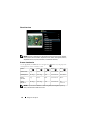
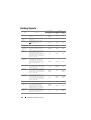
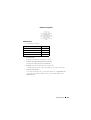
Guiding Signals
Control Buttons
Projector
Status
Description
Indicator
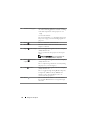
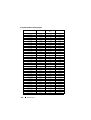
Power
TEMP
(Amber)
LAMP
(Amber)
Standby mode
Projector in Standby mode. Ready to
power on.
BLUE
Flashing
OFF
OFF
Warming up
mode
Projector takes some time to warm up
and power on.
BLUE
OFF
OFF
Lamp on
Projector in Normal mode, ready to
display an image.
Note: The OSD menu is not
accessed.
BLUE
OFF
OFF
Cooling mode
Projector is cooling to shutdown.
BLUE
OFF
OFF
Cooling before
Power Saving
mode
The projector takes 60 seconds to cool
down before entering Power Saving
mode.
AMBER
OFF
OFF
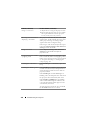
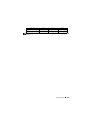
Projector
overheated
Air vents might be blocked or ambient
temperature may be above 35 ºC. The
projector automatically shuts down.
Ensure that the air vents are not blocked
and that the ambient temperature is
within operational range. If the problem
persists, contact Dell.
OFF
AMBER
OFF
The lamp driver is overheated. The air
vents may be blocked. The projector
automatically shuts down. Turn the
display on again after the projector cools
down. If the problem persists, contact
Dell.
AMBER
AMBER
OFF
Fan breakdown
One of the fans has failed. The projector
automatically shuts down. If the problem
persists, contact Dell.
OFF
AMBER
Flashing
OFF
Lamp driver
breakdown
The lamp driver has failed. The projector
automatically shuts down. Unplug the
power cord after three minutes and then
turn the display on again. If this problem
persists, contact Dell.
AMBER
Flashing
OFF
AMBER
Flashing
Color Wheel
breakdown
Color wheel cannot start. The projector
has failed and the projector
automatically shuts down. Unplug the
power cord after three minutes and then
turn on the projector. If this problem
persists, contact Dell.
BLUE
AMBER
Flashing
AMBER
Flashing
Lamp failure
Lamp is defective. Replace the lamp.
OFF
OFF
AMBER
Fault - DC
supply (+12V)
Power supply has been interrupted. The
projector automatically shuts down.
Unplug the power cord after three
minutes and then turn on the projector.
If this problem persists, contact Dell.
AMBER
Flashing
AMBER
AMBER
Lamp module
connection
failed
Lamp module connection may be
disrupted. Check the lamp module and
ensure that it is properly installed. If the
problem persists, contact Dell.
OFF
OFF
AMBER
Flashing
Lamp driver
overheated
132
Troubleshooting Your Projector