1
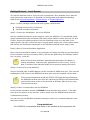
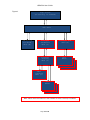
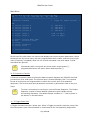
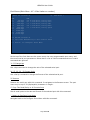
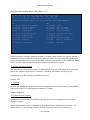
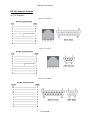
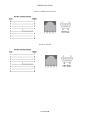
USR4204 User Guide Configure Ports Menu (Main Menu Z) Configure Ports Menu "USR4204 CMD 'A' 'B' 'C' 'D' Config Config Config Config "Console "Console "Console "Console '1' Rename '2' Rename "Power 1 "Power 2 '-' Return to MAIN Menu " A B C D "( "( "( "( 9600 9600 9600 9600 "(ON "(ON None None None None ) ) ) ) 0.0 Amps) 0.0 Amps) At the top of the Configure Ports Menu are the menu name and the user-programmable device name. Below that is a list of valid commands, text, and status. Invalid commands are ignored. 'A'-'D' Config Console Port Navigate to the Port Menu of the corresponding serial port to change the rate, format, or name of the selected port with this command. The current serial port parameters are shown in parentheses next to the port name. '1'-'2' Rename Power Port Navigate to the Rename screen of the corresponding power port to change the name of a power port with this command. The port name may be up to 32 (displayable) characters in length. The current power port state (ON or OFF) and RMS load current are shown in parentheses next to the port name. '-' Return to MAIN Menu Navigate back to the Main Menu with this command. Page 21 of 52