1
3
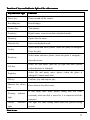
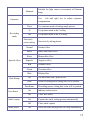
Photometry mode
Indicate current photometry mode
4
Exposure
Indicate current selected exposure value
5
Image Dimension
Indicate current dimension of Resolution
of photo
6
Image quality
Indicate current selected image quality
7
Possible number
of photos
Indicate the remaining number of photos
8
SD card
9
Face detection
10
Count down
portrait
11
Focus indication
12
Quantity
electricity
13
Recording mode
14
Recording time
15
Video format
Indicate inserting memory card and
that the SD card that is used has wiring
protection
Open face detection
of
Indication of count down during portrait
Indicate current digital zoom time
of
Indicate current battery state. When red is
displayed, it means that the battery is
used up and the video camera will
automatically close
Indicate that under recording mode, press
the recording key to carry out recording
Idle time means remaining feasible
recording time; record time means the
recorded time
Indicate the resolution of current video
◆
Menu setting
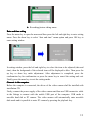
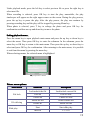
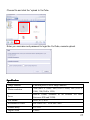
Press the menu key to open the main menu of recording/picture taking and press the left
and right key to select the menu. Press OK key to enter the submenu. In the submenu,
press the menu key or OK key to return to the main menu and press the left and right key
to make selection and finally press OK key for confirmation. After returning to the main
menu, press the menu key to exit the menu.
During menu selection, the selected menu will be covered and displayed by blue and
13