1
Envoy by Draper
Page 3 of 3
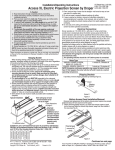
ILT Switch-to-Motor—Dry Contacts or Data Cable connection
Please Note: This Splitter/
Jack is located inside the
junction box of your Access
screen.
Motor Data Cable
plugged in here
Back of wall switch.
UD
P O
W
N
Please Note: Although both
Dry Contact and Data Cable
connections are shown, you
should only use one connection type per motor.
C 5V
O
M
M
O
N
Data Cables to switches or
to additional motors can
be plugged into any of the
three open jacks. If this is a
"Case First, Screen Later"
installation, plug the motor
cable into the jack indicated
in the drawing.
the +5V
UP 5V COM DWN
External Low Voltage and Remote Control
Internal Screen Wiring
White-Common to screen & 110-120V AC Neutral
Red-to screen (directional)
Brown-to screen (directional)
Yellow-to 110-120V AC-Hot
Black-to 110-120V AC-Hot
Green-Ground
White (Common)
Red (Up)
Black (Down)
Green (Ground)
Dashed wiring by electrician
Low voltage wiring by others
To
110-120V
Line
Eye Port for IR Eye, RF Receiver or LED
Wall Switch. For more than one of
these, a splitter is required.
3 Button Wall Switch
DOWN - Black
COM - White
UP - Red
STOP
Location of key
operated on-off
switch if furnished
STOP
Control
Switches
24v DC
Aux Port for connecting additional LVC-III
modules (up to six total can be linkedconnect from Aux to Eye).
Two-Way Serial Communication (RS232) with MC1
See separate Serial Communication-RS232 Instruction
sheet for enabling RS232 with the MC1.
Internal Screen Wiring
Program LED
White-Common to screen & 110-120V AC Neutral
Red-to Screen (directional)
Brown-to Screen (directional)
Black-Hot to 110-120V AC
Green/Yellow-Ground
Low Voltage Wiring by others
AC Wiring by electrician
Fuse
RS232 Data FROM Control System
RS232 Data TO Control System
Signal Ground & Manual Switch Common
Manual Switch Down
Manual Switch Up
MC1
White (Common)
Red (Up)
Black (Down)
Green/Yellow (Gnd)
Eye Port for IR Eye. For RF Receiver or LED
Wall Switch, a Splitter and a Power Supply
is required. Plug RF Receiver or LED Wall
Switch and Power Supply into splitter, then
run cable from Splitter to MC1 Eye Port.
www.draperinc.com
(765) 987-7999
To
110-120V
Line
STOP
STOP
Control
Switches
24v DC
Location of key
operated on-off
switch if furnished