1
Table of Contents
Chapter 1 - Getting Started ................................................................................................................ 1
1.1 - Introduction............................................................................................................................. 2
1.2 - Unpacking............................................................................................................................... 2
1.3 - Reader Battery Installation...................................................................................................... 3
1.4 - Attaching Handles................................................................................................................... 3
1.5 - Powering On/Off Reader......................................................................................................... 4
1.6 - Batch Operation...................................................................................................................... 4
1.6.1 - Introduction................................................................................................................... 4
1.7 - Cabled Operation.................................................................................................................... 4
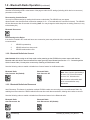
1.7.2 - CR2500 as a USB Keyboard........................................................................................ 5
1.7.2.1 - Addional USB Communication Settings.............................................................. 6
1.7.2.2 - Keyboard Support............................................................................................... 7
1.7.3 - PS/2 Cable Installation Guide....................................................................................... 8
1.7.4 - RS-232 (Serial) Cable Installation Guide...................................................................... 9
1.7.4.1 - Additional RS-232 (Serial) Communication Data Bit Settings........................... 10
1.7.4.2 - Additional RS-232 (Serial) Communication Baud Rate Settings....................... 10
1.7.4.3 - Additional RS-232 (Serial) Communication Parity Settings.............................. 10
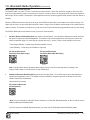
1.8 - Bluetooth Radio Operation.....................................................................................................11
1.8.1 - Introduction..................................................................................................................11
1.8.2 - Bluetooth Radio Auto Connect.................................................................................... 13
1.8.3 - Bluetooth Radio Auto Disconnect................................................................................ 13
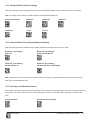
1.8.4 - Bluetooth Radio Time Out Settings ............................................................................ 14
1.8.5 - Bluetooth Radio Out of Range Notification Settings................................................... 14
1.8.6 - Auto Save Last Bluetooth Address.............................................................................. 14
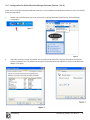
1.8.7 - Configuration for Belkin Bluetooth Manager Software (Version 1.4.2.10)................... 15
1.8.8 - Configuration for Toshiba Bluetooth Stack Instructions............................................... 17
1.8.9 - Configuration for Microsoft Bluetooth Stack Instructions............................................ 20
1.8.10 - Installing CodeXML Router Bluetooth Edition for Windows...................................... 22
1.9 - Targeting and Reading Techniques....................................................................................... 23
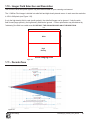
1.10 - Imager Field Selection and Resolution............................................................................... 24
1.11 - Decode Zone....................................................................................................................... 24
Chapter 2 - Optimization and Trigger Programming ..................................................................... 25
2.1 - Introduction........................................................................................................................... 26
2.2 - Global Trigger Optimization Matrix........................................................................................ 27
2.3 - Left Trigger Optimization Matrix............................................................................................ 27
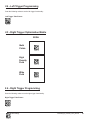
2.4 - Left Trigger Programming..................................................................................................... 28
2.5 - Right Trigger Optimization Matrix.......................................................................................... 28
2.6 - Right Trigger Programming................................................................................................... 28
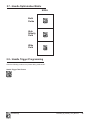
2.7 - Handle Optimization Matrix................................................................................................... 29
2.8 - Handle Trigger Programming................................................................................................ 29
2.9 - Continuous Trigger Optimization Matrix................................................................................ 30
Save Settings
C004386_06_CR2500_ User_Manual
-
iii