1
NOTE: Check National Electrical Code and
applicable local codes and ordinances for
exact wiring requirements for your area.
Auxiliary Alert
The Station Door Phone can be used to
activate an Auxiliary Alert device (such as a
door bell or chime) instead of ringing a
telephone.
1. Loosen each of the terminal block screws
and insert exposed wire ends into
appropriate terminal block locations.
Tighten screws and ensure wire
connections are correct before continuing.
VOX Operation
The Station Door Phone is equipped with a
VOX (voice activated switch) circuit. This
feature is provided to automatically drop
communications to the door speaker when
there is no audio detected, for more than 24
seconds, from the telephone extension within
the building. Visitors talking into the door
speaker will not affect the VOX circuit.
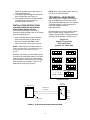
2. Place the dip switch in the position shown
in Figure 5 (factory default setting).
Program your telephone system for the
phone number(s) to be called when the
Station Door Phone button is activated.
Dip Switch Features
INSTALLATION
(Power must be cycled after dip switch
settings change).
There are two surface mount methods to
secure the Station Door Phone to a wall. The
first method utilizes mounting brackets. The
gang box mounting brackets (included) can be
screwed to the back plate so they protrude out
the sides of the box. Position the screws
through the bracket holes and secure the box
to the wall.
Guard Mode - Alerts the guard with the
second DPDT (Double Pole, Double Throw)
contacts and disables off-hook control.
Elevator Mode - Depressing button activates
the unit and can not be turned off (on-hook)
and disables VOX timeout.
Another method to attach the gang box to the
surface of a wall is to drill mounting holes (4)
directly into the back of the box. Position the
screws through the inside of the box and
secure to the wall.
Push On-Push Off Mode - Depress button to
activate, press again to cancel. 24 second
VOX timeout. Factory default position.
Line Flash Ring Mode - Depress button to
activate. Press again to flash (800mS) to
signify “telephone” host system to re-ring.
NOTE: All conduit and closure plug
connections should be adequately sealed
(i.e., pipe joint compound) for wet location
installations.
Push On Only Mode - Depressing button
activates unit and can not be turned off, unit
returns on-hook status after 24 second timeout
period.
Do not allow conduit to protrude into rear
opening of outlet box to avoid interference with
Station Door Phone. Wire length should be
kept to 6 inches to avoid interferences during
installation. For maximum protection from
ESD or lightning, connect the outlet box to
earth ground via the conduit.
Momentary Page Mode - Push to activate.
NOTE: Total length of wire from the door
phone unit to the telephone system is not to
exceed 1500 feet.
CONNECTIONS
3. Connect the Station Door Phone wires to
the designated station port on the
telephone system.
4. Test the system by having an assistant call
the designated extension number of the
Station Door Phone.
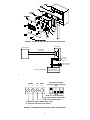
The Station Door Phone back panel has two
sets of terminals; one set is labeled “ALERT”,
and the other labeled “TIP/RING” (see Figure
1). The “TIP/RING” terminals that connect to
your telephone system must use twisted pair
phone wire. See Figure 2 for wiring diagram.
Follow steps below:
2