1
NOTE: When using Auxiliary Alert option, all
four wires must be connected.
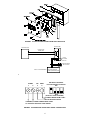
Adjust the speaker volume (see Figure 3)
to an appropriate level.
5. Place poly-fil pad in designated position for
good sound quality (see Figure 3).
6. Secure Station Door Phone and faceplate
to double-gang outlet box with four
mounting screws (included).
TECHNICAL ASSISTANCE
When calling, have a VOM and a telephone
test set available and call from the job site.
Call (540) 563-2000 and press 1 for PagePac
Technical Support or visit our websites at
http://www.pagepac.com and
www.valcom.com.
INSTALLATION INSTRUCTIONS
CUSTOMER PROVIDED OR EXISTING
DOOR ALERT (SIGNALING UNIT)
These instructions apply to the use of a
customer provided auxiliary alert or an existing
door alert (signaling) unit.
Should repairs be necessary, attach a tag to
the unit clearly stating company name,
address, phone number, contact person and
the nature of the problem. Send the unit to:
1. Connect Station Door Phone to existing
door alert push button so that existing
button is in parallel with Station Door
Phone Terminals 1 and 2 (see Figure 2).
Valcom, Inc.
PagePac® Repair Dept.
5614 Hollins Road
Roanoke, VA 24019-5056
NOTE: While Station Door Phone button or
existing door bell button is depressed some types
of alerting devices will continue to sound or
operate.
If desired, the existing door bell button can be
removed thus allowing the Station Door Phone
button to replace the function of the existing
door bell button. Connect wires from existing
door bell button to Terminals 1 and 2 on the
Station Door Phone (see Figure 4).
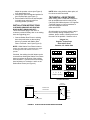
Guard
Elevator
Push On Push Off
Line Flash Ring
Push On Only
Momentary Page
1 2
3 4
On
ALERT Tip Ring
Off
FIGURE 1. STATION DOOR PHONE TERMINAL
LOCK/DIP SWITCHES
STATION
DOOR PHONE
PHONE SYSTEM
TWISTED PAIR
PHONE WIRE
T&R
3
4
DOOR
SPEAKER
DOOR
STATION PORT
BUTTON
FIGURE 2. STATION DOOR PHONE WIRING DIAGRAM
3