1
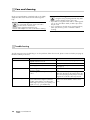
Troubleshooting
The subwoofer is buzzing, what can I do?
These buzzing noises may be produced by connected devices or interference in the power
supply.
Please perform the following test to help determine the cause of the buzzing.
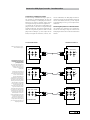
1. Disconnect all cinch cables from the subwoofer’s input jacks. If this eliminates the
buzzing noise, please proceed to step B. Otherwise, start with step A.
A. Connect the subwoofer’s power cable to a
different power circuit (e.g. kitchen or bedroom).
If the subwoofer continues to buzz, please contact our support team.
If this action stops the buzzing noise, it means
there is interference in your power supply. This
may be caused by a dimmer switch or charging
devices, for example. To determine the source
of interference, please disconnect all electrical appliances from the mains power supply in
succession. As soon as the buzzing noise disappears, you have found the source.
B. In this case, an “interference loop” is responsible for the fault. Please proceed as follows in
order to ascertain the cause.
ĕ Disconnect the lead from your cable or
satellite connection from the TV receiver and
check whether the buzzing noise disappears.
If so, use a sheath current filter for the cable
connection to stop the loop, e.g. the coax AC
9022 ED sheath current filter. If you have satellite television, please connect the satellite receiver to the Decoderstation using an optical
cable like Teufel’s optical digital cable.
ĕ If this action fails to solve the problem,
please contact us again so we can provide further individual assistance.
»There is no sound – neither from the satellites
nor the subwoofer«
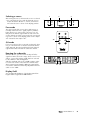
Please check to see if the LEDs on the front of the
subwoofer display are illuminated; if not, change
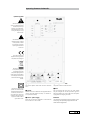
the fuse. The main fuse on the subwoofer might
have blown as a result of
a power surge. The fuse
compartment on the
Concept E subwoofer
is underneath the IEC
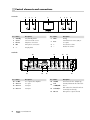
power connector (see illustration on page 13,
item T). Always disconnect the subwoofer from
the mains supply before replacing the fuse! Use
a small screwdriver to open the lid, replace both
fuses and return the fuse holder to the fuse compartment. The subwoofer should now be ready for
use again.
»There is no sound from one of the satellites,
or the sound is distorted – all of the other satellites are working«
In order to pinpoint the defect more specifically, please swap the non-functioning satellite
for a functioning satellite in order to determine
whether the defect is in the satellite or the subwoofer. If the non-functioning satellite now plays
on a different subwoofer channel, the fault is
probably with the subwoofer electronics. If the
satellite fails to play on a different channel, the
satellite itself is faulty.
»There is no sound from the subwoofer – all of
the other satellites are working«
You can check the function of the subwoofer by
connecting the subwoofer cinch input on the
subwoofer only to the output from one of the
front channels L/R front on the sound card or a
device such as a portable CD player. If the woofer
now plays, it could not have been getting the correct signal before. Either the cinch cable is faulty
or the subwoofer output of your source device is
not generating a signal. Alternatively, set the subwoofer volume to »Min«, remove the subwoofer
cinch cable from the PC/DVD player/AV receiver,
increase the volume carefully and touch the inner cinch thermistor with your finger. If you can
hear buzzing or crackling, there is an error in the
PC/DVD player/AV receiver or its settings. If the
subwoofer stays silent, please read the following
frequently asked questions carefully.
Concept E ·
15