1
Contents
Before Use
Care of the camera ...................................5
(Important) About the Waterproof/
Dustproof and Anti-shock Performance
of the Camera ...........................................8
Standard Accessories .............................13
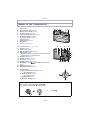
Names of the Components .....................14
Preparation
Attaching the Strap..................................16
Charging the Battery ...............................17
• Charging ...........................................17
• Approximate operating time and
number of recordable pictures ..........19
Inserting and Removing the Card
(optional)/the Battery...............................21
About the Built-in Memory/the Card ........23
• Approximate number of recordable
pictures and available recording
time ...................................................25
Setting Date/Time (Clock Set).................27
• Changing the clock setting ................28
Tips for taking good pictures ...................29
• Fit the strap and hold the camera
carefully ............................................29
• Preventing jitter (camera shake) .......29
Basic
Selecting the Recording Mode ................30
Taking Pictures with Your Favourite
Settings (Programme AE Mode) .............32
Focusing..................................................33
Taking Pictures Using the Automatic
Function (Intelligent Auto Mode) .............35
• Changing the settings .......................37
Recording Motion Pictures ......................38
Playing Back Pictures ([Normal Play]).....40
• Selecting a picture.............................40
• Displaying Multiple Screens
(Multi Playback) ................................41
• Using the Playback Zoom .................41
Playing Back Motion Pictures..................42
• Creating Still Pictures from
a Motion Picture ................................43
Deleting Pictures .....................................44
• To delete a single picture ..................44
• To delete multiple pictures
(up to 100) or all the pictures ............45
Setting the Menu .....................................46
• Setting menu items ...........................46
• Using the Quick Menu .......................48
About the Setup Menu.............................49
Recording
About the LCD Monitor............................61
Using the Zoom .......................................63
• Using the Optical Zoom/
Using the Extra Optical Zoom (EZ)/
Using the Intelligent Zoom/
Using the Digital Zoom......................63
Taking Pictures Using the Built-in
Flash........................................................65
• Switching to the appropriate flash
setting ...............................................65
Taking Close-up Pictures
([AF Macro]/[Macro Zoom]) .....................68
Taking Pictures with the Self-timer..........69
Compensating the Exposure ...................70
Taking Pictures Using Auto Bracket........71
Taking picture by setting the exposure
manually (Manual Exposure Mode).........72
Take the Outdoors Scene
Expressively ............................................73
• [Sports] ..............................................73
• [Snow] ...............................................73
• [Beach & Snorkeling].........................74
• [Underwater]......................................76
-2-