1
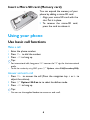
Insert a Micro SD card (Memory card)
You can expand the memory of your
phone by adding a micro-SD card.
1 Align your micro-SD card with the
slot. Put it in place.
2 To remove the micro-SD card,
press the card to release it.
Using your phone
Use basic call functions
Make a call
1 Enter the phone number.
2 Press ( to dial the number.
3 Press ) to hang up.
Tips:
• For international calls, long press 0 to enter the "+" sign for the international
prefix.
• To dial the number by using SIM 2, press LOptions, select Call(Secondary SIM).
Answer and end a call
( to answer the call (Press the navigation key
adjust the volume).
2 Press LOptions>H-free to to select handsfree mode.
3 Press ) to hang up.
1 Press
Tips:
• You can use the supplied headset to answer or end a call.
6
<
or
>
to