1
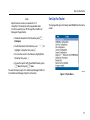
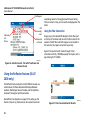
Set Up the Tester Note Report names can have a maximum of 12 characters. The extension LRS is appended when the file is saved to your PC through the LinkRunner Manager PC application. Set Up the Tester To change settings on the tester, select Tools from the home screen. • To delete characters in the filename, press Backspace. • To add characters to the filename, use to highlight a character, then press L. • To move the cursor in the filename, highlight the filename, then press . • To save the report with the edited filename, press Save, then press Save. To view the report, open it in LinkRunner Manager. Refer to the LinkRunner Manager help for instructions. ffy23.bmp Figure 5. Tools Menu 11