1
KR.TP_Manuale.FH11 Fri May 25 15:19:06 2007
Pagina 3
C
M
Y
CM
MY
CY CMY
K
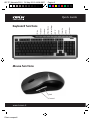
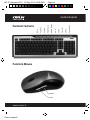
Quick Guide
Installation
1. Plug the Micro receiver into a USB port of your computer.
2. Insert battery into your mouse and keyboard. Your mouse support 1 battery
operation. You can insert 1 battery only or 2 battery to double the operation
time.
3. Move the mouse to get connected with the receiver.
4. Click the keyboard key to get connected with the receiver.
Caution: before your mouse and keyboard is connected with the
receiver. You need to keep the mouse and keyboard at a distance of
less than 2 meter to the receiver to finish the initial connection.
Trouble Shooting
1. Check Micro receiver connection; try to inserting Micro Receiver to another
USB port on your computer.
2. No Connection between the mouse/keyboard and the Micro Receiver.
Re-insert the Micro Receiver. Take out the battery from the mouse /
keyboard and reinstall it.
www.kraun.it
Colori compositi